Reading an Unknown Modbus Device: Verify Before Interpreting

Before I can interpret registers, I need to know what I am talking to, and knowing here means walking over to read the label on the device, not guessing from the patterns in the numbers coming out.
I took over an old system whose original installer had disappeared. What I got was a pair of wires from a control cabinet and someone telling me, "It's Modbus." That was it. No documentation, no register map, not even a brand name. The original display had died along with the cloud service that shut down. My job was to make those values readable again. In this article, I describe the stage before decoding the register map: the stage where I did not even know what I was reading, which is where I made a mistake and spent a month interpreting things incorrectly.
I have replaced all brands, models, locations, and IP subnets in this article with fictional ones. The investigation methods and statistics are real.
The first rule before touching anything: read only
The system I was connecting to was in live operation, with goods inside and motors running under the controller's commands. It was not a test setup on a bench. Before writing my first line of script, I set a rule that every tool I wrote could use only two functions.
Only FC01 (read coils) and FC03 (read holding registers) are allowed. Do not use FC05 FC06 FC10, which are write commands, even if the device documentation says I can write setpoints or force operation. One incorrect write on a system with real goods inside can mean losing an entire batch or destroying a compressor, costing several times the fee for the whole job. Every tool I write shows a READ-ONLY banner at startup, and I grep for func=5, func=6, func=16 in the code before every run.
There is another thing to watch alongside this: the logs must clearly state which values were "read." Once, I displayed a controller's setpoint in the log as set 100.0C. The system owner saw it and panicked, thinking my script had changed the setting, when it was simply a value read from a register. After that, I changed every occurrence to set(อ่านมา): 100.0C. A small detail, but it saves people an unnecessary scare.
Scanning to find the device's communication speed
Before scanning, check that the operating system actually sees the port and that nothing else is using it. I once spent half an hour investigating because an old script of mine was still running in another window, competing for the port and preventing reads.
ls -l /dev/serial/by-id/            # ดูว่าตัวแปลง USB-RS485 เสียบอยู่จริงไหม
sudo fuser -v /dev/ttyUSB0          # มีโปรเซสไหนถือพอร์ตนี้อยู่หรือเปล่า
stty -F /dev/ttyUSB0 -a | head -3   # ค่าปัจจุบันของพอร์ต
sudo usermod -aG dialout "$USER"    # จะได้ไม่ต้อง sudo ทุกครั้ง (ต้อง logout/login)
Modbus RTU has no built-in device discovery mechanism. I have to guess the parameters and send requests myself. There are four layers of variables to scan, multiplied together.
Multiplying them gives tens of thousands of attempts. Trying every combination and waiting for the full timeout each time would take all night. I split it into two stages: first, a coarse scan using a few sample addresses to find parameter combinations that get a response; then, a full scan of addresses 1 through 247 using only the combinations found.
#!/usr/bin/env python3
"""bus_sweep.py - READ-ONLY: กวาดหาอุปกรณ์บนบัส RS485
   ใช้ FC03 อย่างเดียว ไม่มีคำสั่งเขียนในไฟล์นี้"""
import itertools, time, serial

BAUDS   = [1200, 2400, 4800, 9600, 19200, 38400, 115200]
PARITY  = ["N", "E", "O"]
BYTES   = [8, 7]
PROBE   = [1, 2, 10, 20, 32, 247]      # ชั้นแรกลองแค่ไม่กี่ที่อยู่

print(">>> READ-ONLY MODE - FC03 only <<<")

def crc16(frame: bytes) -> bytes:
    crc = 0xFFFF
    for b in frame:
        crc ^= b
        for _ in range(8):
            crc = (crc >> 1) ^ 0xA001 if crc & 1 else crc >> 1
    return bytes([crc & 0xFF, crc >> 8])

def probe(ser, slave, addr=0, count=1):
    req = bytes([slave, 0x03, addr >> 8, addr & 0xFF, 0x00, count])
    ser.reset_input_buffer()
    ser.write(req + crc16(req))
    return ser.read(256)

for baud, par, bits in itertools.product(BAUDS, PARITY, BYTES):
    try:
        ser = serial.Serial("/dev/ttyUSB0", baud, bytesize=bits,
                            parity=par, stopbits=1, timeout=0.35)
    except serial.SerialException as e:
        print(f"  เปิดพอร์ตไม่ได้ {baud}/{bits}{par}1: {e}")
        continue
    for sl in PROBE:
        resp = probe(ser, sl)
        if valid(resp, sl):                 # ตัวตรวจอยู่หัวข้อถัดไป
            print(f"[พบ] {baud}/{bits}{par}1 slave={sl} "
                  f"raw={resp.hex(' ')}")
        time.sleep(0.05)
    ser.close()
I found only one combination that got a response: 19200 8N1. Every address was completely silent at the other baud rates. That gave me the first piece of information I could trust. The output looked roughly like this.
$ python3 bus_sweep.py
>>> READ-ONLY MODE - FC03 only <<<
  ... 1200/8N1 เงียบทุกที่อยู่
  ... 9600/8N1 เงียบทุกที่อยู่
[พบ] 19200/8N1 slave=20 raw=14 03 02 00 00 c4 2b
  ... 38400/8N1 เงียบทุกที่อยู่
  ... 115200/8N1 เงียบทุกที่อยู่
สรุป: ชุดที่ใช้ได้ = 19200 8N1 · มีอุปกรณ์ตอบ 1 ที่อยู่
The first byte, 14, is hexadecimal for 20, matching the address I queried. The second byte, 03, is the function I sent, and the final two bytes are a CRC that matches the calculation. Passing all three checks means it is real.
A scanner without CRC checks returns a pile of fake addresses
The first time I scanned the full range from 1 through 247, the results showed devices at addresses 13, 15, 17, 20, 22, and on through 37: a dozen or so devices. I was pleased for a while that I had found so many, before noticing that they were spaced suspiciously evenly. In reality, there was only one actual device. The rest were fragments of old frames left in the buffer and echoes on the half-duplex line, whose first byte happened to match the address I was querying.
A trustworthy scanner needs three checks, not just a check for whether any bytes came back.
def valid(resp: bytes, slave: int) -> bool:
    if len(resp) < 5:
        return False
    if resp[0] != slave:              # กันเฟรมของตัวอื่นที่ค้างในบัฟเฟอร์
        return False
    if resp[1] not in (0x03, 0x83):   # 0x83 = ตอบว่า error ก็ยังนับว่ามีตัวตน
        return False
    body, got = resp[:-2], resp[-2:]
    return crc16(body) == got         # ด่านสุดท้ายที่กันของหลอนได้จริง
Some devices respond very slowly, especially controllers busy with other work. For the coarse scan, I set the timeout to 0.35 seconds for speed, but for the detailed scan I extended it to 5 seconds and found additional devices that the first pass had missed. If the first scan is silent, do not conclude that nothing is there. Try again with a longer timeout first.
One device found, with 74 registers, but I still did not know what it was
Once the scan was clean, the actual result was a single responding device on the bus, at address 20, with around 74 readable registers. Some values moved constantly; others were completely still. At this point, many people, including me, start guessing from the number patterns immediately. That is where I went wrong.
I saw one block of 16 consecutive values. Six to eight of them stayed at the same value all the time, while the rest changed. I decided on my own that these were 16 temperature channels, and that the static ones were channels with values stuck in the controller's cache. I then built three more rounds of hypotheses about how to wake those stuck values up. I tried restarting the device, reading at different intervals, and reading larger and smaller blocks. I wasted several weeks.
A central controller
16 consecutive values = 16 temperature channels. Static values meant a stuck cache that I needed to wake up. Every hypothesis built on this rested entirely on a guess about the device type.
A 16-channel current measurement module
Those 16 values were 16 electrical current measurement channels. The static ones had no probes connected. They were correctly reading zero all along. Nothing was broken, nothing needed waking up, and this device had never held any temperature values.
Proving which registers are really dead with data, not intuition
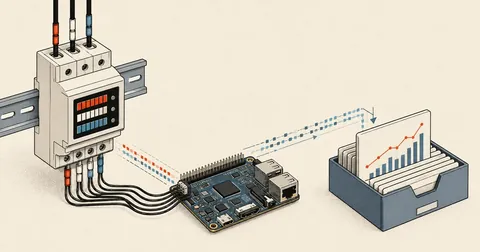
Before reaching that conclusion, I switched from guessing to collecting statistics. My reader was already storing raw values from every register in a database every second. Once I had accumulated tens of thousands of rows, I asked a simple question: "Over this whole period, how many different values has this register held?"
-- ตัวไหน distinct = 1 คือไม่เคยเปลี่ยนเลยตลอด 57,000 ตัวอย่าง
SELECT reg_index,
       COUNT(*)                 AS samples,
       COUNT(DISTINCT reg_value) AS distinct_values,
       MIN(reg_value)           AS min_v,
       MAX(reg_value)           AS max_v
FROM   raw_register_samples
WHERE  slave = 20
  AND  ts_unix >= UNIX_TIMESTAMP() - 86400 * 7
GROUP  BY reg_index
ORDER  BY distinct_values ASC, reg_index;
The result settled the argument. Six registers in that block had distinct_values = 1 across 57,000 samples over seven days. Throughout the entire week, with the machines running and stopped, day and night, they never moved by even one unit. Values that static were not a "stuck cache," because a stuck cache would hold the last value it had seen, which should be some arbitrary number. These stayed at exactly zero, meaning those channels had nothing connected.
The reusable helper I wrote summarized the entire set of register profiles in one table. One look showed which ones were interesting and which could be ruled out.
def profile(rows_by_reg: dict[int, list[int]]):
    """rows_by_reg = {หมายเลข register: [ค่าที่อ่านได้ตามเวลา]}"""
    print(f"{'reg':>4} {'n':>7} {'distinct':>9} {'min':>8} {'max':>8}  หมายเหตุ")
    for reg, vals in sorted(rows_by_reg.items()):
        d = len(set(vals))
        note = ("ไม่เคยเปลี่ยน - ตายหรือไม่ได้ต่อ" if d == 1 else
                "สองสถานะ - น่าจะเป็นสถานะเปิดปิด" if d == 2 else
                "ค่าต่อเนื่อง - น่าจะเป็นค่าวัด")
        print(f"{reg:>4} {len(vals):>7} {d:>9} {min(vals):>8} {max(vals):>8}  {note}")
Collect raw values for a few days, then count three things per register: the number of distinct values (distinct=1 means dead or unconnected), the minimum-to-maximum range (suggesting whether the scale needs division by ten or a hundred), and how often it changes (a value that changes every second is a different kind of value from one that changes once a day). These three measures can eliminate more than half the wrong hypotheses without any guessing.
In the end, the answer was on the device label
What closed this case was not a script I wrote. It was walking over, opening the cabinet, and taking a photo of the label on the module. The specifications were all there: it was a 16-channel electrical current acquisition module, powered by a certain DC voltage range and communicating over RS485. Once I had the model name, I searched further and found an open-source project where someone had already written a reader for this family, with a register map to compare against. Everything fell into place within an hour.
Identifying the actual device overturned the entire set of earlier hypotheses. The temperature values I was looking for had never been on this device. They came from other controllers on the same bus, but their A/B wires had come loose before I took over the job. Once I reconnected them and scanned again at 19200, I immediately found two more devices at addresses 1 and 2. Each had two temperature readings, making four in total, exactly matching what the old system had displayed.
# ตัวอ่านหลังรู้ตัวจริงแล้ว: แยกจังหวะการอ่านตามชนิดอุปกรณ์
SLAVES = [
    # (ที่อยู่, ช่วง register ที่ต้องอ่าน, อ่านทุกกี่วินาที)
    (20, [(0, 56), (109, 18)], 1),   # กระแส: ต้องทุก 1 วิ เพราะเอาไปคิดพลังงาน
    (1,  [(0, 2)],             5),   # อุณหภูมิ: ตอบช้าและเปลี่ยนช้า อ่านถี่ไม่มีประโยชน์
    (2,  [(0, 2)],             5),
]

for cycle in itertools.count(1):
    for slave, ranges, every in SLAVES:
        if (cycle - 1) % every:
            continue                  # ยังไม่ถึงรอบของตัวนี้
        for start, count in ranges:
            regs = read_holding(slave, start, count)   # FC03 เท่านั้น
            store(slave, start, regs)
    time.sleep(1)
When I first found the two temperature devices, I still did not know where each probe was installed in the room. I used neutral labels on the screen, point 1 through 4, and included the source as addr·reg so I could trace each one back. I would not name them "room center" or "at the coil" until I had physically traced the wires to confirm, because a guessed label becomes fact in the reader's mind the moment it appears on screen, and nobody goes back to check it again.
My checklist for the next unknown device
- Set a read-only rule before writing the first line of code, add a banner to the script, and grep for write commands before every run.
- Run a coarse scan to find a baud/parity/databits combination that gets a response, then scan every address using that combination.
- The scanner must check the address byte, function byte, and CRC: all three. Otherwise, it returns a pile of fake addresses.
- Scan a second time with a longer timeout to catch slow devices.
- Store raw values from every register in a database for a few days before interpreting anything.
- Count distinct values, value ranges, and change frequency to rule out dead registers using data.
- Walk over and photograph the device label. This should actually be the first step if the cabinet is accessible.
- Once the model name is known, look for an open-source reader for the same family. Someone has often already decoded the map.
The real lesson from this job for me is that data from the bus can only show what the number patterns look like. It can never tell me what those numbers mean. Guessing the device type from number patterns is a hypothesis that sounds so reasonable that I forget it is only a hypothesis, then build three more layers on top without going back to check the foundation. My rule now is that until I have seen the device label or the manufacturer's documentation, every register interpretation gets marked "unconfirmed." If a bus seems to have an unusually large number of responding devices, try checking the scanner's CRC handling first. I suspect the result will be the same as mine. If I have skipped over anything, or there are devices that behave differently, I will come back and update this later.
Hit something like this? Stuck somewhere?
Come trade notes on the LinuxThai board

Comments 0
No comments yet — be the first