Omada API Success with No Change: Hidden SSID/LAN/forward Fields

A Success message from the API only tells me that the request passed format validation, not that the value in the system has changed. If the script does not read the values back and compare them, I can keep trusting Success until I find that the Wi-Fi has not done what I asked.
1-minute summary
- Symptom / problem
- A PATCH to the Omada controller returns errorCode 0 Success, but the SSID's device type does not change.
- Who should read
- People scripting the Omada controller through its API.
- Fix in short
- Read the value back and compare after every call. If an SSID cannot be edited, delete and recreate it without cutting off the branch you sit on, and use the field table for LAN, DHCP and port forward.
I configured my entire home Omada setup with Python scripts because its API has no public documentation, so I had to work it out from the web UI and my own test requests. At one point, I sent a PATCH to change an SSID's device type and got a clean errorCode: 0 and Success. back, but when I checked the controller, the value was exactly the same. I spent quite a while wondering whether the token had expired or I had sent the request to the wrong site before finding that the controller accepted the request, reported success, and simply discarded the value I sent.
I have already covered the basics of login, Csrf-Token and self-signed certs in Controlling the TP-Link Omada OC200 Through Its REST API with Python. This article covers only what came after that: traps where the error tells me nothing. I have replaced all IPs, MACs, SSID names and passwords in this article with examples. The fields and error codes are what I actually encountered during a home configuration session in mid-October, and everything described here is the behavior of the controller version I use. I have not tried other firmware versions, so I cannot guarantee they behave the same way.
The symptom: Success, but the old value remains
I wanted an SSID broadcast by both the AP and the gateway, so I sent a PATCH to change deviceType on an existing SSID. I tried three values: 1 for AP only, 2 for gateway, and 3 for both, based on my own testing. It looked like a bitmask similar to band, where 1 is 2.4G, 2 is 5G, and 4 is 6G, but that is an observation from testing, not documentation.
# ตัวอย่างโครงสคริปต์ — SSID_URL คือ path ของ SSID ตัวนั้นที่ได้จาก GET list
import os, requests, urllib3
urllib3.disable_warnings()

B   = "https://192.168.10.121"
CID = "<omadacId>"
A   = f"{B}/{CID}/api/v2"
S   = f"{A}/sites/<siteId>"

s = requests.Session()
s.verify = False
s.headers["Csrf-Token"] = os.environ["OMADA_TOKEN"]    # ได้จากขั้น login

body = s.get(SSID_URL).json()["result"]
body["deviceType"] = 3
r = s.patch(SSID_URL, json=body, timeout=30)
print(r.status_code, r.json())
# 200 {'errorCode': 0, 'msg': 'Success.'}
The result was errorCode: 0, as described above. When I sent a GET to read it back, deviceType was still 1. I repeated it three times with the same result, which ruled out a timing issue. The controller's web UI states that an SSID's device type cannot be edited after creation: the field is locked when it is created, but the API does not reject requests that try to change it. It accepts them and ignores them.
My hypothesis is that the API checks whether the body matches the schema but does not check whether the submitted fields are immutable. I have not proved this; it is only an explanation that fits the symptoms. And because I do not know the exact cause, I am not concluding that other fields behave the same way. I have simply set myself a rule: every write must be followed by a GET and a comparison.

When an API write returns errorCode 0, treat it only as "the request is correctly formatted." Whether the values actually changed must be proved by reading them back and comparing them field by field with what was sent. If they differ, make the script fail loudly instead of continuing.
A small helper I put around every write
After this case, I stopped calling patch directly and wrapped it in a function that writes, reads back, and compares only the fields I sent. If any field differs, it raises an error showing what I sent and what came back.
def patch_verified(s, url, changes: dict, read_url=None):
    """PATCH แล้ว GET กลับมาเทียบ ถ้าไม่ตรงให้ล้ม"""
    cur = s.get(url).json()["result"]
    cur.update(changes)                       # ส่ง object เต็มเสมอ ดูหัวข้อ LAN
    r = s.patch(url, json=cur, timeout=30).json()
    if r.get("errorCode") != 0:
        raise RuntimeError(f"PATCH ล้ม: {r}")

    after = s.get(read_url or url).json()["result"]
    wrong = {k: (v, after.get(k)) for k, v in changes.items() if after.get(k) != v}
    if wrong:
        raise RuntimeError(f"errorCode 0 แต่ค่าไม่เปลี่ยน (ส่ง, ได้): {wrong}")
    return after
This function is not clever. It simply turns "the value did not change" into an exception I can see immediately in the terminal, instead of finding out when someone at home tells me the gateway is not broadcasting Wi-Fi. One caveat is that the controller normalizes some fields itself, such as list order or MAC letter case. A direct comparison can produce false alarms, so adjust the comparison field by field according to the value type.
The SSID workaround: delete and recreate it, but not from that Wi-Fi
Since the device type cannot be edited, the only way I found was to delete the SSID and recreate it with the same name. The order matters: if I create a duplicate name in the same WLAN group before deleting the old one, the controller returns error -33219. I therefore have to delete first and then create, and the home Wi-Fi is down for about 1-2 minutes in between.
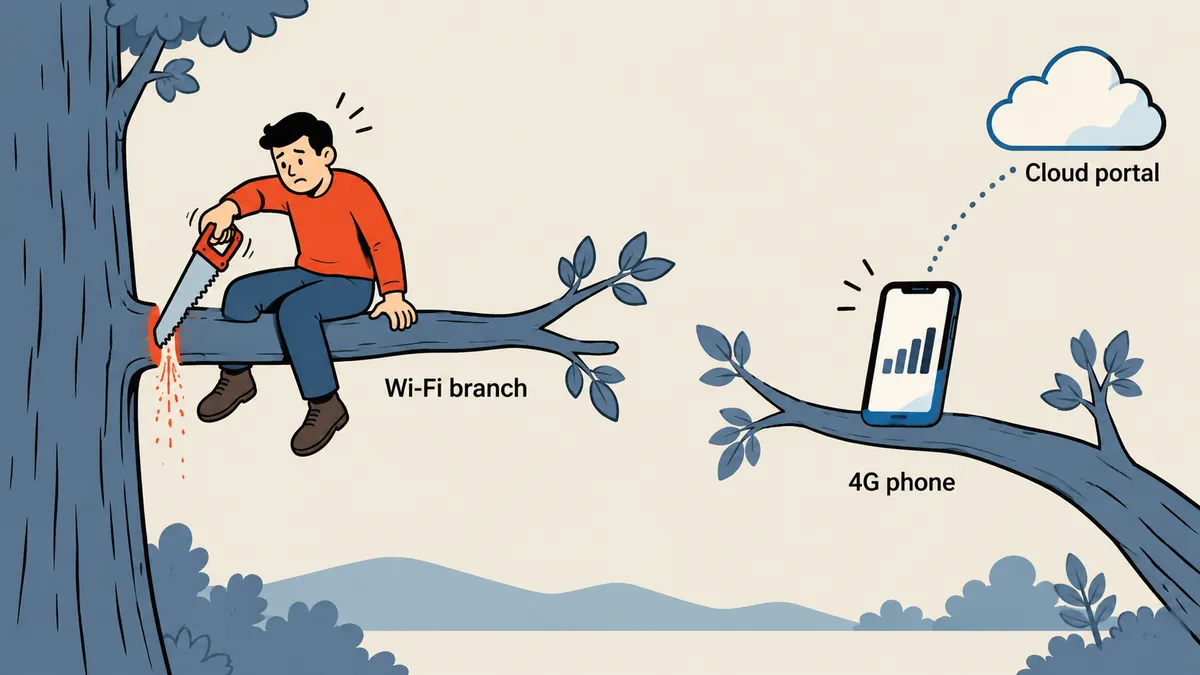
This is the trap I call "cutting off the branch I am sitting on." If I issue the delete from a laptop connected to that Wi-Fi name, the laptop loses its connection as soon as the SSID disappears. The create request that follows has no way to reach the controller. I therefore worked through the controller's cloud portal from a phone connected to 4G, which did not use the home Wi-Fi at all, so the session stayed connected throughout the Wi-Fi outage.
- Prepare all the old SSID's settings before deleting it: name, security, band and the password kept in my own records, not from chat.
- Open the controller's cloud portal from a phone with Wi-Fi off and 4G connected, then confirm that the controller page is actually accessible.
- Delete the old SSID, then recreate it with the same name and password, selecting both EAP and Gateway as device types during creation.
- Wait 1-2 minutes. Home devices reconnect automatically because the name and password are unchanged.
- Read the new SSID's settings back and check that the device type matches the intended value.
Deleting the SSID disconnects everyone's wireless network at home until recreation is complete, and if all APs use that Wi-Fi to communicate with the controller, I will not be able to get back in to finish the changes. Always have a way to reach the controller that does not use that SSID before starting. I did this in my own home and was prepared for the consequences. For a customer's setup, I would need to announce the outage window beforehand.
LAN: send the full object, and use numbers for DHCP
To edit the Default LAN, I send a PATCH to {S}/setting/lan/networks/{id}. Here the controller is not silent: it returns errors directly, but the messages only say which field is null, not which fields are required. I encountered three issues in sequence.
First, I have to send the full object returned by GET and change only the fields I want. If I leave a field out, I get -1001 saying that field is null. Second, lanNetworkIpv6Config must contain proto; without it, I get -1001 with Parameter [proto] should not be null. I fixed this by supplying {"enable": 0, "proto": 0}. Third, dhcpSettings.ipRangeStart and ipRangeEnd are integers, not IP strings.
import ipaddress

def ip2int(ip: str) -> int:
    return int(ipaddress.IPv4Address(ip))

net = ipaddress.ip_network("192.168.10.0/24")
print(ip2int(str(net.network_address)))    # 3232238080  ปลายต่ำของวง
print(ip2int(str(net.broadcast_address)))  # 3232238335  ปลายสูงของวง

lan = s.get(f"{S}/setting/lan/networks/<lanId>").json()["result"]
lan["lanNetworkIpv6Config"] = {"enable": 0, "proto": 0}
lan["dhcpSettings"]["ipRangeStart"] = ip2int("192.168.10.100")
lan["dhcpSettings"]["ipRangeEnd"]   = ip2int("192.168.10.200")
patch_verified(s, f"{S}/setting/lan/networks/<lanId>", {"dhcpSettings": lan["dhcpSettings"]})
The numbers 3232238080 and 3232238335 are the converted network and broadcast addresses for 192.168.10.0/24. I included them as a reference for checking that the converted values look right. Another trap is that if the site has no gateway yet, editing the Default LAN fails with error -1 or -33515 and a message saying LAN interfaces could not be none. I have to finish adopting a gateway into the site before I can edit it.
A table of non-obvious fields
The remaining fields are ones I could never have guessed from their names; I had to see the actual requests to understand them. I have collected them in one table.
| Task | Field trap | Symptom if wrong |
|---|---|---|
| DHCP reservation | Use mac, not clientMac |
-1001 saying must not be null |
| port forward | Requires from: 0 (0 = Source IP Any) |
I did not record the symptom |
| port forward | interfaceWanPortId is a list of portUuid values from /setting/wan/networks |
I did not record the symptom |
| port forward | virtualWanId: [] and dMZ: false, with uppercase D and M |
I did not record the symptom |
| port forward | externalPort and forwardPort are strings; ranges such as "80-100" are allowed |
I did not record the symptom |
| port forward | protocol: 0 = All, 1 = TCP, 2 = UDP |
The protocol differs from the intended one |
| LAN | ipRangeStart and ipRangeEnd are integers |
I did not record the symptom |
I did not guess the port forward fields; I captured them from the web UI when actually clicking Save. This works with almost any device whose web UI talks to its backend through XHR. I injected JS to wrap XMLHttpRequest.prototype.open and send, stored every non-GET request in window.__log, then filled in the form with actual clicks and typing, clicked Save, and read the log. I covered this technique in detail in Capturing Requests from a Device's Web UI, so I will not repeat it here.
# port forward — ตัวอย่างทั่วไป ค่า ip และพอร์ตเป็นตัวอย่าง
pf = {
    "name": "web-example",
    "status": True,
    "from": 0,                          # Source IP: Any
    "interfaceWanPortId": ["<portUuid>"],
    "virtualWanId": [],
    "externalPort": "8443",             # สตริง ใส่ช่วงได้ เช่น "8000-8010"
    "forwardPort": "443",
    "forwardIp": "192.168.10.50",
    "protocol": 1,                      # 1 = TCP
    "dMZ": False,                       # D และ M ตัวใหญ่
}
r = s.post(f"{S}/setting/transmission/portForwardings", json=pf).json()
assert r["errorCode"] == 0, r
rows = s.get(f"{S}/setting/transmission/portForwardings").json()["result"]["data"]
assert any(x["name"] == "web-example" for x in rows), "ไม่เจอรายการที่เพิ่งสร้าง"
The last line follows the same rule: write, then read back. In this example, I wrote the payload structure using the fields confirmed in the table. I did not recheck field names such as forwardIp and name against the controller when writing this article. Before using it, compare it with a request captured from the web UI of your own version.
The script continues
- Success means moving to the next step
- I find out it is wrong when users complain
- I do not know which field was ignored
- Tracing the cause is difficult
The script fails immediately
- Send, GET, then compare field by field
- The ignored field appears in the error message
- Adds a little time to each request
- I know immediately that deletion and recreation are needed
Other traps I encountered along the way
Three small issues cost me quite a bit of time. First, on a controller that has just booted or rebooted, /api/info returns 404 for about 2-5 minutes, even though the web UI is already up. Set the login timeout to 60-90 seconds, and do not interpret a 404 during that period as a failure. Second, adopting a device with POST /cmd/devices/adopt and {mac} often times out at 20 seconds, even though the operation actually succeeds. Do not rush to retry; poll the device status instead. The status codes I encountered were 14 = Connected, 20 = Pending, 10 and 11 = Provisioning or Configuring, and 0 = Disconnected.
import time

STATUS = {14: "Connected", 20: "Pending", 10: "Provisioning", 11: "Configuring", 0: "Disconnected"}

def wait_connected(s, mac, tries=40, gap=6):
    for _ in range(tries):
        devs = s.get(f"{S}/devices").json()["result"]
        d = next((x for x in devs if x["mac"].upper() == mac.upper()), None)
        st = d["status"] if d else None
        print(f"[..] {mac} -> {STATUS.get(st, st)}")
        if st == 14:
            return d
        time.sleep(gap)
    raise TimeoutError(f"{mac} ไม่เป็น Connected ภายใน {tries*gap} วินาที")

wait_connected(s, "AA-BB-CC-DD-EE-FF")   # ชื่อฟิลด์ status และโครง result ให้เทียบกับ response จริงของรุ่นที่ใช้
Third, the controller's login page in the browser driven by my script had autofilled values left in the user and password fields. Typing over them appended text and resulted in Invalid username or password. I have to press Ctrl+A and delete before typing every time. This issue does not affect API-only access.
What I do not know
I have not tested whether the fields above are the same on other firmware versions, and I do not know the meanings of errorCode values beyond those listed here, or the internal reason why the controller accepts a PATCH and then silently ignores it. What I wrote above is a hypothesis that fits the symptoms. If anyone encounters different behavior on their own version, treat this table as a starting point for capturing requests and comparing them. The method I use throughout is to write and then read back, every time, without exception. If I have missed anything in my conclusions or made a typo, I will come back and correct it later.
Hit something like this? Stuck somewhere?
Come trade notes on the LinuxThai board



Comments 0
No comments yet — be the first