Playing 9 Stems in a Browser: One Clock, No Drift When Seeking
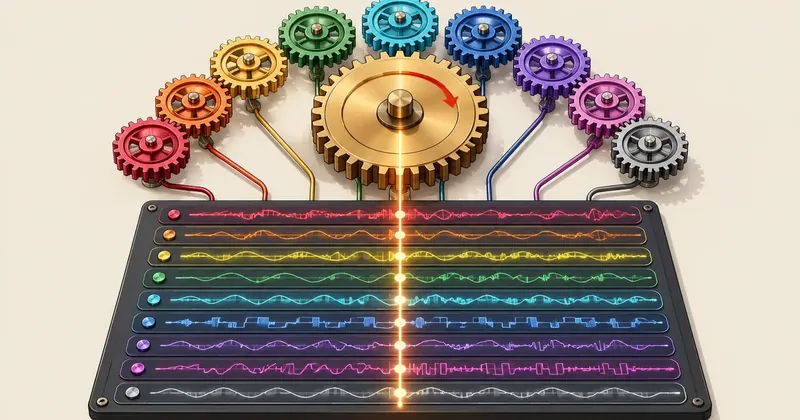
If 9 audio parts need to stay aligned to the millisecond, there must be no more than one clock on the page. I moved everything under a single AudioContext and made the song position come exclusively from the audio clock.
1-minute summary
- Symptom / problem
- Playing 9 stems with separate audio tags drifts out of sync and goes wrong on seek
- Who should read
- Developers building multi-track players in the browser
- Fix in short
- Decode into AudioBuffers and start every BufferSource with start(origin, offset) on one AudioContext, take the song position from the audio clock, and use a server that supports HTTP Range.
I had an experimental song split into 9 WAV stems and wanted to listen to them on a web page, individually or together: mute the vocals, play just the drums, and keep everything aligned with a separate video preview. I started with the first approach that comes to mind: 9 <audio> tags, calling play() on all of them together. As soon as I heard it, I knew it would not work. The sound was hollow, as if the phase were off. Seeking to the middle of the song made it worse: one part had already reached the position while another was still loading.
This article explains how I switched to a single Web Audio API setup to control everything. I rewrote the code for readability, used generic filenames, track names, and ports throughout, and used only stems from the experimental song.
The symptoms: nine audio tags out of sync during playback and seeking
The first version of the code looked very simple.
// รอบแรก: แท็ก audio ตัวละสเต็ม
const stems = ['vocals', 'drums', 'bass' /* ... รวม 9 ตัว */].map(name => {
  const a = new Audio(`/audio/stems/${name}.wav`);
  a.preload = 'auto';
  return a;
});

function playAll() { stems.forEach(a => a.play()); }
function seekAll(t) { stems.forEach(a => { a.currentTime = t; }); }
At a glance, it looks correct. But these lines send 9 separate commands, and each tag has its own process: it needs enough data loaded, must seek within its own file, must wait for its own decoder, and then starts playing when it is ready. Nothing guarantees that two of them will start at the same instant.
As a general principle, multiple audio tags can start tens of milliseconds apart when told to play or seek. I did not use any tools to measure the actual timing differences in this project, so I will not give a specific figure. I only know that overlapping copies of the same sound with a timing difference of this order are enough to sound hollow.
Why there must be a single clock
The problem is not that browsers play audio poorly. The problem is that each tag is an independent player with its own start time. Even if I issue the commands in the same loop, all 9 do not start on the same sample boundary. Another issue is that each tag's currentTime can gradually drift apart over time, with nothing comparing it against the others.
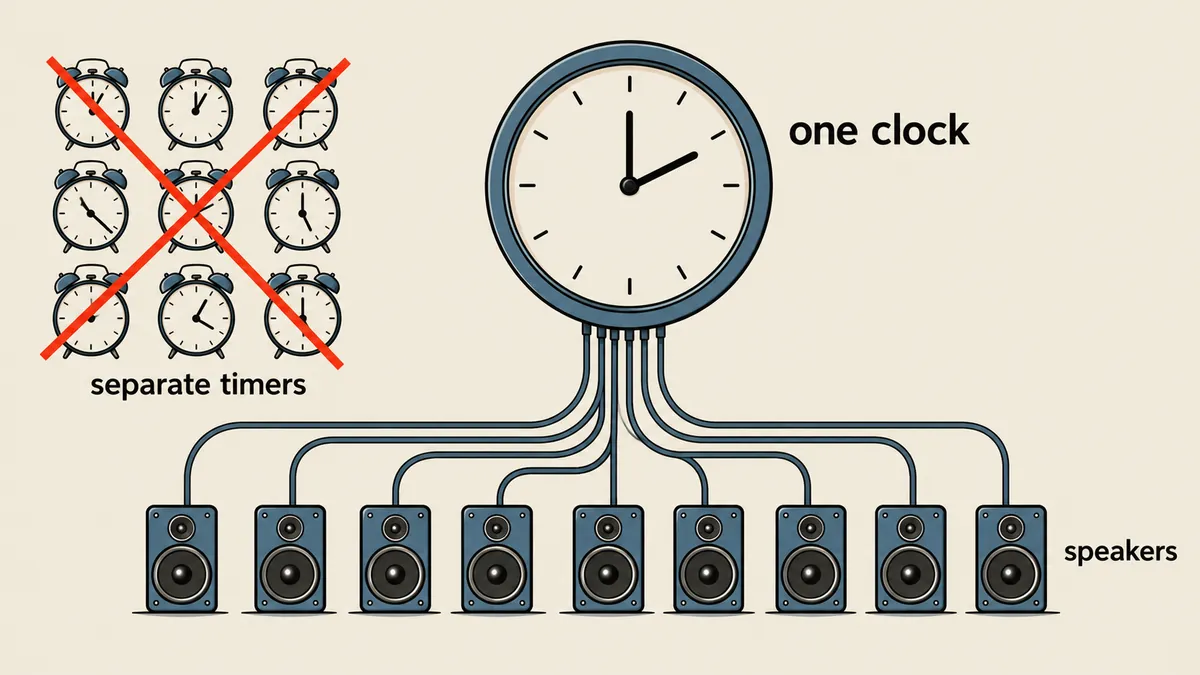
AudioContext has its own clock, context.currentTime, expressed in fractional seconds and driven by the actual audio hardware. Every source under the same context can be scheduled to start using this clock. So I made one decision: never use setInterval or Date.now() to find the song position. The position must be calculated only from context.currentTime minus the scheduled start time.
The design: decode everything into AudioBuffer objects, then start together
There are three principles. First, load every WAV file with fetch and use decodeAudioData to turn it into an AudioBuffer before playback. Second, whenever play is pressed, create 9 new AudioBufferSourceNode objects and call start(origin, offset) with the same origin. Third, origin must be slightly ahead of the current time. I use 25 milliseconds so that all 9 commands are scheduled before the start time arrives. If I set exactly origin = currentTime, the sources instructed later in the loop will miss the start by a little.
The core code, rewritten from the actual implementation for readability (the original is about 17 lines, compressed into long lines).
// stem-transport.js — เวอร์ชันย่อ ใช้ได้กับ config ด้านล่าง
class StemTransport extends EventTarget {
  constructor(config) {
    super();
    this.config = config;                 // { duration, masterGain, tracks: [{id, src}] }
    this.duration = config.duration;      // 192.8 วินาที
    this.tracks = config.tracks.map(t => ({ ...t, muted: false, solo: false, gain: 1 }));
    this.paused = true;
    this._position = 0;                   // ตำแหน่งตอนหยุด (วินาที)
    this._origin = 0;                     // เวลา context ตอนสั่งเริ่ม
    this._sources = [];
  }

  async load() {
    if (this.loaded) return;
    this.context ??= new AudioContext({ sampleRate: 48000 });
    this.master = this.context.createGain();
    this.master.gain.value = this.config.masterGain;      // 0.8854
    this.master.connect(this.context.destination);
    this.buffers = new Map(); this.gains = new Map();

    for (const t of this.tracks) {
      const res = await fetch(t.src);
      if (!res.ok) throw new Error('โหลดแทร็กไม่สำเร็จ: ' + t.id);
      const buf = await this.context.decodeAudioData(await res.arrayBuffer());
      if (Math.abs(buf.duration - this.duration) > 0.01)
        throw new Error('ความยาวแทร็กไม่ตรงกัน: ' + t.id);   // กันไฟล์ผิดชุดตั้งแต่ต้น
      const g = this.context.createGain();
      g.connect(this.master);
      this.buffers.set(t.id, buf); this.gains.set(t.id, g);
    }
    this.loaded = true;
  }

  get currentTime() {
    if (this.paused) return this._position;
    const run = Math.max(0, this.context.currentTime - this._origin);
    return Math.min(this.duration, this._position + run);   // ตำแหน่งมาจากนาฬิกาเสียง
  }

  _startSources() {
    this._stopSources();
    this._origin = this.context.currentTime + 0.025;        // ล่วงหน้า 25 ms
    for (const t of this.tracks) {
      const s = this.context.createBufferSource();
      s.buffer = this.buffers.get(t.id);
      s.connect(this.gains.get(t.id));
      s.start(this._origin, this._position);                // ทุกตัวใช้ origin เดียวกัน
      this._sources.push(s);
    }
  }

  _stopSources() {
    for (const s of this._sources) { try { s.stop(); } catch (e) {} s.disconnect(); }
    this._sources = [];
  }
}
I added the comparison between buf.duration and this.duration because if one stem is even slightly shorter or longer than the others, the audio will go out of sync without any warning. It is better to throw an error naming the track during loading. The config for this project is simple JSON.
{
  "duration": 192.8,
  "masterGain": 0.885369738339,
  "tracks": [
    { "id": "vocals",         "src": "/audio/stems/vocals.wav" },
    { "id": "backing-vocals", "src": "/audio/stems/backing-vocals.wav" },
    { "id": "keys",           "src": "/audio/stems/keys.wav" },
    { "id": "guitar",         "src": "/audio/stems/guitar.wav" },
    { "id": "bass",           "src": "/audio/stems/bass.wav" },
    { "id": "drums",          "src": "/audio/stems/drums.wav" },
    { "id": "percussion",     "src": "/audio/stems/percussion.wav" },
    { "id": "strings",        "src": "/audio/stems/strings.wav" },
    { "id": "fx",             "src": "/audio/stems/fx.wav" }
  ]
}
The masterGain value comes from min(1, 0.95 / peak ของผลรวมทุกสเตม). The sum of all 9 parts playing together has a peak of about 1.073. Without reducing the level, it could clip when everything is enabled, so I bring the ceiling down to 0.95.
seek, mute, and solo without clicks
An AudioBufferSourceNode cannot be started again. Its start method can be called only once in its lifetime. So seeking means discarding all 9 old sources and creating new ones, rather than moving their position. It sounds wasteful, but a source is just a pointer to an already decoded buffer. No files are read again.
// เสริมใน StemTransport
set currentTime(t) {
  t = Math.max(0, Math.min(this.duration, Number(t) || 0));
  const playing = !this.paused;
  this._stopSources();
  this._position = t;                   // ตำแหน่งใหม่
  if (playing) this._startSources();    // origin ใหม่ + start(origin, t) ครบ 9 ตัว
  this.dispatchEvent(new Event('seeked'));
}

_applyGains() {
  const now = this.context.currentTime;
  const anySolo = this.tracks.some(t => t.solo);
  for (const t of this.tracks) {
    const audible = !t.muted && (!anySolo || t.solo);
    // เปลี่ยนค่าแบบนุ่ม ค่าคงที่เวลา 15 ms ไม่ตัดสัญญาณทันที เลยไม่มีเสียงคลิก
    this.gains.get(t.id).gain.setTargetAtTime(audible ? t.gain : 0, now, 0.015);
  }
}
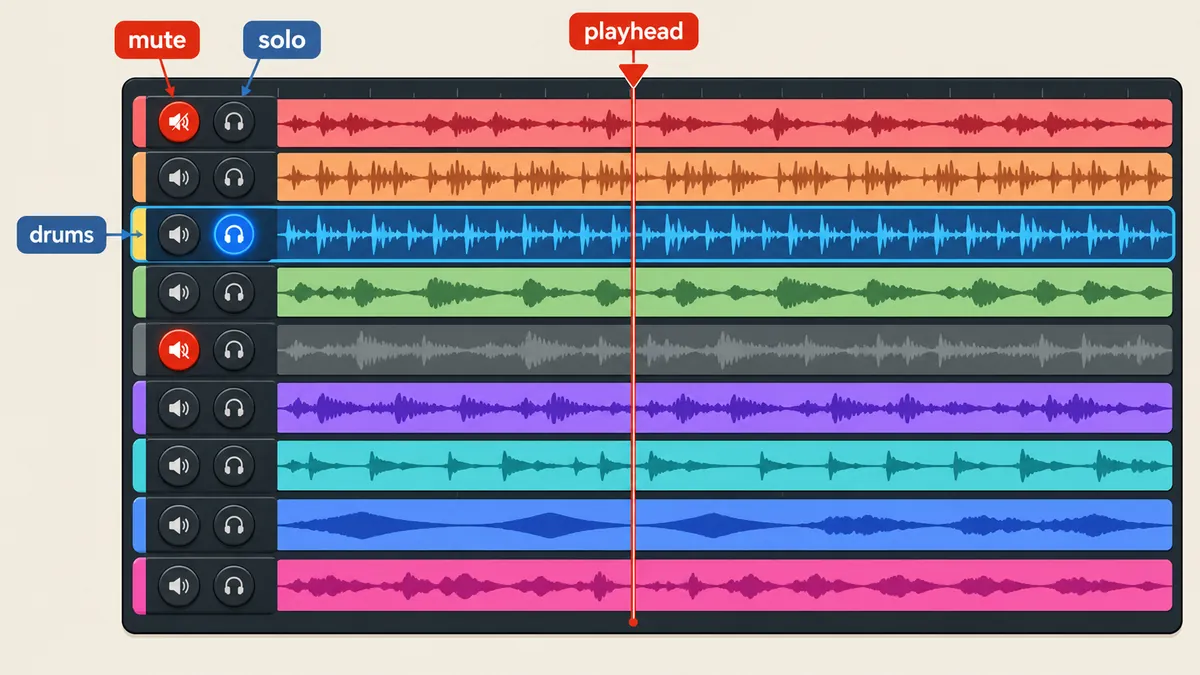
The reason I do not set gain.value = 0 directly is that cutting a waveform in the middle of a cycle produces a clearly audible click. setTargetAtTime gradually approaches the target along an exponential curve. A time constant of 15 milliseconds is short enough for the button to feel responsive but long enough to smooth the waveform. The rule for what is audible is audible = !muted && (!anySolo || solo). If any stem has solo enabled, all the others are silent. If nothing is soloed, each stem follows its own mute state.
The three shortcuts I use most often are built from the same solo and mute states.
Solo the lead vocal
Set solo on the lead vocal stem alone. All the others become silent through the audible formula, without any special conditions.
Mute lead and backing vocals
Turn off the two stems containing voices, leaving all 7 instrumental parts.
The play button is async: handling rapid clicks during loading
In this player, play() is async because it must wait for two things before producing sound: context.resume(), which the browser permits only when triggered by a user action, and load(), which finishes decoding all the files. The problem to guard against is the user pressing play and then immediately pressing stop while loading is still in progress. Once loading finishes, the player might start on its own even though the user has already told it to stop. I prevent this with an _intent counter.
async play() {
  const intent = ++this._intent;           // จำว่าคำสั่งนี้คือรอบที่เท่าไร
  this.context ??= new AudioContext({ sampleRate: 48000 });
  await this.context.resume();
  await this.load();
  if (intent !== this._intent) return;     // มี pause หรือ play ใหม่แทรกระหว่างรอ -> ยกเลิก
  if (!this.paused) return;
  if (this._position >= this.duration) this._position = 0;
  this.paused = false;
  this._startSources();
}

pause() {
  this._intent++;                          // ทำให้ play ที่ค้างอยู่หมดอายุ
  if (!this.paused) this._position = this.currentTime;
  this._stopSources();
  this.paused = true;
}
The loop that updates the seek bar uses requestAnimationFrame to read currentTime, which is already calculated from the audio clock. The loop only draws the interface. If frames are dropped, the audio does not stutter with them, because it does not depend on this loop at all.
The cost: decoding everything sends RAM usage up
This approach is not free. decodeAudioData converts the entire WAV file into float32 data in memory. The figures below are calculations, not measurements of the browser's actual memory usage.
The calculation is 192.8 x 48,000 x 2 x 4 = 74,035,200 bytes per stem. Multiplying by 9 gives roughly 666 million bytes. A three-minute song is manageable on a machine with RAM to spare, but this is certainly unsuitable for hour-long files. That case needs a different approach, streaming in chunks, which is much harder because the chunks must be scheduled consecutively by hand.
The 666 MB figure is an estimate for the files I used. I use this player on a single computer to review my own work and have not made it available to anyone else. Before using it on a public web page, measure it on the target devices. Do not take my figures on trust.
A preview server with HTTP Range support on loopback
Opening the HTML file directly through file:// does not work. The browser will not let fetch retrieve audio files for decoding from a file origin. If the preview page also has a <video>, the video needs HTTP Range to seek into the middle of the file. A plain python -m http.server does not handle Range, so I wrote a small static server bound only to 127.0.0.1, with no API for writing or publishing anything.
# serve_preview.py — static เฉพาะ loopback รองรับ Range ช่วงเดียว
from pathlib import Path
from http.server import ThreadingHTTPServer, SimpleHTTPRequestHandler
from urllib.parse import urlsplit

ROOT = Path(__file__).resolve().parent

class Handler(SimpleHTTPRequestHandler):
    def __init__(self, *a, **kw):
        super().__init__(*a, directory=str(ROOT), **kw)

    def do_GET(self):
        if urlsplit(self.path).path == '/':
            self.send_response(302); self.send_header('Location', '/preview.html')
            self.end_headers(); return
        super().do_GET()

    def send_head(self):
        self.remaining = None
        path = Path(self.translate_path(self.path)).resolve()
        if not path.is_relative_to(ROOT):                 # กันออกนอกโฟลเดอร์
            self.send_error(403); return None
        if not path.is_file():
            return super().send_head()
        size = path.stat().st_size
        start, end, partial = 0, size - 1, False
        spec = self.headers.get('Range')
        if spec:
            try:
                unit, value = spec.split('=', 1)
                assert unit == 'bytes' and ',' not in value   # รับช่วงเดียวเท่านั้น
                a, b = value.split('-', 1)
                if a:
                    start = int(a)
                    if b: end = min(int(b), end)
                else:
                    start = max(0, size - int(b))             # รูปแบบ bytes=-N
                assert 0 <= start <= end < size
                partial = True
            except (ValueError, AssertionError):
                self.send_response(416)
                self.send_header('Content-Range', f'bytes */{size}')
                self.end_headers(); return None
        f = path.open('rb'); f.seek(start)
        self.remaining = end - start + 1
        self.send_response(206 if partial else 200)
        self.send_header('Content-Type', self.guess_type(str(path)))
        self.send_header('Content-Length', str(self.remaining))
        self.send_header('Accept-Ranges', 'bytes')
        self.send_header('Cache-Control', 'no-cache')
        if partial:
            self.send_header('Content-Range', f'bytes {start}-{end}/{size}')
        self.end_headers(); return f

    def copyfile(self, source, output):
        if self.remaining is None:
            return super().copyfile(source, output)
        left = self.remaining
        try:
            while left:
                data = source.read(min(left, 256 * 1024))
                if not data: break
                output.write(data); left -= len(data)
        except (BrokenPipeError, ConnectionResetError):
            pass

ThreadingHTTPServer(('127.0.0.1', 8800), Handler).serve_forever()
I made my implementation stricter than usual in three places. I reject Range values containing commas outright because multiple ranges are not supported. I support the bytes=-N form because browsers use it to request the end of a file. For malformed or out-of-bounds ranges, I return 416 with Content-Range: bytes */ขนาด as the standard specifies. I set Cache-Control: no-cache because I frequently overwrite preview files while working, so I do not have to clear the cache. It can be tested directly with curl.
# ขอเฉพาะ 4 ไบต์แรก ควรได้ 206 พร้อม Content-Range
curl -s -D - -o /dev/null -H "Range: bytes=0-3" http://127.0.0.1:8800/audio/stems/vocals.wav

# ขอเกินขนาดไฟล์ ควรได้ 416
curl -s -D - -o /dev/null -H "Range: bytes=999999999999-" http://127.0.0.1:8800/audio/stems/vocals.wav

# ลองออกนอกโฟลเดอร์ ควรได้ 403 หรือ 404 ไม่ใช่เนื้อไฟล์
curl -s -o /dev/null -w "%{http_code}\n" --path-as-is http://127.0.0.1:8800/../secret.txt
This server has no authentication at all. It is safe enough because it listens only on 127.0.0.1, so other machines on the network cannot connect. If that changes to 0.0.0.0, access control needs to be reconsidered from scratch.
The sequence I use to set up this kind of player
- First, set up a static server that handles Range on loopback. Do not open the page through file://.
- Prepare a JSON config specifying the target duration and masterGain calculated from the peak of the sum.
- Decode every stem and compare its duration against the config. On a mismatch, throw an error naming the track.
- Whenever playback starts or seeks, create 9 new BufferSource objects and call start(origin, offset) with origin = currentTime + 0.025.
- Read the position only from context.currentTime - origin. Do not use setInterval.
- For mute and solo, change only gain through setTargetAtTime with a 15 ms time constant.
- Set up an intent counter so that pressing pause cancels a play request pending during loading.
This player is the first part of a series. The second part uses this audio setup as the master clock for a video preview, described in Previewing MV Cuts on One Web Page: Audio as the Clock, Two Alternating Videos. That setup relies entirely on this player's currentTime.
What I learned from this work is that if several things need to stay in sync, find a single clock they can all read, then stop telling each one to start in its own way. I did not measure the actual timing differences between audio tags, and the 666 MB figure is a calculation. I have not reread the automated preview-checking script in the project either, so I will not cite its results. If I have left anything out or made a typo, I will come back and correct it later.
Hit something like this? Stuck somewhere?
Come trade notes on the LinuxThai board

Comments 0
No comments yet — be the first