Mail Checks Ban the Whole Office—Fixing It with Login Auto-Whitelist

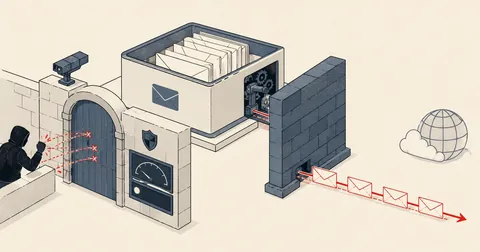
On one side, bots scan POP3/IMAP/SMTP around the clock. On the other, real customers keep sending wrong, old passwords from machines they forgot to update — the useful dividing line is not the IP, but "who has the right password." This system whitelists behavior, not identity.
Every hosting provider that offers mail services runs into this dilemma:
On one side — bots scan POP3/IMAP/SMTP around the clock. You need fail2ban/CSF-LFD to ban IPs that repeatedly guess passwords wrong, or brute-force attempts will eventually compromise an account.
On the other — real customers behave exactly like bots:
- An office shares a mailbox across 5-6 machines (a shared sales@ address everyone has added) — one employee changes the password, and the other 5 machines automatically keep retrying the old password = a ban. Everyone sharing the office internet connection gets hit.
- Thai home/mobile internet IPs change all the time (dynamic) — permanently whitelisting individual customers' IPs is pointless. Tomorrow, the IP will already be different.
- The harshest triggers are distributed rules (such as CSF's LF_DISTSMTP) — they see "multiple IPs using the same account" and assume a compromise, when it is actually just the office + employees' 4G connections.
The result is a steady trickle of "can't check mail" tickets, each resolved by manually lifting the ban with csf -dr — it never ends. So I sat down and designed a system that could resolve this on its own. All IPs and names in this article are made up (this is entirely a server-side protection system).
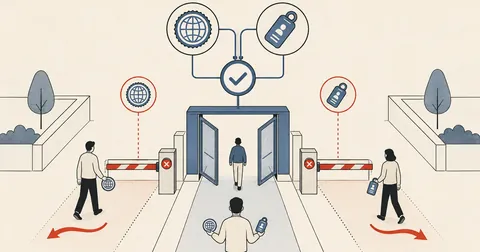
The idea: successful login = a human with the right password — grant a temporary whitelist entry
The core of this system is a simple observation: bots guess passwords; they do not have the right one. Someone who logs in successfully has the actual password. Even if another of their machines follows up with failed attempts using an old password, that should not get the whole office banned.
I wrote a daemon to watch the logs — here is the core code (trimmed from the actual version to show just the main logic):
#!/bin/bash
# mail-autowl: login สำเร็จจาก IP ไทย -> temp allow 24h กัน LFD/BFM แบนทับ
tail -Fn0 /var/log/dovecot.log /var/log/exim/mainlog | \
while read -r line; do
  case "$line" in
    *'Login: user='*|*'A=dovecot_login'*) ;;
    *) continue ;;
  esac
  ip=$(grep -oE 'rip=[0-9.]+|\[[0-9.]+\]' <<<"$line" | grep -oE '[0-9.]+' | head -1)
  [ -z "$ip" ] && continue
  # ข้าม IP ที่ allow อยู่แล้ว (กัน spam คำสั่ง csf)
  csf -g "$ip" 2>/dev/null | grep -q 'csf.allow\|Temporary Allow' && continue
  # GeoIP: เอาเฉพาะไทย — ระวัง! ต้อง match ให้แม่น
  cc=$(geoiplookup "$ip" | grep -oE ': [A-Z]{2},' | tr -d ':, ')
  [ "$cc" = "TH" ] || continue
  csf -ta "$ip" 86400 -p "110,143,993,995,25,465,587" "mail-autowl login-ok" >/dev/null
  logger -t mail-autowl "allow $ip (login ok)"
done
Details I learned the hard way and want you to watch for
1. The GeoIP regex must match precisely
At first, I matched just [A-Z]{2}, which picked up other letters in the geoiplookup output before reaching the country code — every country passed, silently whitelisting the whole world for several hours. Luckily, I checked the logs in time — you need to match [A-Z]{2}, (with a trailing comma), as in the script.
2. Temporary allow entries must specify ports — csf -ta without a port restriction = opening every service to that IP. We only need mail ports, so grant only those, following least privilege.
3. Do not run a daemon like this with overly broad privileges — if you run it as a separate user and grant sudo access only to csf -ta, watch out for this sudoers trap: the * wildcard in sudoers can match across arguments (csf -ta * means any number of arbitrary arguments, including other csf flags!). You need a pattern that strictly constrains the IP format, or a wrapper script that validates the input, with sudo access granted to the wrapper instead.
4. It needs self-healing — systems like this die silently, and nobody knows until customers complain. I added systemd Restart=always + OnFailure= to send alerts to Telegram, and a cron job to check every 15 minutes that the process is still running.
5. Panel/system updates may overwrite the config — control panels tend to regenerate config during updates. If your hook/service depends on a file they generate, add a checker to verify that your additions are still there after every update.
Results in production
The "can't check mail because I'm banned" tickets that used to arrive regularly dropped to almost zero, while the LFD logs still showed foreign bots getting banned repeatedly as usual — the system distinguished "real users with the right password" from "bots guessing passwords" much more effectively than the old permanent IP whitelist, and nobody had to sit there manually lifting bans anymore.
This approach applies to any service with a "successful authentication event" you can watch for — FTP, panel login, etc. The principle is the same: do not whitelist identity (IP); whitelist behavior (successful login).
I think a good security system should not create more work for its administrator — if you still have to manually lift bans every week, the design is not finished. Feel free to adapt this structure to fail2ban or another firewall. If I have left anything out of the explanation or made a typo, I will come back and fix it later.
Want us to set this up?
Get help with server setup, configuration, migration, or troubleshooting. Save time for the work that matters.
Hit something like this? Stuck somewhere?
Come trade notes on the LinuxThai board

Comments 0
No comments yet — be the first