Auto-Unblock the Office in CSF with a Geo+Account Gate
One client office whose mail server I manage has an IP that changes daily, and a ghost device with an old password keeps sending failed auth attempts all day until CSF blocks the public IP shared by the whole office. I cannot fix the root cause because I cannot access the client's devices, so I had to build a workaround entirely on my own server.
One client office whose mail server I manage uses a PPPoE internet connection whose public IP changes daily. One device in the office still has an old email password configured and keeps sending auth attempts with the wrong password all day. As a result, CSF and DA Brute Force Manager see the office's public IP as a brute-force source and block the IP everyone in the office shares. When that IP gets blocked, the whole office loses the ability to send mail at once, repeatedly throughout the day.
The problem is that the root cause is on the client's side, but the client cannot fix it because of 3 constraints.
Why I Cannot Fix the Root Cause
In this case, I ran into 3 barriers that made it impossible to fix the problem at its source.
- The client has no IT staff in the office. Even when I say, "Try logging this email account out on every device," they cannot do it because nobody knows which devices have what running.
- The office is far away, and sending someone onsite is not worth the distance and cost.
- I cannot access the client's LAN. I can only see logs of public-facing traffic on the mail server I manage.
These three constraints mean that only the client can fix the device with the old password that is causing the problem, but the client lacks the capacity to do so. I therefore had to find a solution on my own server: relieve the symptoms so the office can send mail again while the client gradually tracks down that ghost device.
The Requirements I Set
Before starting, I wrote down what the system needed to do.
- Unblock the real office as quickly as possible, in seconds, not minutes, or the office could be stuck from morning until afternoon.
- Never accidentally unblock foreign attackers using leaked credentials for brute-force attempts. In this case, I kept seeing IPs from CN/IN/VN/KR/BR mixed into the logs.
- Add no service that the client has to maintain. Everything runs on my machine.
- Make everything reversible. Once the client fixes the ghost device, I need to remove the service and leave the machine clean again.
This article contains every actual file I had deployed at the time of writing. I sanitized all names, IPs, and domains into placeholders, but left the logic untouched. Anyone facing a similar case (rotating IP + ghost device + remote client) can copy and adapt it.
office-a = fictional client office name / office-a.example = the office's mail domain / [email protected] = the ghost device's account with the old password / 203.0.113.42 = the office's public IP (RFC 5737 documentation range) / 192.168.1.44 = the ghost device's LAN IP / web1 = my mail server (DA + CSF + LFD) / bak1 = a separate bot machine in another datacenter / botuser = the user the bot runs under on bak1 / @example_monitor_bot = the bot handle on Telegram. Filenames in /usr/local/sbin/, /etc/systemd/system/, /etc/cron.d/ use the prefix csf-office-sweep-* in place of the actual names. You can change it to your own client's name.
3 Automatic Layers + 1 Manual Layer
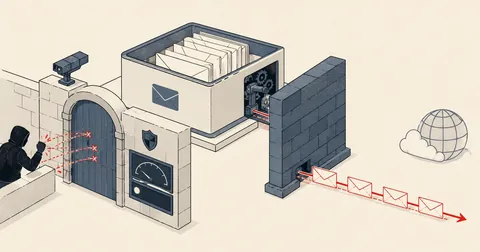
I did not stop at a single pipeline. I stacked several layers because each covers different cases. Here is the overview.
Going through each layer:
- Layer A BLOCK_REPORT hook unblocks immediately, but only covers blocks originating from LFD.
- Layer B systemd .path watcher unblocks within 5 seconds and covers DA-BFM calling
csf -ddirectly. - Layer C cron from 07:30 to 08:30 is a safety net when the office powers up in the morning.
- Layer D manual
.capsthrough the bot lets me check system health myself.
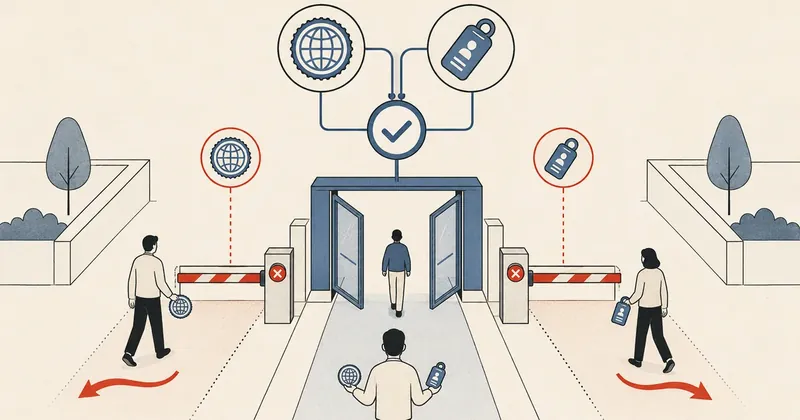
Every automatic layer passes through exactly the same gate:
set_id ต้องเป็น *@office-a.example ทั้ง 100% AND geoiplookup ต้องได้ TH
If both conditions are not met, the block stays in place because the IP is treated as an attacker. After unblocking, I also whitelist it for 24 hours to prevent another ban using csf -ta <IP> 86400.
Why Multiple Layers Are Needed
Some might ask whether one layer is enough. The answer is no, because each layer has gaps that another layer needs to cover.
Covers
- LFD blocks (smtpauth/distattack/imapd)
Does not cover
- DA-BFM calling csf -d directly
Covers
- Every write to csf.deny / csf.tempban
Does not cover
- systemd dying / a full inotify queue
Covers
- A safety net during the office boot window
Does not cover
- The rest of the day (handled by the path watcher)
Covers
- Live checks while I troubleshoot manually
Does not cover
- Not designed for automatic unblocking
Here is the reasoning behind each layer.
Why B is needed: DA Brute Force Manager in DirectAdmin calls csf -d directly, bypassing LFD, so Layer A's BLOCK_REPORT hook never fires. The IP then sits in csf.deny all day. I therefore use a systemd .path watcher to watch /etc/csf/csf.deny and trigger a sweep as soon as the file changes.
Why C is needed: if the systemd .path service has died (as happened in my actual case; see the failure mode section below), cron covers the office boot window from 07:30 to 08:30. When the office powers up in the morning and the ghost device retries the wrong password, the IP gets unblocked automatically before work starts.
Why D is needed: the sweep is not wired into the bot's monitored services list. If the service dies silently, no alert comes through. I therefore added .caps sweep-health to check it myself, making it the single source of truth for sweep health.
Files and Locations Across the System
Before getting into each layer, here is the full file map for an overview, so you can map it to your own machine.
| File | Purpose | perm |
|---|---|---|
| /usr/local/sbin/csf-cond-unblock.sh | Layer A — BLOCK_REPORT hook | 750 root:root |
| /usr/local/sbin/csf-office-sweep.sh | Layer B/C — main sweep | 755 |
| /etc/systemd/system/csf-office-sweep.path | Layer B — watches csf.deny + tempban | - |
| /etc/systemd/system/csf-office-sweep.service | Layer B — oneshot service | - |
| /etc/systemd/system/csf-office-sweep.service.d/burst.conf | Drop-in to raise StartLimit | - |
| /etc/cron.d/csf-office-sweep | Layer C — cron 07:30-08:30 | 644 |
| /usr/local/sbin/caps-analyze.sh | Layer D — analyzer with 5 sections | 755 |
| /etc/sudoers.d/botuser-phase1 | 5 NOPASSWD lines for botuser | - |
| /etc/csf/csf.conf (BLOCK_REPORT) | Points to csf-cond-unblock.sh | - |
| /var/log/csf-office-sweep.log | Sweep unblock log | - |
Layer A — BLOCK_REPORT Hook
The first layer is a hook CSF calls every time it blocks an IP. Start by editing csf.conf.
BLOCK_REPORT = "/usr/local/sbin/csf-cond-unblock.sh"

# context: LF_PERMBLOCK เลื่อน temp ban -> permanent หลัง 4 ครั้ง/วัน
# ghost device รหัสผิดจะโดน temp >4 ครั้ง/วัน -> ขึ้น csf.deny permanent
LF_PERMBLOCK          = "1"
LF_PERMBLOCK_INTERVAL = "86400"
LF_PERMBLOCK_COUNT    = "4"
LF_PERMBLOCK_ALERT    = "1"
After editing, run systemctl restart lfd once.
The hook script itself lives at /usr/local/sbin/csf-cond-unblock.sh. It receives the IP and reason CSF passes as arguments, then decides whether to unblock it.
#!/bin/bash
# CSF BLOCK_REPORT hook - auto-unblock IP if cause was ONLY @office-a.example mail-auth fails.
# Args: $1=IP $2=ports $3=perm $4=inout $5=time $6=reason $7=app

set -e
IP="$1"; REASON="$6"
[ -z "$IP" ] && exit 0

# Match LFD (smtpauth/distattack/imapd) + DA BFM (dovecot/exim/BFM) reasons
echo "$REASON" | grep -qiE 'smtpauth|distattack|pop3d|imapd|dovecot|exim|BFM' || exit 0

# Fast path: LFD DISTATTACK ระบุ account ใน reason -> match @office-a.example
if echo "$REASON" | grep -qE '\[[^]]*@office-a\.example\]'; then
    /usr/sbin/csf -dr "$IP" >/dev/null 2>&1 || true
    /usr/sbin/csf -tr "$IP" >/dev/null 2>&1 || true
    logger -t csf-cond-unblock "unblocked $IP - distattack on @office-a.example"
    exit 0
fi

# Slow path: BFM reason ไม่ระบุ account -> ดึงจาก exim mainlog ย้อน 50 บรรทัด
RECENT_USERS=$(grep -F "$IP" /var/log/exim/mainlog /var/log/exim/mainlog.1 2>/dev/null \
    | grep 'authenticator failed' | tail -50 \
    | grep -oE "set_id=[^)[:space:]]+" | sort -u)
[ -z "$RECENT_USERS" ] && exit 0

# ANY non-office account -> mixed attacker -> keep block
if echo "$RECENT_USERS" | grep -qvE '^set_id=\S*@office-a\.example$'; then
    logger -t csf-cond-unblock "keep block $IP - mixed accounts"
    exit 0
fi

# All @office-a.example -> unblock
/usr/sbin/csf -dr "$IP" >/dev/null 2>&1 || true
/usr/sbin/csf -tr "$IP" >/dev/null 2>&1 || true
logger -t csf-cond-unblock "unblocked $IP - only @office-a.example fails"
exit 0
There are three points I want to highlight.
- Layer A does not check geo because LFD blocks infrequently enough that the overhead of calling geoiplookup is not worthwhile (DA-BFM blocks much more often). I moved the geo check to Layer B instead.
set_idis the field in exim mainlog that identifies which account attempted auth.- I separate the fast path and slow path because LFD sometimes embeds the account directly in the reason as
[user@domain]. In that case, I can match it immediately without reading the log. For BFM entries that do not specify an account, I look it up in mainlog.
Layer B — systemd Path Watcher + Service
Layer B does the main work of covering DA-BFM. Start with the .path file that watches CSF's ban files.
[Unit]
Description=Watch CSF ban files for office ghost-device sweep trigger

[Path]
PathModified=/etc/csf/csf.deny
PathModified=/var/lib/csf/csf.tempban
Unit=csf-office-sweep.service

[Install]
WantedBy=multi-user.target
Then the oneshot service called by .path.
[Unit]
Description=Office ghost-device auto-unblock sweep
After=lfd.service csf.service
ConditionPathExists=/usr/local/sbin/csf-office-sweep.sh
# default - overridden by burst.conf
StartLimitIntervalSec=30
StartLimitBurst=10

[Service]
Type=oneshot
ExecStart=/usr/local/sbin/csf-office-sweep.sh
Nice=10
And the drop-in that raises StartLimit, which I will explain in the failure mode section.
[Unit]
# Raised from 10/30s after manual batch-unblock triggered 13 path events in 17s
# -> systemd refused start -> service stuck failed for 29h. Script-internal 5s
# debounce still caps CPU; this is purely systemd-level safety belt.
StartLimitIntervalSec=60
StartLimitBurst=30
The real core is the sweep script at /usr/local/sbin/csf-office-sweep.sh. It collects all blocked IPs, then filters them through the account + geo gate before unblocking them.
#!/bin/bash
# Periodic sweep: unblock IPs whose recent fails are 100% @office-a.example
# AND IP geo-locates to TH, then whitelist 24h.

set -e
LOG=/var/log/csf-office-sweep.log

# Debounce 5s - CSF credscan can write csf.deny many times/sec
LOCK=/var/run/csf-office-sweep.last
NOW=$(date +%s)
if [ -f "$LOCK" ]; then
    LAST=$(cat "$LOCK" 2>/dev/null || echo 0)
    if [ $(( NOW - LAST )) -lt 5 ]; then
        exit 0
    fi
fi
echo "$NOW" > "$LOCK"

# Snapshot csf -t (DENY + ALLOW) + csf.deny (BFM perm)
CSF_TEMP=$(csf -t 2>/dev/null)
TEMPS=$(echo "$CSF_TEMP" | awk '/^DENY/ {print $2}')
ALLOWS=$(echo "$CSF_TEMP" | awk '/^ALLOW/ {print $2}')
PERMS=$(grep -E 'BFM:.*(dovecot|exim)' /etc/csf/csf.deny 2>/dev/null | awk '{print $1}')
ALL=$(echo -e "$TEMPS\n$PERMS" | sort -u | grep -E '^[0-9]+\.[0-9]+\.[0-9]+\.[0-9]+$')
[ -z "$ALL" ] && exit 0

ts() { date '+%F %T'; }

# Fail-closed: geoiplookup not available -> abort entire sweep
if ! command -v geoiplookup >/dev/null 2>&1; then
    echo "[$(ts)] geoiplookup not found - sweep aborted (fail-closed)" >> "$LOG"
    exit 0
fi

for IP in $ALL; do
    # Skip permanent allow / temp allow
    if grep -qE "^${IP}( |$)" /etc/csf/csf.allow 2>/dev/null; then
        continue
    fi
    if echo "$ALLOWS" | grep -qE "^${IP}$"; then
        continue
    fi

    USERS=$(grep -F "$IP" /var/log/exim/mainlog /var/log/exim/mainlog.1 2>/dev/null \
        | grep 'authenticator failed' | tail -50 \
        | grep -oE "set_id=[^)[:space:]]+" | sort -u)
    [ -z "$USERS" ] && continue

    # ANY non-office account -> real attacker
    if echo "$USERS" | grep -qvE '^set_id=\S*@office-a\.example$'; then
        continue
    fi

    # Geo check - must be TH
    CC=$(geoiplookup "$IP" 2>/dev/null | grep -oE '[A-Z]{2},' | head -1 | tr -d ',')
    if [ "$CC" != "TH" ]; then
        echo "[$(ts)] skip $IP - @office fails but country=$CC (not TH)" >> "$LOG"
        continue
    fi

    /usr/sbin/csf -dr "$IP" >/dev/null 2>&1 || true
    /usr/sbin/csf -tr "$IP" >/dev/null 2>&1 || true
    /usr/sbin/csf -ta "$IP" 86400 "office ghost device TH - auto-whitelist 24h" >/dev/null 2>&1 || true
    echo "[$(ts)] unblocked + whitelisted 24h: $IP (TH)" >> "$LOG"
done

exit 0
The GeoIP Regex Trap That Once Got Me Banned
This was the most painful lesson in this case. At first, I wrote the regex to extract the country code like this.
# ผิด: match "IP" ใน "GeoIP" ก่อน country code
CC=$(geoiplookup "$IP" | grep -oE '[A-Z]{2}' | head -1)   # ได้ "IP"

# ถูก: ต้องมี comma ตามท้าย
CC=$(geoiplookup "$IP" | grep -oE '[A-Z]{2},' | head -1 | tr -d ',')
geoiplookup returns output in the form GeoIP Country Edition: TH, Thailand. When I used the bare regex [A-Z]{2}, it matched "IP" in "GeoIP" before reaching the actual country code. As a result, every IP ended up with the country "IP", breaking the conditions and causing incorrect unblocks. Fortunately, I caught it during testing before production. The fix was to require a trailing comma, then strip the comma afterward.
When parsing geoiplookup output, do not match a bare [A-Z]{2}, because the label contains GeoIP, which includes "IP". Always anchor it to the actual delimiter (a comma). An overly broad regex applied to text that controls security conditions opens the door to incorrect unblocks.
Layer C — Cron Safety Net
Layer C is short: just two cron lines covering the morning.
30,45 7 * * * root /usr/local/sbin/csf-office-sweep.sh
0,15,30 8 * * * root /usr/local/sbin/csf-office-sweep.sh
I limit it to the office boot window from 07:30 to 08:30 because Layer B (the path watcher) already handles the rest of the day. There is no need to waste resources running cron frequently.
A Failure Mode I Encountered — StartLimitBurst Stalemate
This is why the burst.conf drop-in is needed, and why Layer C and Layer D exist.
systemd has a built-in anti-flood mechanism. If a service is told to start more than StartLimitBurst times within StartLimitIntervalSec, it refuses and enters a failed state that does not automatically recover.
One day, I accidentally triggered it myself by clearing csf.deny in a batch, unblocking 13 IPs in 17 seconds. The path watcher fired 13 times in succession, hitting the default StartLimitBurst of 10 starts per 30 seconds. The service failed, and the sweep died silently for 29 hours. I only found out when the client told me they could not send mail.
How to recover:
systemctl reset-failed csf-office-sweep.service csf-office-sweep.path
systemctl start csf-office-sweep.path
systemctl status csf-office-sweep.path   # ต้องขึ้น active (waiting)
To prevent it happening again, the burst.conf drop-in raises the burst to 30 starts per 60 seconds (the file shown in Layer B). CPU usage is not a concern because the script already has a 5-second lockfile debounce. This StartLimit setting is just another safety belt at the systemd level.
The sweep is not in the bot's monitored services list, so if it dies silently, no alert comes through. This is why I needed Layer D in the first place. Use .caps sweep-health regularly to check the systemd status of .path and .service yourself.
Layer D — Caps Analyzer + Bot Integration
My bot runs on a separate machine: bak1 runs the Telegram bot, while web1 is the mail server. I added the .caps command so the bot can SSH into web1, run caps-analyze.sh, and send the output back to Telegram. The analyzer is divided into 5 sections.
| section | What it checks |
|---|---|
| activity | Success vs fail count for @office-a.example in mainlog + number of distinct accounts |
| working | Top 5 IPs with successful auth (= real devices), with account + geo + rDNS |
| broken | Accounts with only failures, all wrong passwords (= ghost device candidates) |
| blocked-and-unblock | Rows in csf.deny for @office-a.example + auto-unblock only for TH and office-only IPs |
| sweep-health | systemd state of .path and .service + latest log tail |
On the sudoers side, I allow the bot to use sudo for only 5 lines, in /etc/sudoers.d/botuser-phase1.
botuser ALL=(root) NOPASSWD: /usr/local/sbin/caps-analyze.sh activity
botuser ALL=(root) NOPASSWD: /usr/local/sbin/caps-analyze.sh working
botuser ALL=(root) NOPASSWD: /usr/local/sbin/caps-analyze.sh broken
botuser ALL=(root) NOPASSWD: /usr/local/sbin/caps-analyze.sh blocked-and-unblock
botuser ALL=(root) NOPASSWD: /usr/local/sbin/caps-analyze.sh sweep-health
Why Specify 5 Lines Instead of Using a Wildcard
# อันตราย: bot สั่ง subcommand อะไรก็ได้
botuser ALL=(root) NOPASSWD: /usr/local/sbin/caps-analyze.sh *

# ปลอดภัย: ระบุทุก section explicit
botuser ALL=(root) NOPASSWD: /usr/local/sbin/caps-analyze.sh activity
botuser ALL=(root) NOPASSWD: /usr/local/sbin/caps-analyze.sh working
...
If I put * there, an attacker can pass any arguments as soon as the bot is compromised. But with each section specified explicitly, even a compromised bot can only do the 5 things I defined. That greatly reduces the blast radius. And remember to check the syntax with visudo -cf /etc/sudoers.d/botuser-phase1 before saving every time.
Safety Mechanisms — Why I Allow Auto-Unblocking
The question to ask is whether automatically unblocking IPs is dangerous. My answer is that I allow it because the gate is very narrow. Every IP must pass all these checks before it is unblocked.
| Gate | What it checks | How it passes |
|---|---|---|
| Account check | The latest 50 set_id entries must be 100% @office-a.example | If @gmail.com / @yahoo.com appears among them, keep the block |
| Geo check | geoiplookup = TH only | Keep non-TH blocked (= foreign credential stuffing) |
| Fail-closed | If geoiplookup is unavailable, unblock nothing | Abort the sweep instead of unblocking incorrectly |
| Debounce | 5-second lockfile | Prevent CPU saturation from a CSF credscan flood |
| Whitelist 24h | csf -ta 86400 after unblocking | Prevent a re-ban loop, but keep it short enough that the exemption does not linger when the office changes IP tomorrow |
| Sudoers per-section | No wildcard | Bot compromise = small blast radius |
| Mail-only trigger | Filter for dovecot/exim in csf.deny | SSH brute / web brute does not enter this pipeline |
I need to emphasize that this service does not fix the root cause. It only relieves the symptoms while the client tracks down the ghost device. The actual fix is to find that device and reset the password, or stop using that account altogether. Once that is done, remove the service.
Removing the Service After Fixing the Ghost Device
The full removal procedure, in layer order:
# Layer A
sed -i 's|^BLOCK_REPORT = .*|BLOCK_REPORT = ""|' /etc/csf/csf.conf
systemctl restart lfd
rm -f /usr/local/sbin/csf-cond-unblock.sh

# Layer B
systemctl disable --now csf-office-sweep.path
rm -f /etc/systemd/system/csf-office-sweep.path
rm -f /etc/systemd/system/csf-office-sweep.service
rm -rf /etc/systemd/system/csf-office-sweep.service.d
systemctl daemon-reload
rm -f /usr/local/sbin/csf-office-sweep.sh

# Layer C
rm -f /etc/cron.d/csf-office-sweep

# Layer D
rm -f /usr/local/sbin/caps-analyze.sh
# ลบ 5 บรรทัดใน /etc/sudoers.d/botuser-phase1 (ใช้ visudo)
# ลบ caps command ใน bot config + restart bot
Everything is reversible. The machine returns to a clean state as though this service had never existed.
Summary
The pattern in this case is automatic unblocking behind a very narrow gate. It suits cases with these characteristics.
- The client uses an ISP with rotating IPs (PPPoE / DHCP / mobile-LTE / 4G/5G).
- There is a ghost device or stale credential in the office that is hard to locate.
- The client has no in-house IT, and an onsite visit is either impossible or not worth the cost.
- You must avoid accidentally unblocking real attackers at the same time.
To adapt it to your own case:
- Change the account match pattern from @office-a.example to your client's domain.
- Change the geo gate if the office travels frequently, for example TH+SG or TH+US, but understand that expanding the scope means reducing security.
- If it is not mail brute force, change the trigger source from dovecot/exim to sshd/ftp/http as appropriate.
- Keep fail-closed, debounce, a short whitelist duration, and explicit sudoers entries per command unchanged.
All the scripts above were actually running at the time of writing. I sanitized only the names, IPs, and domains. Feel free to examine their structure and adapt them to your own work; it is better than writing everything from scratch. Use them as you see fit—the principles are the same throughout.
Want us to set this up?
Get help with server setup, configuration, migration, or troubleshooting. Save time for the work that matters.
Hit something like this? Stuck somewhere?
Come trade notes on the LinuxThai board

Comments 0
No comments yet — be the first