Using an NVR to Reach Inaccessible Cameras with ISAPI and SDK

An NVR does more than store recordings. It is the only device in the system that can talk to every camera. When I cannot reach any camera directly, the NVR becomes the only gateway left, and that gateway provides far more access than its web interface reveals.
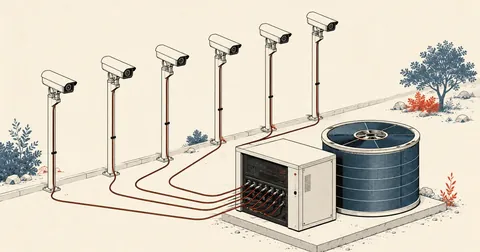
I took on an inspection of a camera system someone else had installed. Looking at the network diagram, I found that more than thirty cameras were on a different subnet from my workstation. They sat behind the NVR's second interface, on an isolated network with no router and no route back to my subnet. I could not even ping a single camera. My task was to determine which cameras had gone down and when, so I had to do everything through the NVR alone.
For camera audits, I normally query the cameras directly. I have already covered the reasons and methods in Auditing CCTV Cameras on My Own Network with ISAPI and ffprobe RTSP. I will skip that entirely here and start at the point where not a single camera is directly reachable.
The IP addresses, hostnames, and passwords in this article are all examples. The ISAPI paths, SDK function names, and observed numbers are real, taken from a device I administer using an account I am authorized to use, not by guessing anyone's password.
Cameras behind the second interface, with no route from my network
The setup looked like this. The NVR had two network interfaces. The first connected to the office network, which I could access. The second served a completely separate camera network. There was no router between them, no route, and no NAT of any kind. The cameras could talk only to the NVR.
The option most people think of is plugging a laptop into the camera network on site, which works if you are there. But for historical audits that need to run every month, going there to plug in each time is not practical. Another option is asking them to add a route back, which would undo the network separation they deliberately put in place. I chose a third option: use what the NVR already exposes.
Every command in this article targets a device I administer, using an account authorized by its owner. This is not scanning for other people's devices or guessing passwords, and almost everything is read-only. My endpoint probe sends only GET requests and POST requests specifically for searches, with no PUT or DELETE, because one mistake on a live camera system can mean lost footage.
First, check what this model exposes
ISAPI is REST over ordinary HTTP on port 80 with digest auth, so Python needs no special libraries: requests and HTTPDigestAuth are enough. But before starting, there is one thing to understand: different NVR models and firmware versions expose different endpoints. I cannot assume what is available; I have to send requests and check.
I wrote a probe that sends GET requests through a list of known paths, then reports which return 200 and which return 403, along with their subStatusCode.
GETS = [
    "/ISAPI/System/status", "/ISAPI/System/capabilities", "/ISAPI/System/time",
    "/ISAPI/System/Network/interfaces", "/ISAPI/System/Network/ipFilter",
    "/ISAPI/System/Network/virtualHost", "/ISAPI/System/Network/mapping",
    "/ISAPI/Security/users", "/ISAPI/Security/adminAccesses",
    "/ISAPI/ContentMgmt/InputProxy/channels",
    "/ISAPI/ContentMgmt/InputProxy/channels/status",
    "/ISAPI/ContentMgmt/InputProxy/search",
    "/ISAPI/ContentMgmt/StreamingProxy/channels",
    "/ISAPI/ContentMgmt/Storage", "/ISAPI/ContentMgmt/record/tracks",
    "/ISAPI/Streaming/channels", "/ISAPI/Streaming/status",
    "/ISAPI/Event/triggers", "/ISAPI/Event/notification/httpHosts",
]

def brief(text, n=120):
    t = re.sub(r"<\?xml[^>]*\?>", "", text)
    t = re.sub(r"\s+", " ", t).strip()
    root = re.match(r"<([A-Za-z]+)", t)
    sub = re.search(r"<subStatusCode>([^<]+)</subStatusCode>", text)
    tag = root.group(1) if root else "?"
    return f"<{tag}>" + (f" {sub.group(1)}" if sub else "") + " " + t[:n]

a = HTTPDigestAuth(args.user, args.password)
B = f"http://{args.ip}"
ok = []
for path in GETS:
    r = requests.get(B + path, auth=a, timeout=15)
    if r.status_code == 200:
        ok.append(path)
        print(f"200  {path}\n        {brief(r.text)}")
    else:
        sub = re.search(r"<subStatusCode>([^<]+)</subStatusCode>", r.text)
        print(f"{r.status_code}  {path}   ({sub.group(1) if sub else r.reason})")
print(f"\n# ใช้ได้ {len(ok)}/{len(GETS)} endpoint")
I do not embed the password in the file. I read it from the environment and pass it as an argument at runtime.
export HIK_PASS='<PASSWORD>'
python isapi_probe.py 192.168.10.20 admin "$HIK_PASS" --out out/isapi_nvr.txt
On the device I tested, a 32-channel NVR running firmware V5.04, 26 of the 38 endpoints I tried worked, far more than I initially expected.
Endpoints that work, and those this model blocks entirely
Read status across almost the entire device
/ISAPI/ContentMgmt/InputProxy/channelsAll configured camera channels, with IP, port, protocol, and the user used to connect.../channels/statusWhether each is actually online, withchanDetectResultvalues such as netUnreachable/ISAPI/ContentMgmt/InputProxy/searchTells the NVR to scan for devices on my behalf; an ordinary GET that returns ip, mac, model, serial, and firmware/ISAPI/System/Network/interfacesShows every interface, including IP, MAC, and link status/ISAPI/Security/adminAccessesShows which of HTTP, RTSP, and SDK are enabled
Do not waste time retrying
Network/virtualHostandNetwork/mappingare unavailable, meaning camera web interfaces cannot be opened through the NVR- All forms of passthrough, including
InputProxy/channels/<id>/passthroughand/ISAPI/RemoteChannel/... Event/schedules,Event/notification/mailingSecurity/onlineUsers,ContentMgmt/record/quota,System/diskManagementContentMgmt/logSearchexists, but I could not find the correct body; it returned 400 every time
The first two entries in the left column are what I use every day. Joining them on the channel id gives me a table showing each channel's camera IP, its connection protocol, and whether the NVR can currently see it.
cfg, _ = h.xml("/ISAPI/ContentMgmt/InputProxy/channels")
st,  _ = h.xml("/ISAPI/ContentMgmt/InputProxy/channels/status")

status = {}
for s in as_list(st.get("InputProxyChannelStatus")):
    status[s.get("id")] = {"online": s.get("online"),
                           "why": s.get("chanDetectResult")}

off = []
for ch in as_list(cfg.get("InputProxyChannel")):
    src = ch.get("sourceInputPortDescriptor") or {}
    s = status.get(ch.get("id"), {})
    mark = "ONLINE" if s.get("online") == "true" else "OFFLINE"
    print(f"{ch.get('id'):<4}{mark:<10}{str(src.get('ipAddress')):<16}{ch.get('name')}")
    if s.get("online") != "true":
        off.append((ch.get("id"), src.get("ipAddress"), s.get("why")))

for cid, ip, why in off:
    print(f"    ch{cid} {ip} เหตุที่ NVR บอก: {why}")   # เช่น netUnreachable
The chanDetectResult value included with the status is much more useful than just "offline." It distinguishes between the NVR having no route to the camera and reaching it but failing to log in. Those are different problems with different fixes.
What broke my first plan was the absence of virtualHost. I had intended to use the NVR as a reverse proxy, exposing each camera's web interface on a different port. Models that support this can indeed do it, but this model returned notSupport for both virtualHost and mapping, with every passthrough option blocked as well. That meant I would never be able to talk to the cameras' own ISAPI through this NVR. All I could do was request information the NVR already knew.
Snapshots and RTSP from unreachable cameras
The good news is that even though I cannot talk to the cameras directly, I can still see their video, because their streams already pass through the NVR. The key is converting the channel number to a trackID using ch * 100 + 1, so channel 17 becomes 1701.
# ภาพนิ่ง JPEG ของช่อง 17 ผ่าน NVR ได้ทันที ไม่ต้องถึงตัวกล้อง
curl -s --digest -u "admin:$HIK_PASS" \
  "http://192.168.10.20/ISAPI/Streaming/channels/1701/picture" -o ch17.jpg
ls -l ch17.jpg      # ของจริงที่ผมได้อยู่ราว 38-52 KB ต่อภาพ

# สตรีมสดก็ผ่าน NVR ได้เหมือนกัน เอา ffprobe อ่านค่าจริงของภาพ
ffprobe -v error -rtsp_transport tcp \
  -select_streams v:0 -show_entries stream=codec_name,width,height,avg_frame_rate \
  -of default=nw=1 "rtsp://admin:[email protected]:554/Streaming/Channels/1701"
This is more useful than I expected, because seeing the actual image and seeing "online" in the web interface are different things. I have seen channels marked online with completely black images because something was blocking the lens, and channels marked online with the image frozen on the same frame. Saving a snapshot once a day and reviewing them together catches both cases.
The JPEG files show their actual premises; they are more than technical test results. I store them on a machine with disk encryption, set them to be deleted automatically within a few days, and never take them off that machine. When sending a report to the client, I send a status table, not images, unless they specifically ask for them.
Finding when a channel last recorded
The question I had to answer was when each camera had gone down. The most direct approach was to search the recordings for the date of that channel's latest clip, using POST /ISAPI/ContentMgmt/search with an XML body.
BODY = """<?xml version='1.0'?><CMSearchDescription>
<searchID>{A1B2C3D4-0017-0000-0000-000000000001}</searchID>
<trackIDList><trackID>1701</trackID></trackIDList>
<timeSpanList><timeSpan>
  <startTime>2026-09-01T00:00:00Z</startTime>
  <endTime>2026-09-17T23:59:59Z</endTime>
</timeSpan></timeSpanList>
<maxResults>1</maxResults><searchResultPostion>0</searchResultPostion>
<metadataList><metadataDescriptor>//recordType.meta.std-cgi.com/CMR</metadataDescriptor>
</metadataList></CMSearchDescription>"""

r = requests.post(f"http://{ip}/ISAPI/ContentMgmt/search", data=BODY,
                  auth=HTTPDigestAuth(user, pw), timeout=30)
print(r.status_code, r.text[:600])
I lost almost an hour here. Using a short searchID such as C1 returned 400 badXmlContent every time, with no indication of what was wrong. Switching to a full GUID enclosed in braces, such as {A1B2C3D4-0017-0000-0000-000000000001}, worked immediately. Also note that the field name searchResultPostion is missing an i in the original API. Do not correct the spelling, or it will not be recognized.
Time pitfalls, and SADP's inability to see the second network
I encountered these three issues in practice and noted them here to save others the same trouble.
First, the timestamps ISAPI returns end in Z as though they were UTC, but they are actually the device's time, which is set to +07. Converting them to Thai time again introduces a seven-hour error. Always compare them with /ISAPI/System/time before drawing conclusions.
Second, the InputProxy/search endpoint that tells the NVR to scan for devices only scans the interface set as defaultConnection, which is the one facing the office network. It cannot see the camera network on the second interface. I tried adding netInterfaceID, interfaceID, and subnet parameters, but none had any effect.
Third, this one applies specifically to git-bash users on Windows: paths starting with /ISAPI/... are automatically converted to Windows paths. The request ends up targeting C:/Program Files/..., leaving me wondering why I get a 404.
# git-bash แปลง path ให้เองจนพัง ต้องปิดด้วยตัวแปรนี้
MSYS_NO_PATHCONV=1 curl -s --digest -u "admin:$HIK_PASS" \
  "http://192.168.10.20/ISAPI/System/time"

# เทียบเวลาเครื่องกับเวลาที่ค้นได้ ก่อนสรุปว่ากล้องตายกี่โมง
MSYS_NO_PATHCONV=1 curl -s --digest -u "admin:$HIK_PASS" \
  "http://192.168.10.20/ISAPI/System/time" | grep -o '<localTime>[^<]*'
When ISAPI runs out of options, move down to HCNetSDK
What I needed most was the device log, because it could tell me most directly when a camera disconnected and who logged in to do what. But ContentMgmt/logSearch returned 400 with every approach I tried. The remaining option was the Device Network SDK, which uses this brand's proprietary protocol on port 8000 and comes as a binary library.
ISAPI
Ordinary HTTP, cross-platform, no DLL installation, and debuggable with curl. Newer devices support almost all of it. For reading status, building an inventory, retrieving images, and searching clips, this is enough.
HCNetSDK
Adds device log access, camera configuration relayed through the NVR, disk formatting, remote firmware updates, PTZ, and callback-based live view. The tradeoff is needing a DLL that matches the architecture.
The good news is that there is no need to download the SDK from the manufacturer's website, because the DLL comes with the SADP application already installed on the machine. It is at C:\Program Files (x86)\SADP\SADP\HCNetSDK.dll, with an HCNetSDKCom folder alongside it. The bad news is that it is strictly x86, so 64-bit Python cannot load it.
I wasted time trying pip install hikvision-sdk, because its code hardcodes libhcnetsdk.so and LD_LIBRARY_PATH: it was built for Linux only. Using it requires WSL and the Linux SDK. I uninstalled it. What worked on Windows was calling the DLL directly with ctypes.
My approach was to download 32-bit embeddable Python and extract it into a temporary folder, without installing anything over the existing setup, then call ctypes from that interpreter. The two essential lines are add_dll_directory and chdir, because the SDK looks for HCNetSDKCom relative to the current directory, not the DLL's path.
import ctypes as C, os

SDK_DIR = r"C:\Program Files (x86)\SADP\SADP"

def load_sdk():
    if not os.path.isdir(SDK_DIR):
        raise SystemExit(f"[ERR] ไม่พบโฟลเดอร์ SDK: {SDK_DIR}")
    os.add_dll_directory(SDK_DIR)
    os.chdir(SDK_DIR)                       # SDK หา HCNetSDKCom จาก cwd
    return C.WinDLL(os.path.join(SDK_DIR, "HCNetSDK.dll"))

sdk = load_sdk()
sdk.NET_DVR_Login_V30.restype = C.c_long
sdk.NET_DVR_Init()
sdk.NET_DVR_SetConnectTime(3000, 1)
sdk.NET_DVR_SetReconnect(10000, True)

info = NET_DVR_DEVICEINFO_V30()
uid = sdk.NET_DVR_Login_V30(ip.encode(), 8000, user.encode(), pw.encode(), C.byref(info))
if uid < 0:
    raise SystemExit(f"[ERR] login ไม่ผ่าน error={sdk.NET_DVR_GetLastError()}")
print(f"ช่อง IP {info.byIPChanNum + info.byHighDChanNum * 256} เริ่มที่ {info.byStartDChan}")
- First, check that the SDK protocol is actually enabled at
/ISAPI/Security/adminAccesses, and that port 8000 is reachable. - Find HCNetSDK.dll in the existing SADP installation folder. There is no need to download the full package from the manufacturer's website.
- Extract 32-bit embeddable Python into a temporary folder because the DLL is x86. Do not install it over the machine's main Python installation.
- Always call Init, then Login_V30, do the work, then Logout and Cleanup, in that order. Do not forget to close the connection, or the session will remain open on the remote device.
- Delete the temporary folder after the run. Do not leave copied DLLs lying around on the workstation.
Reading logs to distinguish a dead camera from a hung NVR
The function I actually needed was NET_DVR_FindDVRLog_V30, followed by repeated calls to NET_DVR_FindNextLog_V30. Its return values are 1000 for one record retrieved, 1001 for no more records, and 1002 for a search still in progress that needs more time. I also count the 1002 responses and stop after two thousand iterations. I have seen devices get stuck there indefinitely.
LOG_OFF = {"major": 24, "minor": 28, "panelUser": 32, "netUser": 48,
           "ipv4": 64, "paraType": 208, "channel": 212, "disk": 216}

def parse_log(buf):
    import struct as _s
    b = buf.raw if hasattr(buf, "raw") else bytes(buf)
    y, mo, d, h, mi, s = _s.unpack_from("<6I", b, 0)
    g = lambda k: _s.unpack_from("<I", b, LOG_OFF[k])[0]
    z = lambda o, n: b[o:o + n].split(b"\x00")[0].decode(errors="replace")
    return {"time": f"{y:04d}-{mo:02d}-{d:02d} {h:02d}:{mi:02d}:{s:02d}",
            "major": g("major"), "minor": g("minor"), "channel": g("channel"),
            "user": z(LOG_OFF["netUser"], 16) or z(LOG_OFF["panelUser"], 16),
            "ip": z(LOG_OFF["ipv4"], 16)}

h = sdk.NET_DVR_FindDVRLog_V30(uid, mode, major or 0, 0, C.byref(t1), C.byref(t2), False)
buf, n, waits = C.create_string_buffer(4096), 0, 0
while n < 20000:
    r = sdk.NET_DVR_FindNextLog_V30(h, buf)
    if r == 1000:
        n, waits = n + 1, 0
        e = parse_log(buf)
        print(f"{e['time']}  major={e['major']} minor=0x{e['minor']:02x} "
              f"ch={e['channel']} user={e['user']} ip={e['ip']}")
    elif r == 1002:                 # กำลังค้น รอแป๊บ
        waits += 1
        if waits > 2000:
            break
    else:                           # 1001 หมดแล้ว หรือ error
        break
sdk.NET_DVR_FindLogClose_V30(h)
I declared NET_DVR_LOG_V30 as a Structure according to the documentation, and it crashed outright with a segfault and no explanatory message, because its size and layout did not match what this DLL version actually used. The approach that worked was receiving raw data in create_string_buffer(4096) and unpacking it manually by offset. It is only slightly harder to read and has not crashed again.
The second trap is lSelectMode: it is more than just a filter. 0 means search by time, 1 means search by type, which ignores the entire time range supplied, 2 means both time and type, and 3 means everything. I used 1 on my first attempt and got historical logs until the buffer filled up. I spent quite a while wondering why entries from last year were showing up. To filter by type within a time range, use 2.
The third trap is that channel numbers differ between ISAPI and the SDK. The SDK starts counting IP channels from byStartDChan, which was 33 on the device I worked with. That means channel 17 in ISAPI becomes channel 49 in the SDK. Getting that mapping wrong makes the entire report's conclusions wrong.
Once I sorted the minor codes by time, the picture became clear immediately. Every 0x43 followed by 0x41 two minutes later represented a power outage followed by the device booting back up. And within seconds of each completed boot, 0x29 appeared for the same channel. That meant the camera never came back, regardless of how many times the NVR rebooted, ruling out a hung NVR. The remaining possibilities were a failed camera, a broken cable, or no power at the camera, requiring someone to inspect it on site. The report to the owner ended with a single sentence stating which channel had been down since which date.
The sequence I follow for this kind of work
- Always run the probe first. Do not guess what the model supports. The successful endpoints and those returning 403 define the full scope of the work.
- Retrieve the channel list and status from InputProxy and save them as JSON organized by date, ready to diff next month.
- For offline channels, check snapshots and search past recordings first to establish when they actually stopped.
- Only move to the SDK on port 8000 if device logs are needed. Do not start there, because it involves much more work.
- Summarize the channels, the times they stopped, and the causes inferred from minor codes in a table, then send it to the system owner to decide what to do.
Personally, I think a camera system with this degree of network separation is designed correctly. I should not add routes just to make my own work easier. What I should do is make full use of the existing gateway and write tools that can run repeatedly. Anyone working with a model that supports virtualHost will have a much easier time. I work with what is available.
Still on my list are a tool to retrieve a snapshot from every channel once a day and compare hashes to detect frozen images, and a way to get ISAPI's logSearch working so I no longer need 32-bit Python. If I have left anything out or made a typo, I will come back and correct it later.
Hit something like this? Stuck somewhere?
Come trade notes on the LinuxThai board


Comments 0
No comments yet — be the first