reCamera + Gimbal: RISC-V Cross-Compilation, CAN, and Node-RED

A small AI camera on two brushless axes that turns when an angle is written to a single line in a text file. Behind it are a RISC-V processor that needs cross-compilation and a CAN bus that talks to the motors with 0.01-degree resolution.
I got a reCamera Gimbal kit to try out. It is a small AI camera mounted on two brushless axes (yaw and pitch), with a RISC-V processor running an object detection model onboard and driving the motors to follow detected objects. Devices like this usually have completely closed firmware, but this one lets me write my own motor control programs over CAN bus. I dug into everything from cross-compilation to moving the motors one degree at a time, and put the process into steps here.
The usernames, some paths, and PID values in this article are examples adjusted for readability. The IP 192.168.42.1 is the device's actual default. All commands and CAN frame structures come directly from the development kit.
The hardware in the box: RISC-V + AI camera + brushless motors
The processor is an SG2002-family SoC with two RISC-V C906 cores (the larger one at 1GHz, the other at 700MHz), and an NPU delivering around 1 Tops at Int8, enough to run an object detection model directly on the camera without an external machine. It has 256MB RAM and runs Linux (reCamera OS). The camera is an OV5647 5MP, with 12V power supplied through XT30.
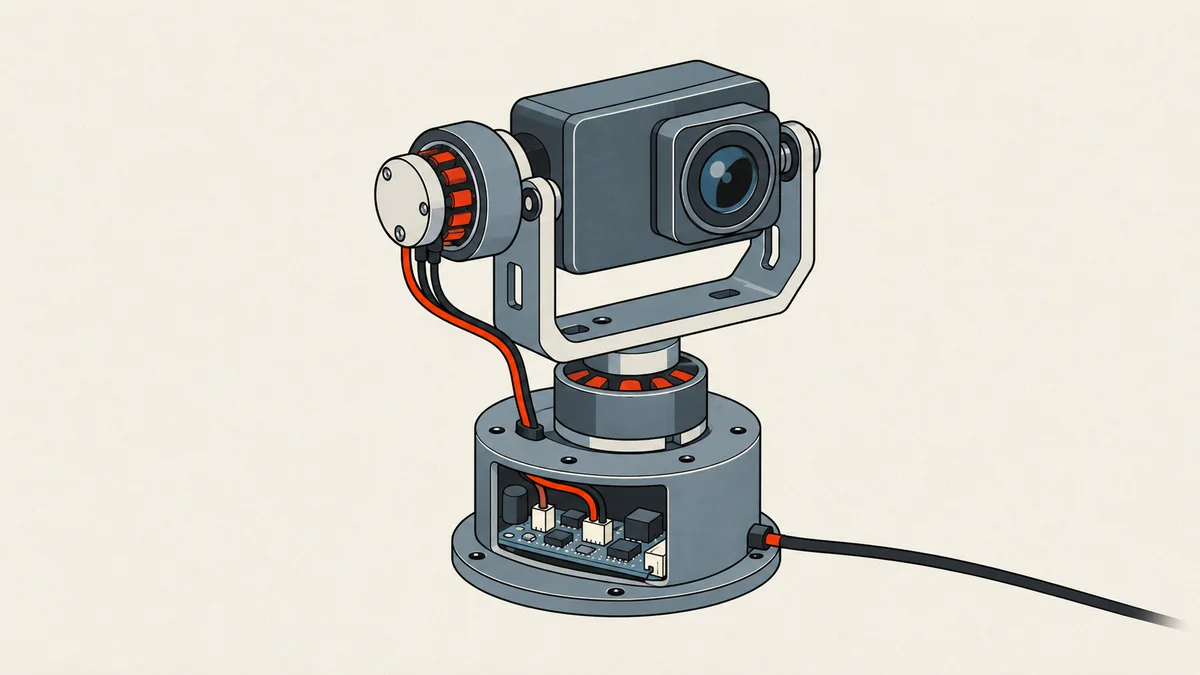
The key to controlling the motors is replacing the base board with the B4_CAN version to expose the CAN interface. The two brushless motor models, MS3008 and MS3506, share one CAN bus, with their IDs set to 01 and 02. Each has a built-in 15-bit magnetic encoder, and they communicate over CAN at 1Mbps. The mode I use throughout is a 2KHz position loop.
The overall system looks like this: I write code on a PC, then send commands over to the RISC-V processor on the camera, which actually drives the motors.
Cross-compiling C to run on RISC-V musl
The camera is RISC-V, not x86, so code compiled with gcc on my machine will not run on it. I need a cross-compiler that produces riscv64 binaries, and crucially, it must target musl, not glibc, because the camera's userland uses musl. With the wrong toolchain, the binary will compile successfully but fail immediately when run on the camera.
I use sophgo's host-tools, cloned onto any Linux machine (I use Ubuntu):
git clone https://github.com/sophgo/host-tools.git
The gcc I need is in host-tools/gcc/riscv64-linux-musl-x86_64/bin. I take the full path to that directory (using pwd) and add it to PATH in my .bashrc:
# ต่อท้าย ~/.bashrc — เปลี่ยน path ให้ตรงกับที่โคลนไว้
export PATH=$PATH:/home/user/host-tools/gcc/riscv64-linux-musl-x86_64/bin
source ~/.bashrc
With PATH set, I can compile directly. The full compiler name is riscv64-unknown-linux-musl-gcc:
riscv64-unknown-linux-musl-gcc can_send.c -o can_send
It must be riscv64 + musl. If I accidentally use the machine's regular gcc or a glibc-based riscv toolchain, it will produce a binary, but after uploading it to the camera with scp, running it will give a puzzling not found / segfault. Check with file can_send and make sure RISC-V and musl appear before uploading to the device.
Uploading to the device and driving the first motor
Once I have the binary, I upload it to the camera with scp using the default IP 192.168.42.1, then log in over ssh to run it. The can_send program continuously reads a file named Angle.txt. All I need to do is write an angle to that file, and the motor turns.
- Upload the binary to the camera: scp ./can_send [email protected]:~/
- Log in to the camera: ssh [email protected]
- Create the angle control file and run the program: touch Angle.txt, then ./can_send
- Open another window and write angles to the file: echo "1_90_90+2_90_90" >> Angle.txt
scp ./can_send [email protected]:~/
ssh [email protected]

# บนกล้อง
touch Angle.txt
./can_send

# อีกหน้าต่าง — สั่งมอเตอร์ ID1 ไป 90° และ ID2 ไป 90° เพดานความเร็ว 90 dps
echo "1_90_90+2_90_90" >> Angle.txt
The file format is motorID_มุม_ความเร็ว. To command both motors at once, separate them with +, as in 1_90_90+2_90_90. The speed value is in dps (degrees per second) and sets the maximum turning speed. To stop the program, write q to the file or press q on the keyboard. It will bring can0 down before exiting.
Behind the scenes: the CAN frame that controls the motors
Now I can look at what actually happens when I write 1_90_90 to the file. The program uses Linux SocketCAN directly, opening a PF_CAN socket and binding it to can0. Before use, the bitrate must match the motors at 1Mbps, or they will not communicate. The program handles this itself through system():
// ตั้งความเร็ว CAN ให้ตรงกับมอเตอร์ แล้วยกอินเทอร์เฟซขึ้น
system("sudo ip link set can0 type can bitrate 1000000");
system("sudo ip link set can0 up");
The core of it is assembling the frame. Each motor has a CAN ID of 0x140 + motor_id (0x141 for ID1). The command to move to an absolute angle uses 0xA4 as the first byte (a position loop with a speed limit). The angle is multiplied by 100 before sending because the motor's unit is 0.01 degrees per 1 LSB. This is why it can accept commands down to fractions of a degree:
// angle = องศาที่ต้องการ, maxSpeed = เพดานความเร็ว dps
int32_t angleControl = angle * 100;   // 0.01 องศา/LSB
struct can_frame rotate_frame;
rotate_frame.can_id  = 0x140 + motor_id;
rotate_frame.can_dlc = 8;
rotate_frame.data[0] = 0xA4;                          // position loop 2
rotate_frame.data[1] = 0x00;
rotate_frame.data[2] = (uint8_t)(maxSpeed & 0xFF);   // เพดานความเร็ว low byte
rotate_frame.data[3] = (uint8_t)(maxSpeed >> 8);     // เพดานความเร็ว high byte
rotate_frame.data[4] = (uint8_t)(angleControl);      // มุม byte 0
rotate_frame.data[5] = (uint8_t)(angleControl >> 8); // มุม byte 1
rotate_frame.data[6] = (uint8_t)(angleControl >> 16);// มุม byte 2
rotate_frame.data[7] = (uint8_t)(angleControl >> 24);// มุม byte 3
That first byte determines the control mode. This motor family has a fairly extensive command set. These are some common commands, taken directly from the motor's CAN command example file:
0x88  เปิดมอเตอร์ (run)          0x81  หยุดมอเตอร์ (stop)
0x80  ปิดมอเตอร์ (off)           0xA2  speed loop (คุมความเร็ว)
0xA4  position loop 2 (คุมมุม + เพดานความเร็ว)
0x90  อ่านค่า encoder            0x9C  อ่านสถานะ 2 (อุณหภูมิ/กระแส/ความเร็ว/encoder)
0x19  ตั้งตำแหน่งปัจจุบันเป็นศูนย์ ลง ROM
0x30  อ่าน PID   0x31  เขียน PID ลง RAM   0x32  เขียน PID ลง ROM

# ตัวอย่าง: A4 00 78 00 50 46 00 00 = position loop2 ความเร็ว 120dps มุม +180°
Control speed, with no final angle
Keep rotating at the specified speed. Used for homing (driving the motor to its end stop), and unsuitable for aiming at an angle.
Absolute angle + speed limit
Specify the target angle and speed limit. The motor runs its own PID control to stop at that angle. This is the main mode used to aim the camera.
Always leave a way to stop things during the first test. If a motor moves unexpectedly, the stop frame uses ID 0x140+id with first byte 0x81 (stop) or 0x80 (off, releasing torque immediately). Bind this to a button before trying large angle commands, or an axis could hit something and snap a cable.
Angle.txt: an interface that makes control simple
One part of this kit's design I like is using a text file as the intermediary. can_send does not open a socket for other programs to send commands to. Instead, it loops over Angle.txt and clears the file on every pass. When something writes a new line, the next pass picks it up, converts it into a CAN frame, and clears the file again. This means I can control it from anything that can write a file, whether that is shell, Node-RED, or a Python script.
char buffer[256] = {0};
fgets(buffer, sizeof(buffer), file);
int motor_id, angle, maxSpeed, motor_id2, angle2, maxSpeed2;
int n = sscanf(buffer, "%d_%d_%d+%d_%d_%d",
               &motor_id, &angle, &maxSpeed,
               &motor_id2, &angle2, &maxSpeed2);
// n == 3 สั่งตัวเดียว, n == 6 สั่งพร้อมกันสองตัว (หน่วง 30ms ระหว่างสองเฟรม)
The advantage is that debugging is very easy: to see what a command does, I just echo it into the file and watch the motor. The downside is that it is fire-and-forget, with no ack confirming whether the motor has actually reached the angle. For proper closed-loop control, I need to read the status back through a separate path, which is the next topic.
Reading status back: 15-bit encoder, angle, temperature, current
Sending commands alone is not enough. I also want to know the motor's angle, how hot it is, and how much current it draws. The development kit includes a separate can_receive program that sends read commands 0x90 (encoder value) or 0x9C (status 2) and decodes the returned bytes. It can also poll at a specified frequency:
./can_receive --help              # ดูวิธีใช้ทั้งหมด
./can_receive --state 1           # อ่านอุณหภูมิ กระแส ความเร็ว encoder
./can_receive --fre 10 --state 0  # อ่านมุมซ้ำ 10 ครั้ง/วินาที (กด q เพื่อออก)
Decoding the response frame is straightforward. Temperature is at byte 1, torque current occupies the next two bytes, speed is in dps, and the encoder occupies the final two bytes. The encoder is 15-bit, and the sample code maps the range 0–16383 to angles of 0–180 degrees:
int8_t   temperature = recv_frame.data[1];
int16_t  power   = (recv_frame.data[3] << 8) | recv_frame.data[2]; // กระแสแรงบิด
int16_t  speed   = (recv_frame.data[5] << 8) | recv_frame.data[4]; // dps
uint16_t encoder = (recv_frame.data[7] << 8) | recv_frame.data[6]; // 15-bit
float    angle   = encoder / 16383.0 * 180.0;                      // แปลงเป็นองศา
Scaling the raw power value with power / 2048 * 33 gives an approximate current value. This is useful beyond just monitoring: it indicates whether the motor is exerting unusually high force, which I will use for homing in the next section.
Finding motor zero against the end stop (auto calibration)
The problem with a self-assembled gimbal is that the motors do not know where "center" is, and there are no limit switches either. The development kit solves this with an approach I find clever: using torque current to detect the end of travel. In Gimbal_init, it uses a speed loop to turn the motor slowly in one direction while repeatedly reading status 0x9C. When the axis reaches the mechanical end stop, the motor pushes hard and torque current rises sharply. Once it exceeds the threshold (around 5), the program knows it has reached the end. It then writes that position to ROM as zero using command 0x19, before commanding the motor back to the center.
power = power / 2048.0 * 33; // แปลงกระแสแรงบิดเป็นหน่วยจริงโดยประมาณ
if (power >= 5.00) { // แรงบิดพุ่ง = แกนชนสุดแล้ว
send_frame(s, &zero_frame); // 0x19 ตั้งตำแหน่งนี้เป็นศูนย์ ลง ROM
if (motor_id == 1) send_frame(s, ¢er_frame_1); // 0xA4 กลับมา 180°
else if (motor_id == 2) send_frame(s, ¢er_frame_2); // กลับมา 90°
break; // จบการหาศูนย์
}
I like this method because it needs no extra hardware: the sensor already in the motor does two jobs. The caveat is that the current threshold needs to be set correctly. Too low, and it stops before reaching the end stop; too high, and the motor pushes hard enough to fatigue the plastic housing. I adjust this to suit the camera's weight and the friction in the assembled axes.
Node-RED dashboard + PID + auto-track
For control beyond the shell, the kit includes a Node-RED flow that imports into a complete dashboard. It has a live camera view, model confidence/IoU settings, manual controls, auto-track to make the camera follow objects, shortcut buttons for sleep / standby / calibration / Emergency Stop, and a separate PID tuning page for each axis. Since each person's assembly has a different weight, the tuning values need individual adjustment.
PID has two layers per axis: an angle loop (outer) and a speed loop (inner). The flow recommends these initial values:
# แกน Yaw
angle:  Kp = 50   Ki = 0    Kd = 0
speed:  Kp = 200  Ki = 20   Kd = 0     (แนะนำ ~260 / 20 / 0)

# แกน Pitch
angle:  Kp = 50   Ki = 0    Kd = 0
speed:  Kp = 100  Ki = 20   Kd = 0
When I press save, the flow writes the values to a configuration file in the camera user's home directory. Each line uses the format motorID axis Kp Ki Kd, where 0A is the angle loop and 0B is the speed loop:
1 0A 50 0 0      # motor1 (yaw) angle PID
1 0B 260 20 0    # motor1 (yaw) speed PID
2 0A 50 0 0      # motor2 (pitch) angle PID
2 0B 260 20 0    # motor2 (pitch) speed PID
Auto-track is a loop that reads object bounding boxes from the model, applies a gain to their offset from the image center, and writes the target angles to the same Angle.txt. Since can_send is already watching that file, I can write the controller in any language. I wrote a short Python example to show how it connects through the same file (adjust gain and deadzone to suit the setup):
# auto_track.py — host-side controller เขียนมุมลง Angle.txt ให้ can_send อ่านต่อ
FRAME_W, FRAME_H = 640, 480          # ขนาดภาพจากโมเดล
KP_YAW, KP_PITCH = 0.03, 0.03        # แปลง error พิกเซล -> องศา
DEADZONE = 20                        # นิ่งได้ ไม่ต้องขยับ
yaw, pitch = 90, 90                  # มุมกลางเริ่มต้น

def track(box_cx, box_cy):
    global yaw, pitch
    ex = box_cx - FRAME_W / 2        # error แนวนอน
    ey = box_cy - FRAME_H / 2        # error แนวตั้ง
    if abs(ex) > DEADZONE:
        yaw = clamp(yaw - ex * KP_YAW, 0, 180)
    if abs(ey) > DEADZONE:
        pitch = clamp(pitch + ey * KP_PITCH, 0, 180)
    with open("Angle.txt", "a") as f:
        f.write(f"1_{int(yaw)}_90+2_{int(pitch)}_90\n")

def clamp(v, lo, hi):
    return max(lo, min(hi, v))
It ultimately produces the same line I typed manually at the start, 1_มุม_ความเร็ว+2_มุม_ความเร็ว. The only difference is that the AI model now chooses the angles for me.
3D-printing the housing from STP files
The entire gimbal structure comes with STP files for printing, from the camera mounting arm and base enclosure to the sensor cover and CAN board housing. Each part has a separate file; download it, open it in a slicer, and print it. The prebuilt version uses PA nylon, but PETG or PLA+ can work for lighter use. Once printed, fit the two motors to the axes, set their IDs to 01 and 02 with the motor configuration tool, then run Gimbal_init to find zero again. That completes the process from code to structure.
Cross-compile C for riscv64 musl -> upload with scp to the camera at 192.168.42.1 -> write angles to Angle.txt -> the program converts them into CAN frame 0xA4 and sends them to the motors -> read back the 15-bit encoder to close the loop -> add Node-RED + PID + auto-track so AI handles aiming. Every part connects through a single text file.
What I have covered is the core needed to mount the camera on the axes and actually make it turn. I am still working on tuning PID to follow fast-moving objects without oscillation, and on updating the motor firmware. Anyone building on this setup can adjust the gain, homing current threshold, and PID values to suit their own hardware. If I have missed an explanation or made a typo, I will come back and correct it later.
Hit something like this? Stuck somewhere?
Come trade notes on the LinuxThai board

Comments 0
No comments yet — be the first