Claude Builds a Steel Shed in SketchUp, Then Runs FEA and a Heatmap
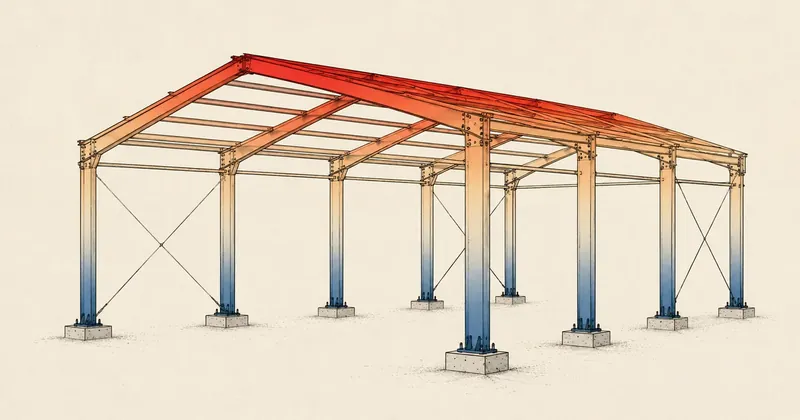
In the previous two parts, I set up the machine and connected MCP. Now comes the real work — I give Claude one prompt to build an entire steel shed in SketchUp, layer by layer, then send the frame for FEA strength analysis and finish by coloring the members according to the forces they actually carry.
In Part 1, I set up the machine and installed PyNite (read it here). In Part 2, I connected the MCP plugin so Claude could control SketchUp (read it here). Now comes the real work — I ask Claude to build an entire steel shed in SketchUp, then send it for FEA strength analysis and apply a heatmap based on the actual forces.
What I wanted was a mono-slope steel shed with a 7.5 × 5.3 meter footprint, sloping roughly 10.3 degrees along its long axis, with steel hollow sections, precast concrete columns, and double-wave roof tiles. I did not draw a single line myself. I gave it one prompt and let Claude work through everything to the end.
The member sequence (load path) I planned from the start
Before giving the instructions, I needed to understand how the load would reach the ground. Otherwise, the model might look good but be impossible to assemble. The member sequence from top to bottom is
Each layer sits on the layer below, with steel physically stacked on steel as a fabricator would assemble it. I also required every point to reference the outer corner (outside face), rather than a grid line through the member center. This matters because a wrong reference makes the bounds overshoot by 1 thickness at every joint. Across 7 layers, that error accumulates.
How I send the instructions (transport)
Once MCP is connected, Claude uses the eval_ruby tool to run Ruby directly in SketchUp. My trick is to avoid sending long scripts directly through the command line. Instead, I save each step in a separate .rb file and run it with
eval(File.read('/home/<user>/sketchup/step3_posts.rb'))
This avoids all the problems with escaping Thai text and quotation marks on the command line. It also returns the last line's value as a status that Claude can read to confirm the result before continuing.
The core of the workflow is always to build in 1 eval and render in another 1 eval. After each layer, have it inspect the image to confirm the result before continuing. I give the instructions once, in a single prompt, then let it work through each layer on its own through to the end of the FEA.
If you set the camera, call view.write_image, or call zoom_extents in the same eval that builds the geometry, it deadlocks the UI thread and SketchUp freezes, requiring a restart. Finish building first, then render in a separate call — I wasted several restarts before this rule stuck.
This is the prompt I actually used. I wrote the complete specification in one go and let it work through it.
load memory ทั้งหมด แล้วใช้ skill thai-building-framing + sketchup-drafting
(ขับ SketchUp ผ่าน MCP server; render แยก eval เสมอกัน hang)

งาน: สร้าง "โรงเหล็กหลังคาเพิงหมาแหงน" ใน SketchUp จากรูปอ้างอิง แล้วปิดท้ายด้วย
การคำนวณโครงสร้างเบื้องต้น (FEA) + ลงสี heatmap ตามแรงบนสมาชิกจริง
รูปอ้างอิง: /home/<user>/sketchup/pic/ref-shed.jpg

=== กติกาการทำงาน (สำคัญ) ===
- ทำต่อเนื่องทุกขั้น "ไม่ต้องหยุดรอ confirm" — ไล่ตั้งแต่ขั้น 1 จนจบ FEA เอง
- แต่ละขั้น: เขียนสคริปต์ .rb แยกต่อชั้น (idempotent: ลบ prefix กลุ่มตัวเองก่อนสร้าง),
  ตัวแปรพิมพ์เล็กทั้งหมด, build 1 eval แล้ว render อีก 1 eval (แยกกัน), อ่านรูปยืนยันสั้นๆ
  ก่อนไปขั้นถัดไป
- ก่อนขั้น 1 ให้ลบ top-level ทั้งหมด (Group/Component/Text/Dimension) เริ่มจากโมเดลว่าง
- อ้างมุมนอก (finishing) ทุกจุด

=== สเปกรวม ===
ฐาน 7.5 × 5.3 ม. slope ตามแกนยาว 7.5 — ต่ำที่ X=0 (หลัง) สูงที่ X=7500 (หน้า),
ความชัน ~10.3° (เก็บตามนี้ เป็น design choice ไม่ต้องอิง 15°)

ขั้น 1) เสาปูน 6 ต้น 150×150 สูง 2000 ที่ X=0/3750/7500 × Y=0/5300
ขั้น 2) ring beam 6×3 (150×75) กรอบชนมุมบนหัวเสา (หน้า/หลังเต็มเส้นแนว X, ซ้าย/กลาง/ขวาชนระหว่างแนว Y)
ขั้น 3) เสาค้ำตั้ง 6×3 จำนวน 9 ต้น = 3 แนว X × 3 แถว Y(0/2650/5300) สูง 300/975/1650
        (ฝั่งต่ำ X=0 = 30 ซม. = คานคู่, กลาง interpolate) นั่งบนหลังคาน
ขั้น 4) คานรับตง 6×3 แนว Y วางบนหัวเสาค้ำทั้ง 3 แนว เต็มลึก 5300
ขั้น 5) ตง 4×2 (100×50) แนว X พาดสัมผัสบนคานรับ (เชื่อมไม่บาก) 5 เส้น
        ยื่นหน้า(สูง) 1.0 ม. / หลัง(ต่ำ) 0.3 ม. — เส้นท้องตงผ่านมุมในของคานรับฝั่งสูง (run = ww−bw)
ขั้น 6) แป ตัว C 100×50×20 t2.3 แนว Y เอียงตั้งฉากลาด ~10 ตัว gauge~962 (ซ้อนหัว 238)
        ตัวแรกชิดปลายตงหน้า, ยื่นรับชายข้างละ 25 ซม.(½กระเบื้อง), ท้องแปนั่งผิวบนตงจริง rd/2÷cosθ
ขั้น 7) กระเบื้องลอนคู่ (component .skp ในโฟลเดอร์ pic) ลอนลงลาด คลุมพ้นโครง 10–15 ซม.ทุกขอบ scale ลงตัว

=== ปิดงาน: คำนวณโครงสร้างเบื้องต้น + ลงสี ===
ค้นยืนยันค่ามาตรฐานวิศวกรรมไทยจากเว็บก่อน แล้วใช้:
  เหล็ก SS400/กล่อง STKR400 fy=245 MPa, E=200,000 (มอก.1227/107) |
  ASD Fb=0.6fy=147 MPa (วสท.) | live load หลังคา 30 kg/m² (กฎกระทรวง ฉบับที่ 6 พ.ศ.2527) |
  กระเบื้องลอนคู่ dead 15 kg/m² | deflection limit L/240 | เสาปูน fc'=23.5 MPa
- เขียน FEA ด้วย PyNite (env ml313 python), หน่วย N-mm-MPa, แกนตั้ง=Y
- load path: กระเบื้อง→แป→ตง→คานรับตง→เสาค้ำ→ring beam→เสาปูน, ฐานเสา fixed,
  combo บริการ 1.0DL+1.0LL, น้ำหนักตัวเอง self-weight
- คำนวณ utilization (σ/0.6fy), deflection vs L/240, buckling, reaction ทุกฐานเสา (kg)
- เขียน member_colors.json (ชื่อกลุ่ม→[r,g,b] เขียว→เหลือง→แดง) แล้วเขียน Ruby อ่านไฟล์
  ลงสี heatmap บนสมาชิกจริงใน SketchUp (ตามชื่อกลุ่ม col_/ringX_/ringY_/post_/topbeam_/tong_/pae_),
  ซ่อนกระเบื้อง, render แยก eval
- สรุปผล: จุดวิกฤต (stress/deflection/buckling), reaction เสา, คำตัดสิน OK/ไม่
- ระบุขอบเขตชัดเจน: ประเมินเบื้องต้น/เพื่อการศึกษา ต้องให้วิศวกรมีใบอนุญาตรับรอง,
  ยังไม่รวมแรงลม/แผ่นดินไหว
You can see that I specified each layer in considerable detail rather than letting it guess the dimensions. In structural work, even a small error can make assembly impossible. What I left to Claude was deciding "how" to stack the layers correctly, not the "numbers."
What it produced, layer by layer
I'll walk through what it built at each step and what needed attention in each layer. The 3D images of each layer and the clips of Claude building them are on the full guide page (linked at the end of the article). Here, I'll describe them in words.
Step 1 — 6 precast concrete columns
The columns are 150×150 and 2000 mm high, placed at X = 0 / 3750 / 7500 intersecting Y = 0 / 5300, for a total of 6 columns. Always start with an empty model, deleting all top-level objects. The corner and edge columns reference their outside faces, while the middle columns at X=3750 sit exactly on the centerline. This is the basis for everything. Get this wrong and the whole shed is wrong.
Step 2 — 6×3 ring beam on the column tops
The perimeter beams (150×75) sit on the column tops with GAP0, meaning full contact with no gap. The X-direction beams (front/rear) run the full length, while the Y-direction beams are cut to fit between the front and rear beams. Every joint meets at the outer corner, forming a rigid frame on top of the concrete columns.
Step 3 — 9 vertical posts (3×3 grid)
This is the layer that creates the slope. There are 9 posts made from 6×3 steel hollow sections, arranged in 3 X lines × 3 Y rows (0 / 2650 / 5300). Their heights increase with the slope: the low side at X=0 is 30 cm high (built as a double beam), the middle row is interpolated, and the high side at X=7500 is 165 cm high. They sit on top of the ring beam. The height difference between the two sides creates the ~10.3° slope.
Step 4 — 6×3 joist support beams along Y
The beams sit on top of the posts along all 3 lines, spanning the full depth of 5300, perpendicular to the joists that will sit above them. They distribute the load from the joists to the posts.
Step 5 — 4×2 joists along X (the hardest part)
There are 5 runs of 100×50 joists spanning along X, extending 1000 mm at the front (high side) and 300 mm at the rear (low side). This is the critical part, because this is welded steelwork, not timber that can be notched to fit.
The underside line of each joist must pass through the "top-downhill corner" of every support beam. On the low side, it touches the outer edge; on the high side, it touches the inner edge. The joists rest against the beam surfaces and are welded in place, without notching into the section, because notching steel hollow sections reduces their strength — unlike timber joists, which can use notched joints. If left to guess, AI often models this as timber construction.
Step 6 — C-section steel purlins
The purlins are C 100×50×20 t2.3, running along Y and tilted perpendicular to the slope. There are roughly 10 of them, with a gauge of ~962 mm (headlap 238). What I emphasized was that they must be actual C-channels, with a web plus 2 flanges plus 2 lips, not simply solid boxes that are easy to draw. The underside of each purlin must actually sit on the top surface of the joists. The first one sits flush with the front joist ends, and they extend 25 cm on each side to support the side overhangs (half a roof tile).
Step 7 — Double-wave roof tiles
Load an actual roof tile component (.skp) and place it with the corrugations running downslope in the direction of water flow. Scale it so the tile count fits exactly, covering roughly 13 cm beyond the frame on every edge. Once this layer is finished, the entire steel shed is complete.
Preliminary structural analysis (FEA) + heatmap coloring
Once the geometry for every layer was complete, I sent the frame to PyNite for analysis, using N-mm-MPa units with Y as the vertical axis, then returned the colors to apply to the actual members according to the forces they carry. This is the final prompt.
คำนวณโครงสร้างเบื้องต้นด้วย PyNite (env ml313): มาตรฐานไทย เหล็ก SS400/STKR400 fy=245,
ASD Fb=0.6fy=147, live load หลังคา 30 กก./ตร.ม. (กฎกระทรวง ฉบับ 6/2527),
กระเบื้อง dead 15 กก./ตร.ม., deflection L/240, ฐานเสา fixed, combo 1.0DL+1.0LL + self-weight
— หา utilization/deflection/buckling/reaction ทุกฐานเสา แล้วเขียน member_colors.json
ให้ Ruby อ่านมาลงสี heatmap (เขียว→เหลือง→แดง), ซ่อนกระเบื้อง, render แยก eval
The idea is that Claude converts the model geometry into a PyNite node/member network and applies loads along the planned load path (tiles to purlins to joists to support beams to posts to the ring beam to concrete columns). The column bases are fixed, and it runs the service combination 1.0DL + 1.0LL plus self-weight. It then writes member_colors.json, mapping group names to RGB colors from green through yellow to red according to utilization, and writes Ruby to read that file back and color the members in SketchUp by group name (col_ / ringX_ / ringY_ / post_ / topbeam_ / tong_ / pae_).
Results (service combination 1.0DL + 1.0LL + self-weight)
- Maximum utilization is 0.36 (at the middle posts and joists), leaving plenty of capacity.
- Maximum deflection is 5.66 mm, below the limit of L/240 = 15.9 mm.
- Maximum middle-column reaction is 811 kg, with roughly 3,884 kg transferred to the ground in total.
- Every member passes, with no overstress or buckling.
The heatmap applied back to the model is mostly green, with some yellow at the middle posts and the joists carrying the largest moments. There is no red at all. This means the frame has considerable spare capacity. The sections could be reduced further to save steel (but I left them alone because wind loads are not yet included).
Standards used
SS400 steel / STKR400 hollow sections, fy = 245 MPa, E = 200,000 MPa (Thai Industrial Standards 1227 / 107), designed using ASD with Fb = 0.60fy = 147 MPa (Engineering Institute of Thailand). Roof live load is 30 kg/m² (Ministerial Regulation No. 6, B.E. 2527), tile dead load is 15 kg/m², the deflection limit is L/240, and the concrete columns have fc' = 23.5 MPa. I had Claude search the web to verify these values before using them, rather than relying on its memory.
The firm rules I collected (to avoid wasting time on the same bugs)
These six rules are lessons I learned through trial and error. If you plan to drive SketchUp through MCP like this, I recommend putting them in memory from the start.
Correct
- Always render in a separate eval from build
- Convert units to inches yourself with mm = 1.0/25.4
- Use lowercase variable names throughout
- Reference outer corners (outside faces)
- Give each member its own sub-group
- Make every script idempotent
Mistakes
- Set camera/write_image in the build eval → deadlock and freeze
- Trust display units → wrong dimensions
- Uppercase names → persistent constants and warning spam
- Reference grid centers → bounds exceed by 1 thickness
- Solids in the same entities collection → faces merge and break geometry
- Keep old groups → repeated runs create overlaps
More detail on each rule
-
Always render in a separate eval — Setting camera / view.write_image / zoom_extents in the same eval as the build deadlocks the UI thread, freezing SketchUp and requiring a restart.
-
SketchUp's internal units are always inches — Raw numbers passed to the API are in inches, regardless of the configured display units. I convert them myself with
mm = 1.0/25.4. -
Use lowercase variable names — SketchUp uses the same Ruby interpreter across evals. Uppercase names become persistent constants and generate warning spam on every rerun.
-
Reference outer corners (outside faces), not grid centerlines — Otherwise, the bounds overshoot by 1 thickness at every joint.
-
Give each member its own sub-group — Solids in the same entities collection merge faces and break each other's geometry. Separate groups can overlap freely.
-
Make every script idempotent — Delete its own groups by prefix before building, so rerunning does not create overlaps.
Scope of this work (read before using it)
All results are preliminary assessments. An actual load-bearing structure must be checked and certified by a licensed engineer. This analysis does not yet include wind (DPT 1311) or earthquakes (DPT 1302), which often govern the design of lightweight roofs with long overhangs like this one. Connections, welds, and foundations have not been designed in detail either.
To be direct, that comfortable-looking utilization figure of 0.36 comes from DL + LL alone. Once wind loads act on the 1 meter overhang on the high side, things change. The value of this work is in the workflow — building a model from a single prompt, then looping back through analysis and coloring to show the actual forces, rather than taking the numbers straight into construction.
Full code and other parts of the series
I put the full code for all 7 scripts, plus the FEA code (PyNite) and the heatmap coloring script, on the full guide page. It includes full HD images you can click to enlarge, along with full clips of Claude building each layer.
Read the whole series
- Part 1 — Set up the machine and install PyNite
- Part 2 — Connect the MCP plugin so Claude can control SketchUp
- Part 3 — Build a steel shed + FEA + heatmap (this part)
I have not finished the "laying roof tiles to standard" section yet. I'll follow up once it is done. If you want to try this yourself, start with the workflow of building and rendering separately and the 6 firm rules. The shed can look however you like; the principles are the same.
Hit something like this? Stuck somewhere?
Come trade notes on the LinuxThai board


Comments 0
No comments yet — be the first