Control Blender Through MCP with Reviewable Scene Scripts

Commands that AI sends to an open application can change everything for real. I want a file as evidence every time, rather than having it disappear into the chat history.
1-minute summary
- Symptom / problem
- You want an AI client to drive Blender 4.5 over MCP without letting it push live code from chat into the scene
- Who should read
- People connecting an AI to a running Blender who want a human to review code before it runs
- Fix in short
- Make every scene change one script file that a person reads first, then send it with run_script.py, which stores the result as .execution.json and .mcp.log next to the script.
I recently set up a CLI AI client that supports MCP to control Blender 4.5 running on my machine. The bridge uses mcp-for-blender version 1.30.0, run through uvx. Once configured, a tool named execute_blender_code can run Python bpy code to do anything Blender can do, which means it can change the scene and actual files just as if I were typing in the Python console myself. I did not want live code from chat going straight into it, so I set a rule: one scene change must be one script file that I read before running, with the results saved in files alongside it. This article covers the bridge, the 26-line script runner, and six problems I encountered during setup.
I am deliberately leaving out what I built in the scene, because that has nothing to do with the connection method. This article is entirely about the command pipeline and keeping evidence.
The connection path: everything stays on one machine
There are four stages from chat to scene. The AI client talks to the bridge over STDIO (the client starts the bridge as a child process and communicates through stdin/stdout). The bridge runs on Python 3.11, managed automatically by uv, then connects over TCP to the addon listening on port 9876 in the Blender window, and the addon calls bpy inside Blender. There is no HTTP or CDP anywhere in this path.
These are the values I put in the client configuration. The file format varies by client, but the values are the same.
[mcp_servers.blender]
command = "uvx"
args = ["--python", "3.11", "mcp-for-blender"]
startup_timeout_sec = 60
tool_timeout_sec = 180
env = { BLENDER_HOST = "127.0.0.1", BLENDER_PORT = "9876", UV_PYTHON_PREFERENCE = "only-managed", PYTHONUTF8 = "1" }
I installed the addon using the bridge's own command, pointing it to Blender 4.5's scripts/addons folder, then enabled it in Preferences, opened the N panel in the 3D View, and clicked Start MCP Server (some versions start it automatically).
$env:PYTHONUTF8 = '1'
uvx --python 3.11 mcp-for-blender install-addon --addons-dir "<โฟลเดอร์ scripts/addons ของ Blender 4.5>"
When the client calls list_tools, it finds seven tools plus a separate group of telemetry tools: get_addon_status, get_scene_info, execute_blender_code, look, generate_3d, search_assets, and import_asset. I disabled telemetry consent and only used execute_blender_code in practice. I did not touch the others.
Why I do not let AI send live code into Blender
execute_blender_code takes a Python code string and runs it directly in Blender. That code can delete objects, change a .blend file, or save over it, and because it is full Python, it can do anything the Blender process has permission to do. If I let code flow straight from chat into Blender, all I would have left is text in the scrollback, leaving me to work out what I told it to do yesterday.
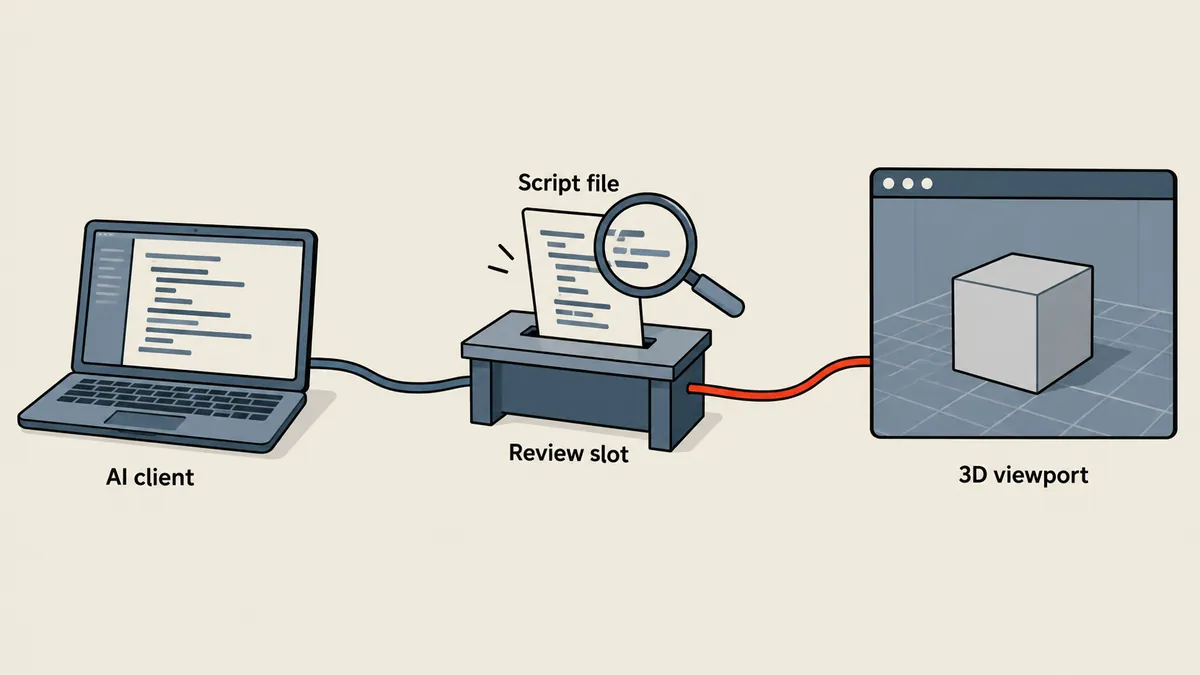
The rule I chose works like this: AI writes a script file in the working folder, I actually open and read it, and then I run it through a runner I control. This gives me three benefits at once.
Fast, but leaves nothing behind
There is no point for a person to read it before execution, no file to check what ran and when, and if the result is wrong, reproducing the same run is almost impossible because the source was a message that has already scrolled past
A little slower, with a history
There is a file to read first, an .execution.json showing whether the run succeeded, and an .mcp.log from the bridge. I can rerun the same file and see the scene change history as a sequence of file sets
bpy code can change real files, and the addon opens a port that accepts code execution commands. If that port accepts network connections, anyone who can connect can issue commands to change the machine. I therefore check that it listens only on 127.0.0.1 and make a person the final checkpoint before every run, rather than trusting code simply because it came from our own tool
run_script.py: the 26-line runner
The runner is a short Python script that acts as an MCP client itself, without depending on chat. It starts the bridge over STDIO, sends the bridge's stderr to an .mcp.log file, calls initialize, then call_tool with the file contents, saves the entire result as .execution.json, and finishes with an assert that isError is false. I rewrote it to be slightly shorter than the actual version.
"""รันสคริปต์ที่ตรวจแล้วหนึ่งไฟล์ผ่าน STDIO bridge ของ Blender MCP"""
import asyncio, json, os, sys
from pathlib import Path
from mcp import ClientSession, StdioServerParameters
from mcp.client.stdio import stdio_client

async def main():
    script = Path(sys.argv[1]).resolve()
    assert script.is_file()
    env = dict(os.environ, BLENDER_HOST='127.0.0.1', BLENDER_PORT='9876',
               PYTHONUTF8='1', UV_PYTHON_PREFERENCE='only-managed')
    params = StdioServerParameters(
        command='uvx', args=['--python', '3.11', 'mcp-for-blender'], env=env)
    with script.with_suffix('.mcp.log').open('w', encoding='utf-8') as errlog:
        async with stdio_client(params, errlog=errlog) as (r, w):
            async with ClientSession(r, w) as session:
                await session.initialize()
                code = script.read_text(encoding='utf-8')
                result = await session.call_tool('execute_blender_code', {'code': code})
                out = script.with_suffix('.execution.json')
                out.write_text(json.dumps(result.model_dump(mode='json'),
                               ensure_ascii=False, indent=2), encoding='utf-8')
                for block in result.content:
                    if hasattr(block, 'text'):
                        print(block.text)
                assert not result.isError, 'Blender ตอบ error ดูใน .execution.json'

asyncio.run(main())
It needs to run through uvx --from mcp-for-blender python run_script.py ... because the mcp library that the script imports is already in that package's environment. There is no need to install it separately on the system.
$env:PYTHONUTF8 = '1'
uvx --python 3.11 --from mcp-for-blender python run_script.py .\changes\0001-first-change.py
- Have AI write
0001-first-change.pyin thechangesfolder, with comments explaining what the script does - I open and read the entire file, checking whether anything reaches beyond the scene, such as writing files, calling processes, or overwriting a saved file
- Run it with the runner above, producing
.execution.jsonand.mcp.logbeside the script - Check
isErrorand the result messages. If something is wrong, put the revised script in a new file,0002-..., rather than overwriting the original - Keep the whole set as a history to review or rerun at any time
That last point is what I value most. If a script messes up the scene, I immediately know which file it was, when it ran, and what result came back, because all three files are there as evidence.
verify_mcp.py: a read-only connection test
Before actual use, I have another script to test the connection. Its structure is the same as the runner, except that it calls list_tools first, checks that execute_blender_code is in the list, then runs a short piece of read-only code that prints JSON containing the Blender version, scene name, object count, whether the addon is enabled, and the telemetry consent setting. It changes nothing in the scene.
code = '''
import bpy, json
print(json.dumps({
    "version": bpy.app.version_string,
    "scene": bpy.context.scene.name,
    "objects": len(bpy.context.scene.objects),
    "addon_enabled": "blender_mcp" in bpy.context.preferences.addons,
    "telemetry_consent":
        bpy.context.preferences.addons["blender_mcp"].preferences.telemetry_consent,
}))
'''
names = [t.name for t in (await session.list_tools()).tools]
assert 'execute_blender_code' in names, names
reply = await session.call_tool('execute_blender_code', {'code': code})
assert not reply.isError, reply
The result is written to connection-test.json, with a passed: true field that I keep as evidence that all four stages of the path actually connected during setup, rather than merely seeing an open port.

The .execution.json file contains the model_dump output of CallToolResult from the mcp library, roughly like this (an example of the structure, not an actual result from any scene).
{
  "content": [
    { "type": "text", "text": "{\"version\": \"4.5.0\", \"scene\": \"Scene\", \"objects\": 3}" }
  ],
  "isError": false
}
What a reviewed script looks like
I make a habit of keeping every script short, doing one thing, and starting with three comment lines explaining what it will do, what it touches, and how to undo it if something goes wrong. A script hundreds of lines long that does five things at once is so hard to read that reviewing it before running becomes a ritual. This is an example of the structure I use (the object names are made up).
# 0002-rename-group.py
# ทำอะไร : เปลี่ยนชื่อ collection หนึ่งตัว
# แตะอะไร: เฉพาะ bpy.data.collections ไม่เขียนไฟล์ ไม่เรียกโปรเซสอื่น
# ย้อนอย่างไร: เปลี่ยนชื่อกลับด้วยค่า OLD/NEW สลับกัน
import bpy

OLD, NEW = "Group_A", "Group_B"
col = bpy.data.collections.get(OLD)
assert col is not None, f"ไม่พบ collection {OLD}"
col.name = NEW
print({"renamed": OLD, "to": col.name})
Notice the assert that checks a condition before touching anything. If the original name does not exist, the script fails there and isError is true, so the runner fails too. I do not have to guess whether it ran successfully. There are only a few things I check when reading a script.
Are there imports that seem unnecessary, such as os subprocess shutil? Does it write or delete files outside the scene? Does it contain bpy.ops.wm.save_mainfile or overwrite a file unintentionally? Does it check conditions before making changes? If anything is unclear, I have AI add an explanation in the comments before running it, rather than running it first and looking afterward
The two timeout settings in the configuration also matter in practice. startup_timeout_sec = 60 is how long the client waits for the bridge to finish starting, since uvx may need to prepare Python 3.11 and the packages on the first run. tool_timeout_sec = 180 is the maximum time for a single tool call. Scripts that take longer should be split into multiple files, which already fits the rule of one script per change.
For the working folder, I prefix filenames with numbers in execution order, so ls gives me the history in order without a separate index.
changes/
  0001-first-change.py
  0001-first-change.execution.json
  0001-first-change.mcp.log
  0002-rename-group.py
  0002-rename-group.execution.json
  0002-rename-group.mcp.log
Six problems I encountered
During setup, I ran into six problems that were not covered in the bridge's short guide, listed here in the order I encountered them.
- The message Repository data ... blender_org not found, sync required I had to sync Blender's extension repository first, then check that the index file actually existed.
- UnicodeEncodeError cp874 during install-addon On Windows configured for Thai, the installer prints text that the cp874 code page cannot handle. I had to set
PYTHONUTF8=1before running it. One thing to watch for is that the addon file may already have been copied successfully even though the command failed while printing the result, so I checked the file before running it again. - Connection refused Blender must be open, and the addon must actually be listening on port 9876.
- Tools do not appear in chat after changing the configuration I had to restart the client. In the meantime, I could use the runner over STDIO without waiting.
- Do not open multiple Blender instances on the same port There is no way to predict which instance will receive the commands, and do not confuse this port with the browser's CDP port.
- The model imported and the scene saved successfully, but the GUI still showed the default cube I told Blender to open the file I had just saved using
bpy.ops.wm.open_mainfile, and the complete scene appeared. I inferred the cause from the work log: the initial scene was probably still displayed on screen. I did not prove this step by step.
These are the commands to check and fix the first three problems.
# 1. ซิงก์คลัง extension แล้วตรวจไฟล์ดัชนี
& "<โฟลเดอร์ติดตั้ง>\Blender 4.5\blender.exe" --background --online-mode --command extension sync
Test-Path "$env:APPDATA\Blender Foundation\Blender\4.5\extensions\blender_org\.blender_ext\index.json"

# 2. กัน cp874 ตอนติดตั้ง addon
$env:PYTHONUTF8 = '1'

# 3. ตรวจว่า addon ฟังพอร์ตหรือยัง
Get-NetTCPConnection -LocalPort 9876 -State Listen |
    Select-Object LocalAddress, LocalPort, OwningProcess
The Get-NetTCPConnection result must show only 127.0.0.1. If it shows 0.0.0.0, the port is accepting network connections, which is not intended and must be closed before continuing. Check this before starting each new work session
What I actually use
Personally, whenever an MCP tool can run arbitrary code like execute_blender_code, I consider a file for a person to read before execution and results saved as files essential. However good the bridge is, it does not solve this part. Feel free to write the runner in another language or keep the history in git, whichever suits you, as long as the three things stay together: the script file, a result file containing isError, and the bridge log.
To compare this with controlling other applications using a similar approach, see A file queue for controlling applications in a VM and The MCP plugin for SketchUp. The difference here is the focus on one script file per scene change, with JSON evidence. If I have left anything out, or the bridge version changes enough that the commands no longer match, I will come back and update this later.
Want us to set this up?
Get help with server setup, configuration, migration, or troubleshooting. Save time for the work that matters.
Hit something like this? Stuck somewhere?
Come trade notes on the LinuxThai board



Comments 0
No comments yet — be the first