Migrating an Old .aspx Site to a JSON Catalog and Filtering Images

A site that has been running for ten years often has valuable content inside, but access to the admin interface disappeared long ago, leaving only the public pages. The hard part of a migration like this is not extracting text. It is making the 2,000-plus items you extract reliable enough to put on a new site without inspecting every image.
A site owner contacted me to build a new website. The old site was built with ASP.NET WebForms more than ten years ago. The developer was long gone, there were no database credentials, and the admin interface was inaccessible. Only the public site still worked normally, but all the content was work the owner had collected over the years. Throwing it away was out of the question.
The site I extracted data from was the client's own site, and the owner asked me to rebuild it. I obtained both permission to use the content and written instructions before starting. This was not a case of scraping someone else's site for my own use. In this article, I have removed the site name, business name, and all business details, leaving only the method. Anyone using it should apply it only to sites they have permission to work with.
The real task was not "get the text out." Anyone could do that. The task was to make the 785 pages and 2,074 images I extracted ready for the new site without opening every image, while also making sure the old links indexed by Google redirected to the correct new pages.
Only the first component actually connects to the network. Everything else works entirely with local files. I deliberately separated them from the start because extracting the data takes dozens of reruns. Fetching the site again on every run would be slow and put unnecessary load on the client's server.
Start with an allowlist of pages, rather than crawling the whole domain
That generation of WebForms sites had only a handful of actual files, with query strings handling everything else. Instead of building a crawler that followed every link it found, I made an allowlist of .aspx files permitted in the queue. Any href outside that list was discarded immediately, keeping the crawler from wandering onto the client's related sites on other domains.
ALLOWED_PAGES = {
    "default.aspx", "about.aspx", "browse.aspx", "view.aspx",
    "services.aspx", "guide.aspx", "blog.aspx", "contact.aspx",
}

SEEDS = [
    "https://www.example.com/default.aspx",
    "https://www.example.com/browse.aspx?browsesub1=1001",
    "https://www.example.com/browse.aspx?browsesub1=1003",
]
Only three URL patterns carried actual content: view.aspx?id=N (one content item), browse.aspx?browsesub1=NNNN (a category listing), and browse.aspx?tag=...&page=N (a tag listing). Every image came through image.aspx?ID=N, without a single file extension.
For pagination, I did not guess page numbers. I let the crawler discover page= links naturally. When the site's pager stopped, the crawler stopped too. That was safer than incrementing numbers indefinitely and making hundreds of requests for nonexistent pages.
Normalize URLs before adding them to the queue
WebForms sites tend to expose the same page in several forms: different capitalization, query keys in a different order, or empty keys. Without normalizing them to a single form first, the queue grows and keeps collecting the same pages.
def canonical_url(href: str, base: str) -> str | None:
    if not href or href.startswith(("mailto:", "tel:", "javascript:", "#")):
        return None
    p = urlparse(urljoin(base, href))
    if p.netloc and p.netloc != "www.example.com":
        return None
    fname = (p.path or "/").rsplit("/", 1)[-1].lower() or "default.aspx"
    if fname not in ALLOWED_PAGES:
        return None
    qs = parse_qs(p.query, keep_blank_values=True)
    qs_norm = {k.lower(): v for k, v in qs.items()}
    qstr = "&".join(f"{k}={v[0]}" for k, v in sorted(qs_norm.items()))
    return f"https://www.example.com/{fname}" + (f"?{qstr}" if qstr else "")
I kept the fetcher simple: one session, one thread, a 0.4-second delay for every page, a 30-second timeout, and 3 retries with backoff increasing by 1.5 seconds each time. Failures went into an error list instead of throwing an exception that brought down the whole job. There was no reason to rush this work. Gentle requests would finish it overnight.
One thing to handle from the very first line is encoding. Many old servers either omit the charset or send the wrong one, causing requests to assume latin-1. The Thai text turns into garbage across the entire page without any warning.
if not r.encoding or r.encoding.lower() in ("iso-8859-1", "windows-1252"):
    r.encoding = "utf-8"
html = r.text
(OUT_HTML / page_filename(url)).write_text(html, encoding="utf-8")
The trap that cost me more than 500 pages
When saving files, I converted query strings directly into filenames, replacing characters that were not allowed in filenames with underscores. That sounded safe, but this site had hundreds of Thai tags.
def page_filename(url: str) -> str:
    p = urlparse(url)
    fname = p.path.rsplit("/", 1)[-1] or "default.aspx"
    if p.query:
        safe = re.sub(r"[^A-Za-z0-9_=&-]", "_", p.query)   # ตัวการ
        return f"{fname[:-5]}__{safe}.html"
    return f"{fname[:-5]}.html"
Every Thai character became an underscore, so different tags produced exactly the same filename, such as browse__tag=_____.html, and silently overwrote one another. The log said I had fetched 1,346 URLs, but only 785 files remained on disk. There was not a single error.
The rule I took from this job is never use a filename sanitizer that maps different characters to the same character on URLs containing Thai. It does not fail visibly. It silently overwrites files. The correct approach is to percent-encode the entire segment or append a short hash of the query to the filename, then check at the end whether the number of successfully fetched URLs matches the number of files on disk. If they differ, something has already gone missing.
Fortunately, the actual content pages used view.aspx?id= with numeric IDs, so they were unaffected. The missing pages were tag listings, which I could rebuild from the catalog anyway, so I did not fetch them again. Had they been content pages, I would have had to rerun the job all night.
Images have no extensions, so sniff the bytes
image.aspx?ID=N returned a raw stream, so I first took the extension from Content-Type. If the server sent application/octet-stream, I inspected the first bytes instead.
ext = ext_map.get(ctype)
if not ext:
    head = r.content[:16]
    if   head[:3]  == b"\xff\xd8\xff":        ext = ".jpg"
    elif head[:8]  == b"\x89PNG\r\n\x1a\n":   ext = ".png"
    elif head[:6] in (b"GIF87a", b"GIF89a"):  ext = ".gif"
    elif head[:4] == b"RIFF" and head[8:12] == b"WEBP": ext = ".webp"
    else: ext = ".bin"
fname = f"img_{img_id}{ext}"      # ชื่อไฟล์ = เลข id ของเว็บเก่า
That last line saved the entire job. I named image files directly after their original IDs on the old site, so none of the later scripts needed a manifest or a database. To find the local file for an image ID, I could just glob the filename. Later, when the crawler died halfway through without writing the manifest, this let the work continue.
The actual haul was 2,050 jpg files, 32 png files, and a handful of .bin and 0-byte files. Those needed a refetch step with a Referer header, because the old site's image handler had hotlink protection.
Extract content from the old theme and use legacy_id as the key
The old theme was a Bootstrap-era template, which was fortunate because it provided main.content, nav.breadcrumbs, and h2.section-title to work with, rather than the long IDs of plain WebForms. I extracted content by subtraction: take the entire main element, then remove what I did not need.
main = soup.select_one("main.content") or soup.find("main") or soup.body
title_el = soup.select_one("h2.section-title") or soup.select_one("h1.section-title")
title = title_el.get_text(strip=True) if title_el else None
title_el and title_el.extract()                  # กันหัวข้อซ้ำในเนื้อ
for sel in ["script", ".share", ".fb-like", "#fb-root", ".social-share"]:
    for n in main.select(sel):
        n.decompose()
body_html = str(main)
body_text = re.sub(r"\s+", " ", main.get_text(" ", strip=True))
I kept only images inside main, in the order they actually appeared on the page. That meant the header logo and footer banners could never enter the gallery in the first place. Also, the original markup mixed id= and ID=, so I had to support both.
I extracted legacy_id from the saved filename, rather than the URL, so the parser could run offline. This key was central to the entire migration. It connected three things at once: old pages to new pages, old images to local files, and cards on listing pages to content pages. With this in place, creating 301 redirects from old links became a mechanical task rather than a visual matching exercise.
{
  "legacy_id": "2000",
  "title": "...",
  "slug": "...",
  "category": "...",
  "breadcrumb": ["...", "..."],
  "cover_image": "images/img_8373.jpg",
  "image_count": 19,
  "images": [
    { "legacy_id": "8373", "file": "images/img_8373.jpg", "shared_with": 1 }
  ],
  "body_preview": "400 ตัวอักษรแรกของเนื้อหา",
  "body_text_len": 5123,
  "source_url": "https://www.example.com/view.aspx?id=2000",
  "source_file": "html/view__id=2000.html"
}
A three-layer image filter to keep QR codes off article covers
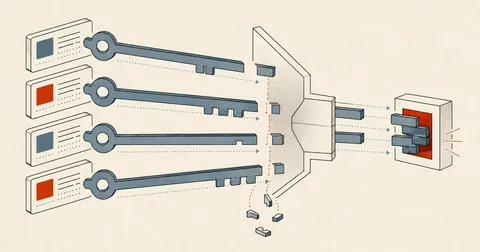
The problem that called for a filter was that the old CMS appended a chat app's QR code and a call-to-action button to almost every article, uploading them again every time. Identical images therefore had different IDs. Tracking IDs was no help at all. I had to examine the bytes.
The first layer hashes each entire file with SHA-1, then builds an index keyed by hash. As soon as I sorted the groups by size, the culprit stood out.
for f in IMG_DIR.iterdir():
    m = re.match(r"img_(\d+)\.[A-Za-z0-9]+$", f.name)
    if not m:
        continue
    raw = f.read_bytes()
    h = hashlib.sha1(raw).hexdigest()
    with Image.open(f) as im:
        w, hpx = im.size
    data[m.group(1)] = {"file": f.name, "hash": h, "w": w, "h": hpx,
                        "bytes": len(raw)}
    hash_to_ids.setdefault(h, []).append(m.group(1))
The largest group was a 900x900 file, 65,430 bytes in size, with 75 images identical down to every byte. That was the QR code. Another group contained 3 images of a second QR variant, and there was also one 97x50 button image.
The second layer catches variants, because saving the QR code again at even a slightly different quality immediately changes its hash. Rather than hard-code a hash, I looked at group characteristics: square images of the same dimensions, repeated at least twice.
for h, ids in sorted(hash_to_ids.items(), key=lambda kv: -len(kv[1])):
    sample = data[ids[0]]
    if sample["w"] == 900 and sample["h"] == 900 and len(ids) >= 2:
        qr_dupe_ids.update(ids)

logo_ids = {i for i, d in data.items()
            if 50 <= d["w"] <= 200 and 30 <= d["h"] <= 100
            and d["bytes"] < 20_000 and d["uses"] >= 2}
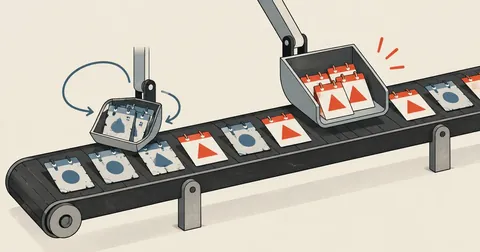
The third layer counts how many content pages use an image. I called it shared_with. Images of actual work appear on one page, while site decorations appear across many pages.
usage = {}
for item in items:
    for iid in item.get("image_ids") or []:
        usage[str(iid)] = usage.get(str(iid), 0) + 1
for iid, d in data.items():
    d["uses"] = usage.get(iid, 0)

banner_ids = {i for i, d in data.items()
              if d["uses"] >= 5 and i not in qr_dupe_ids and i not in logo_ids}
cover_skip = qr_dupe_ids | logo_ids | banner_ids
cover_safe = {i for i in data if i not in cover_skip}
In practice, layers one and two did almost all the work. Layer three found zero because the content parser had already removed header and footer decorations at the start. I kept the third layer anyway, because the next site might not be so fortunate, and it would determine cover selection in the next step.
Does not work with the old CMS
The same asset was uploaded again with every new article, giving it a different id and filename. Filtering by id or name would leave dozens of QR images behind without my noticing.
Works immediately
Whole-file SHA-1 catches all exact duplicates in one pass. Image dimensions and the number of pages using an image then filter out variants whose hashes differ.
I moved the excluded images into a quarantine folder instead of deleting them, because some images that looked like junk were ones the owner wanted to keep. Deletion would make them unrecoverable, but moving them out of the folder served by the new site would still keep them off the website.
Choose covers in three layers, then check my own work
I selected covers in order of priority. If a page already had an og:image, someone had chosen it, so I used that. Otherwise, I picked the image with the lowest shared_with, meaning the image most specific to that page.
cover = None
og_id = og_map.get(str(item["legacy_id"]))
if og_id and og_id not in skip_gallery_ids:
    cover = img_lookup.get(str(og_id))

if cover is None:
    cands = [x for x in image_files if str(x["legacy_id"]) not in skip_cover_ids]
    cands = cands or image_files                      # ทางสุดท้าย
    cands.sort(key=lambda x: (x["shared_with"], int(x["legacy_id"])))
    cover = cands[0]["file"] if cands else None
Of the 226 pages, 219 had an og:image. The remaining 7 genuinely had no usable images. I left their covers as null and let the new site use a fallback cover, which was better than forcing in an arbitrary image.
I wrote three verification checks, and every one caught real issues.
- Count Thai characters in every content item. If any item has zero, the encoding broke during fetching.
- Check whether different items share the same cover. Duplicate covers = the cover selector picked a decorative image.
- Compare file counts in the source folder and the folder served by the new site. Any difference means the mirror is out of date.
My slug generator did not check for duplicates, so 226 items produced only 215 distinct slugs, with 7 colliding pairs. The fix is to append legacy_id only when a collision occurs. The other issue was that categories read from breadcrumbs included both Thai and English names for the same category, along with country names mixed in as categories. I still had to handle these case by case with if/elif. There was no shortcut.
Rules I can apply to the next site
Personally, I think migrating an old site comes down to just two things. The first is choosing the right key from the very beginning. I used legacy_id both for image filenames and as the key in every JSON file. When it came time to create redirects and reconnect images to articles, everything was a simple lookup. No guessing and no matching by article title.
The second is that every step must be countable. How many URLs were fetched, how many files remained, how many images there were, how many were excluded, and how many were still usable. Whenever the numbers do not match, something is silently going missing. In the filename collision case, if I had not compared 1,346 with 785, I would have delivered the job without knowing that half the tag pages were gone.
If you are about to rebuild a client's site where the old content is still available but admin access is gone, feel free to follow this sequence. The important part is to obtain the owner's permission first and make requests gently, because that site still has to keep selling while I build the new one. If I have left anything out or made a typo, I will come back and fix it later.
Want us to set this up?
Get help with server setup, configuration, migration, or troubleshooting. Save time for the work that matters.
Hit something like this? Stuck somewhere?
Come trade notes on the LinuxThai board

Comments 0
No comments yet — be the first