Matching 28 Timestamped Downloads with Audio and Hungarian

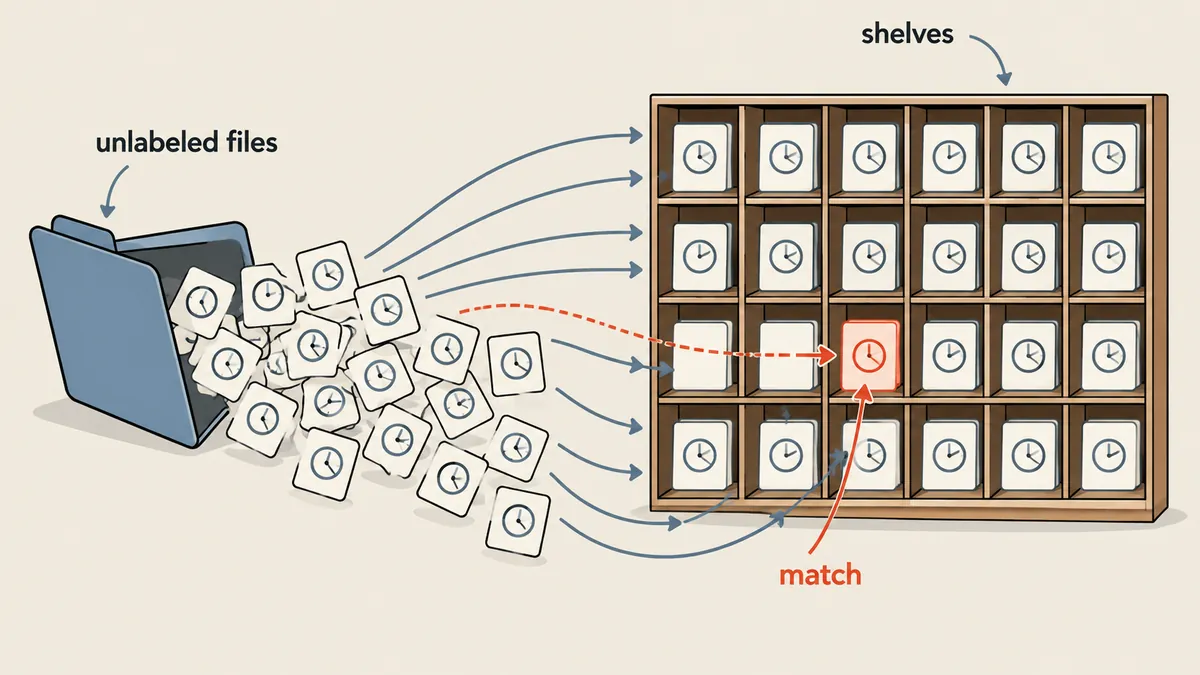
When files have no labels identifying their jobs, the embedded audio is the best fingerprint, and matching must be one-to-one across the whole set, rather than letting each file choose its own favorite.
1-minute summary
- Symptom / problem
- 28 video files are named only by date and time, so nobody knows which file belongs to which job.
- Who should read
- Anyone who must map unlabeled output files back to their source jobs.
- Fix in short
- Correlate the embedded audio against the reference tracks in a 28x28 matrix, then match one-to-one with linear_sum_assignment. Accept scores above 0.90 only and verify SHA-256 when copying.
I had 28 output video files in a single download folder, produced by a batch processing tool. Their filenames contained only dates and times, with no job IDs at all. I needed to know which file belonged to which job before placing them on the edit plan. A wrong match would put footage from one section over the audio of another, which is almost impossible to catch by looking at the images alone.
I will leave out which tool produced the files and what processing they went through. I will cover only how I recovered the mapping using audio signals, which works for any similar task where the output files still contain the original audio.
What not to do: sort by download time
The easiest approach is to sort the files by time and match them to jobs in submission order. I did not do that because jobs do not finish in order. A job submitted later may finish first. The timestamps in the filenames indicate completion order, not submission order, and a single mistake would shift all the remaining matches out of place.
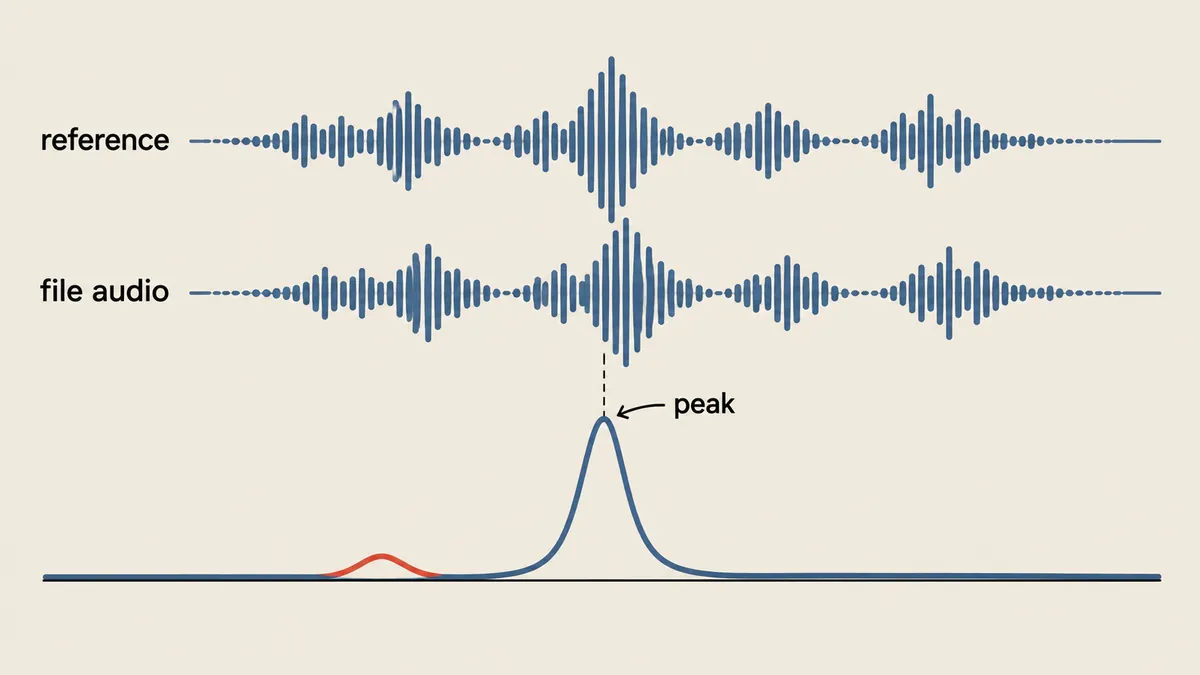
Instead, I had two things to work with. First, each output file contained its job's vocal track. Second, I had the original vocal stem for the entire song and knew where each job started in the song. So if I could find which part of the stem matched the audio in a file, I would know which job it belonged to. I had the computer "listen" through calculation instead of listening myself.
The full procedure
- Extract audio from every file with ffmpeg as mono 8,000 Hz float32, using ThreadPoolExecutor with 4 threads and `-threads 1` per process
- For each pair (file i, job k), skip immediately if the audio duration differs from the job duration by more than 0.35 seconds
- Cut reference segment x from the stem around the job's start position, plus or minus 2,400 samples (plus or minus 0.3 seconds), plus the file's duration
- Run normalized cross-correlation to get the maximum score and offset for each pair, storing them in scores[28][28], initialized to -1
- `linear_sum_assignment(-scores)` produces the one-to-one assignment with the highest total score
- assert that every pair scores above 0.90, then record each file's second-best score as a confidence measure
Scoring each pair: normalized cross-correlation
The core is a function that finds where the short file (probe) best matches the reference signal (ref). I use the same formula I used to move an edit plan onto new audio, which I covered in Moving an edit plan with waveform correlation.
import subprocess
import numpy as np
from scipy.signal import correlate
from concurrent.futures import ThreadPoolExecutor

SR = 8000

def load_mono(path):
    raw = subprocess.run(
        ['ffmpeg', '-v', 'error', '-threads', '1', '-i', str(path),
         '-ac', '1', '-ar', str(SR), '-f', 'f32le', '-'],
        capture_output=True, check=True).stdout
    return np.frombuffer(raw, dtype=np.float32).astype(np.float64)

def ncc_best(ref, probe):
    n = len(probe)
    cc = correlate(ref, probe, mode='valid', method='fft')
    c2 = np.concatenate(([0.0], np.cumsum(ref * ref)))
    energy = c2[n:] - c2[:-n]
    denom = np.sqrt(np.maximum(energy, 1e-12) * float(np.dot(probe, probe)))
    score = cc / denom
    k = int(np.argmax(score))
    return k, float(score[k])

with ThreadPoolExecutor(4) as ex:
    audios = list(ex.map(load_mono, files))      # files = 28 ไฟล์ที่ไม่มีป้าย
Dividing by sqrt(energy_window * dot(y, y)) puts the score in the range -1 to 1, independent of loudness, and energy_window is calculated with a single cumsum of x*x, giving the energy of the sliding window at every position without looping over positions individually.
Next, I build the score matrix, initialized to -1 for pairs that are filtered out.
n_files, n_jobs = len(audios), len(jobs)
scores = np.full((n_files, n_jobs), -1.0)
offsets = np.zeros((n_files, n_jobs))

for i, y in enumerate(audios):
    for k, job in enumerate(jobs):               # job = {'start': วินาทีในเพลง, 'len': วินาที}
        if abs(len(y) / SR - job['len']) > 0.35:
            continue                             # ความยาวไม่เข้า ข้ามทันที
        c = int(job['start'] * SR)
        lo = max(0, c - 2400)
        x = stem[lo:c + 2400 + len(y)]           # บวกลบ 0.3 วินาทีรอบตำแหน่งที่คาด
        kk, sc = ncc_best(x, y)
        scores[i, k] = sc
        offsets[i, k] = (lo + kk - c) / SR
Restricting the search to a window around the "absolute" position in the song matters because the song has repeated sections. Searching the entire stem would give high scores at every occurrence of a repeated section. The narrow window around the expected position is what distinguishes those repetitions.
Why Hungarian instead of argmax
The straightforward approach is to let each file choose its own highest-scoring job (argmax across each row). The problem is that two files can choose the same job if two jobs have similar durations or start at repeated sections. The result is not a permutation. Some jobs get two files, while others get none. linear_sum_assignment enforces a one-to-one assignment with the highest total score.
I should be clear that no incorrect matches actually occurred in this real batch. This is a design rationale. But I tested with synthetic data to see how it fails when sections repeat. I generated a random 60-second song and copied the section from 10 to 14 seconds to 30 to 34 seconds (to imitate a repeated chorus). There were 6 jobs, two of them covering the repeated sections, with durations of 4.00 and 4.02 seconds.
| Row (file) | Correct job | Job A score | Job B score | argmax choice |
|---|---|---|---|---|
| File 3 | A | 0.99246 | 0.99246 | B, wrong |
| File 5 | B | 0.98674 | 0.99266 | B, correct |
File 3 gave exactly the same score for jobs A and B because that audio section had been copied, so argmax chose B and collided with file 5, which also chose B. linear_sum_assignment considers the entire matrix at once, sees that file 5 needs B, and assigns the remaining file 3 to A. The result matched the ground truth for all 6 files. This is a result from synthetic data; I am not claiming it happened in the real batch.
Each file chooses for itself
Fast and easy to write, but files have no awareness of one another. Two files can choose the same job, leaving some jobs with no file at all.
Assign the whole set at once
The result is always a permutation: one file per job, with the highest total score. Repeated sections therefore do not cause collisions.
from scipy.optimize import linear_sum_assignment

rows, cols = linear_sum_assignment(-scores)      # ใส่ลบ เพราะฟังก์ชันหาค่าต่ำสุด
pairs = []
for i, k in zip(rows, cols):
    sc = scores[i, k]
    assert sc > 0.90, ('คะแนนต่ำเกินไป', i, k, sc)
    runner_up = np.delete(scores[i], k).max()    # คะแนนอันดับสองของไฟล์นี้
    pairs.append({'file': int(i), 'job': int(k), 'score': float(sc),
                  'nextBestCorrelation': float(runner_up),
                  'offset': float(offsets[i, k])})
Results from the real batch
These numbers come from the results log. The selected pairs scored between 0.9401 and 0.99986, while the highest second-best score across the entire set was 0.449. The minimum gap between the best and second-best scores was therefore 0.546. A gap this wide let me trust the results without listening to each file. Every file's offset was within plus or minus 0.0000625 seconds, meaning the audio started at the expected position.
The output files were 1280x720 at 30 fps, with durations of 5.43 to 8.97 seconds, slightly shorter than the job durations. I therefore used the correlation offset to calculate the source-in point when rendering, rather than assuming zero.
Copy safely and write a manifest
Once I had the matches, I copied the files into their job folders without moving or deleting the originals. No files in the download folder were modified, moved, or deleted.
import hashlib, json, shutil
from pathlib import Path

def sha256(p, chunk=1 << 20):
    h = hashlib.sha256()
    with open(p, 'rb') as f:
        while block := f.read(chunk):
            h.update(block)
    return h.hexdigest()

manifest = {'items': []}
for pr in pairs:
    src = Path(files[pr['file']])
    dst = Path(job_dirs[pr['job']]) / 'result.mp4'
    if not dst.exists():                          # ข้ามถ้ามีแล้ว รันซ้ำได้
        shutil.copy2(src, dst)
    assert dst.stat().st_size == src.stat().st_size, ('ขนาดไม่ตรง', dst)
    assert sha256(dst) == sha256(src), ('SHA-256 ไม่ตรง', dst)
    manifest['items'].append({**pr, 'sha256': sha256(dst)})

manifest['allTransferredAndVerified'] = True
Path('manifest.json').write_text(json.dumps(manifest, indent=2), encoding='utf-8')
Skipping files that already exist makes the script safe to rerun without overwriting, but the size and SHA-256 assertions still run every time. A partially copied file left over from an earlier run will not silently pass.
This method works only when the output files still contain the original vocals. If the vocals are missing or the audio has changed substantially (for example, through voice conversion), the correlation score will drop and the 0.90 assert will stop the run at the outset, which is the correct behavior. I chose to stop rather than guess and make a wrong match. At 8 kHz, the resolution is 0.125 milliseconds, sufficient for editing at 30 fps.
Summary
When files have no labels, look for a fingerprint in their content. Embedded audio works well because I have the original reference and the expected position. My sequence is to filter by duration first to reduce the number of pairwise correlations, then search only a narrow window around the absolute position, and then use assignment to obtain a permutation. I finish by asserting that scores exceed 0.90 and recording the second-best scores as evidence of confidence. I have not yet tried this with files whose audio has been heavily transformed. If anyone tries it and gets different results, I will come back and update this later.
Hit something like this? Stuck somewhere?
Come trade notes on the LinuxThai board



Comments 0
No comments yet — be the first