Slow Chatbot Replies: Two Models, Persistent Sessions, Timeouts

A chatbot taking time to think is not the problem. The problem is that while it thinks, customers see a completely still screen and have no idea whether anyone is there.
1-minute summary
- Symptom / problem
- A web chatbot using claude -p takes minutes on some questions, and customers see a frozen screen and leave
- Who should read
- People building website chatbots where some questions need long searches
- Fix in short
- Put a small model at the front for instant replies, let the main model do the long work, keep a process alive per chat, and order the 540 and 720 second timeouts so long jobs are not picked up twice.
I maintain a chatbot on a customer's website. It uses Claude CLI to reply, and some questions require minutes of searching before it can answer. During that time, the customer's chat window stays completely silent. Many customers do not wait and close the page before the answer arrives. Another problem is that every message starts a new process, which is slow in itself.
I set three requirements. First, acknowledge the customer immediately. Second, do not start a new CLI process for every message. Third, prevent the same job from being picked up again and giving the customer two answers. The third is the easiest one for me to get wrong, and it comes down entirely to timeout ordering, so that is the main subject of this article.
I made up or reworked the example messages, names, and values. No actual customer messages appear in this article. But every timeout value is a real value checked against the code.
Separate the roles: acknowledge quickly and think longer
My first observation was that "acknowledging" and "answering" are different kinds of work. Greeting someone, saying I am looking into it, and asking for their name and contact details do not require a highly capable model or any tools. Searching for information and answering correctly require a stronger model with tools.
So I split each chat between two models.
Small haiku model, no tools
Greets, acknowledges, and asks for a name and contact details once while the main model searches. Its prompt lives in a separate file, and it has no permission to open files or search for anything.
sonnet with tools
Searches for information and provides the actual answer. It can take minutes. It is the only model that accesses the website's data.
Giving the front-desk model no tools is as much about security as speed, because it is the model that talks directly to strangers from the very first message. If someone tries to trick it into doing something it should not, the only thing it can actually do is type a reply. My rule is therefore that the model that meets outsiders first must have no permission to take any action.

A persistent process per model, per chat
As for starting a new process for every message, I changed this to keeping one process running per model per chat. I start it once with stream-json, then keep sending messages to stdin throughout the chat's lifetime.
# หนึ่ง process ต่อโมเดล ต่อแชท ค้างไว้ตลอดอายุเซสชัน
claude -p \
  --input-format stream-json \
  --output-format stream-json \
  --verbose \
  --model sonnet
# sessions.py — ส่งข้อความเข้า process ที่ค้างอยู่ (แบบย่อ)
import json, subprocess

def spawn(model, args):
    return subprocess.Popen(
        ['claude', '-p', '--input-format', 'stream-json',
         '--output-format', 'stream-json', '--verbose', '--model', model, *args],
        stdin=subprocess.PIPE, stdout=subprocess.PIPE, text=True, bufsize=1)

def send(proc, text):
    msg = {'type': 'user', 'message': {'role': 'user', 'content': text}}
    proc.stdin.write(json.dumps(msg, ensure_ascii=False) + '\n')
    proc.stdin.flush()
That means I need limits, or the persistent processes will pile up until the machine runs out of resources. I set three: a maximum of 6 concurrent sessions, close sessions idle for more than 30 minutes, and a lifetime of 24 hours for idle sessions.
I need to be clear here that my old notes listed 180 and 360 seconds for sessions, which was wrong because those values came from an earlier version. I went back through the code and checked every value before writing this article. The actual values are all listed above. If you write documentation using numbers from memory, I recommend checking the code again too.
Another important point is that the chat runs as a separate service, outside the process of the Telegram bot that I frequently restart while changing code. If they were tied together, every bot restart would immediately disconnect visitors in the middle of a chat. With separate services, restarting the bot leaves all customer chats intact.
The timeout chain: order it from the inside out
Now for the part that caused me the most trouble. This system has several layers of timeouts, and if they are ordered incorrectly, a job that is still running will be handed to someone else to do again.
The constants in the bot (the client side, which calls the CLI) are as follows.
# bot.py — ค่าคงที่ฝั่งที่เรียก CLI (วินาที)
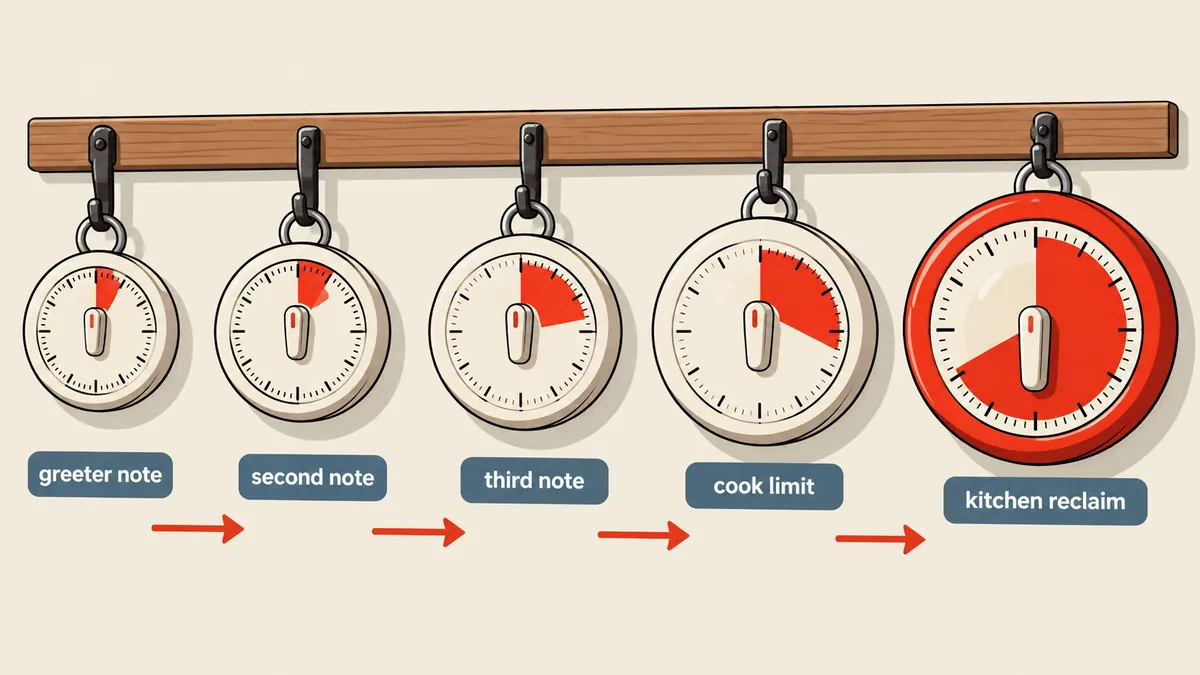
CLAUDE_TIMEOUT = 540      # รอ CLI ตอบได้นานสุดเท่านี้ เกินนี้ถือว่าล้ม
WAIT_FIRST_AT  = 40       # ถึง 40 s ยังไม่เสร็จ ส่งโน้ตรอครั้งที่ 1
WAIT_SECOND_AT = 300      # 300 s ส่งโน้ตครั้งที่ 2
WAIT_THIRD_AT  = 420      # 420 s ส่งโน้ตครั้งที่ 3
WAIT_QUIET     = 15       # ช่วงเงียบก่อนส่งโน้ต

# ฝั่งเซิร์ฟเวอร์ (config ของ Laravel): งานที่ถูก claim ไว้แล้วค้างเกินนี้ ถือว่าตาย
# CLAIM_STALE_SECONDS = 720
The server side is a job queue. Each customer message is one job. The bot claims a job to work on. If it stays silent for longer than claim_stale_seconds after claiming it, the server assumes that bot has died and returns the job to the queue for another bot to pick up.
Here is the trap. If the server's claim_stale is shorter than the bot's CLAUDE_TIMEOUT, the server will assume the bot has died while it is still working and return the job to the queue. Another bot picks it up and starts over. The customer gets two answers, and the model is called twice as well. So I always make the outer timeout longer than the inner one. 540 is on the inside, 720 is on the outside, with a 180 second buffer to finish closing out the job.
The default in the web chat code is 300, used when no value is set in config. If someone forgets to put 720 in config, the system silently falls back to 300, bringing back the failure described above without any warning. So I wrote an explicit check for the ordering.
# check_timeouts.py — รันตอนสตาร์ตบริการ ถ้าลำดับผิดให้ไม่ขึ้นเลย
import sys

CLAUDE_TIMEOUT = 540
WAIT_STEPS = [40, 300, 420]
CLAIM_STALE = 720            # อ่านจาก config จริง ไม่ใช่ default 300

def check():
    errs = []
    if WAIT_STEPS != sorted(WAIT_STEPS):
        errs.append('ขั้นของโน้ตรอต้องเรียงจากน้อยไปมาก')
    if WAIT_STEPS[-1] >= CLAUDE_TIMEOUT:
        errs.append('โน้ตรอสุดท้ายต้องมาก่อน CLI timeout')
    if CLAUDE_TIMEOUT >= CLAIM_STALE:
        errs.append(f'CLI timeout {CLAUDE_TIMEOUT} ต้องน้อยกว่า claim_stale {CLAIM_STALE}')
    return errs

if __name__ == '__main__':
    e = check()
    for x in e:
        print('[ERR]', x)
    print('[OK] ลำดับ timeout ถูกต้อง' if not e else '[FAIL]')
    sys.exit(1 if e else 0)
Whenever you change a timeout at one layer, check the next outer layer at the same time. If the inner timeout grows past the outer one, unfinished jobs will be picked up again. The result is duplicate answers and twice the model cost, without a single error line to show for it.
Waiting notes: let customers know someone is still there
What users actually see are waiting notes at 40, 300, and 420 seconds. If the main model has not answered by 40 seconds, the bot sends a short message saying it is still searching. At 300 it sends another, and at 420 a third, before the CLI times out at 540. As for WAIT_QUIET, which is set to 15 seconds, all I can say is that it is a quiet period before sending a note. I have not finished tracing its precise meaning through the code, so I will leave it at that.
The front-desk model's role is to write the greeting and ask for a name and contact details once. "Once" matters, because customers will get annoyed if it asks again in every note. The front-desk prompt lives in a file separate from the code, so I can change the wording without touching the bot.
An example of a fictional conversation.
ลูกค้า: สวัสดีครับ อยากสอบถามเรื่องรายละเอียดของบริการหนึ่งหน่อย
หน้าบ้าน (0 s): สวัสดีครับ รับเรื่องแล้วนะครับ ขอชื่อกับช่องทางติดต่อไว้ก่อน เผื่อหลุดจะได้ติดต่อกลับครับ
ลูกค้า: คุณสมชาย 081-000-0000
หน้าบ้าน (40 s): ยังค้นข้อมูลให้อยู่นะครับ รอสักครู่
หลัก (ไม่กี่นาทีถัดมา): [คำตอบเต็มพร้อมรายละเอียด]
All the messages above are made up. The name and phone number do not belong to anyone real.
Human handoff and the deadlock I encountered
This chat supports handing the conversation to a human operator (handoff), which is another path that writes to the database alongside the web chat as it writes messages. I encountered a deadlock between these two paths: they competed for locks until the database had to kill one side. The fix I used was to wrap the handoff transaction in DB::transaction with a retry count. When the database kills one side, the transaction starts again automatically without passing the error on to the customer.
// BotController — ธุรกรรมที่ลองใหม่ได้เมื่อชน deadlock
// พารามิเตอร์ตัวที่สองคือจำนวนครั้งที่ยอมลองใหม่
DB::transaction(function () use ($chat, $note) {
    $chat->handoffs()->create(['note' => $note]);
    $chat->update(['status' => 'handoff']);
}, 3);
I used three in this example to show the syntax: the command accepts the retry count as its second parameter. I have not presented the actual value in my code as a fixed number here.
Test without calling a real model
A system with a timeout chain needs to be testable without waiting five minutes each time or paying for model calls. I built fake_claude.py to behave like the CLI: it accepts stream-json from stdin and replies according to a script. I also have scripted_conversations.py containing prewritten conversations, along with three separate test files covering the front desk, sessions, and the chat itself, respectively.
# fake_claude.py — ตัวแทน CLI สำหรับทดสอบ ไม่เรียกโมเดลจริง (แบบย่อ)
import json, sys, time

DELAY = float(sys.argv[1]) if len(sys.argv) > 1 else 0.0   # จำลองคำตอบที่ช้า

for line in sys.stdin:
    msg = json.loads(line)
    time.sleep(DELAY)
    out = {'type': 'result', 'result': 'ตอบจำลอง: ' + str(msg['message']['content'])[:20]}
    print(json.dumps(out, ensure_ascii=False), flush=True)
Simulating slow responses with DELAY lets me shorten the time needed to test the condition "if an answer takes longer than 40 seconds, send a waiting note." It also lets me test that slow jobs are not picked up twice, without actually waiting.
One set of figures I left out of this article was the difference in startup time between a new process and a persistent one. I had written down one second versus five to eight seconds in my notes, but I have not measured it again and have no records to confirm it, so I will not present it as fact.
Lessons
- Separate "acknowledge quickly" from "think longer" using two models with different permissions. The front-desk model must have no tools.
- Timeouts form a chain and must be ordered from the inside out: 540 on the inside, 720 on the outside. Add an ordering check that prevents the system from starting if it is wrong.
- Persistent sessions are faster than spawning new processes, but need limits on both count and idle time.
- The chat service must be separate from other bots that need frequent restarts, so visitors do not get disconnected.
Personally, I consider the second point the most important, because bugs caused by incorrect timeout ordering produce no visible errors, only duplicate answers that customers encounter before I do. Whether you choose 540 and 720 or other values depends on your system. Just make sure the outer timeout is longer than the inner one. I have already covered how to separate the machine owner's personal context from a customer-facing bot in A Customer Bot Using Claude CLI Must Not See the Machine Owner's Personal Rules, and atomic job claiming is covered in outward-job-atomic-claim-idempotency. If I have missed an explanation or made a typo, I will come back and fix it later.
Want us to set this up?
Get help with server setup, configuration, migration, or troubleshooting. Save time for the work that matters.
Hit something like this? Stuck somewhere?
Come trade notes on the LinuxThai board


Comments 0
No comments yet — be the first