CSF Auto-Unblock for Ghost Devices Amid Botnet Brute Force
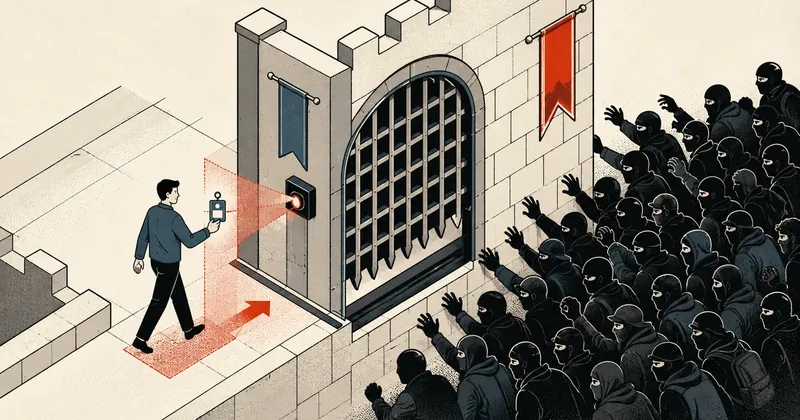
My customer complained every morning that email was unavailable. When I traced the problem, I found a single ghost device in the office. But unblocking it without accidentally unblocking a botnet brute-forcing the same password took careful thought.
In part 5 of the migration series, I briefly covered CSF BFM auto-unblock. After I posted it, several people sent me DMs asking for more detail, so I decided to give it its own post and explain the real customer case that led to this set of workarounds.
This is not theory. I encountered it on a server I maintain and applied the same fix for several customers with the same symptoms.
The Original Problem: A Ghost Device Takes Down Email for the Entire Office
One corporate customer, whom I will call acme-co, uses several mail accounts on the @acme-co.example.com domain. Almost every morning, BFM would block the office IP, leaving the entire office unable to use email. Complaints from the office came in every morning like an alarm clock.
It took me quite a while troubleshooting to understand that there were actually two sources. They looked very similar in the logs but were entirely different problems.
Ghost device in the office
- An office device running Outlook or an iPhone still has an old password cached
- The password was changed, but someone forgot to update it on one device
- That device retries SMTP/IMAP with the wrong password all day
- LFD/DA BFM sees numerous auth failures and blocks the office public IP
- Everyone in the office loses email access, even though they did nothing wrong
Credential stuffing from a botnet
- The old password has probably leaked
- Bots are now distributed worldwide (CN/IN/VN/KR/BR/US)
- They repeatedly brute-force the same set of passwords
- These are real attackers and must never be unblocked
What makes this difficult is that both sides fail authentication for accounts on the same domain, using the same set of passwords. Auth failure counts alone cannot distinguish them.
My goal was therefore clear: auto-unblock the office IP (side a), but keep the attackers (side b) blocked, so the customer would no longer experience morning downtime.
These cases are almost identical at every business with a ghost device left in the office. I decided to build a 4-layer protection system using the same decision logic: it must pass 3 conditions before being unblocked, but each layer has a different trigger to catch every path through which a block can occur.
Architecture: An Overview of the 4 Layers
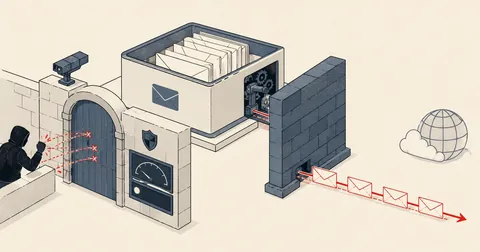
Before getting into each layer, I want to lay out the event flow to show how a block travels through the system and where each layer handles it.
In words, an event can arrive through two paths. The first is when LFD issues the block itself (from LF_SMTPAUTH or DISTATTACK). In this path, LFD writes to csf.tempban and fires BLOCK_REPORT, which Layer 1 listens for.
The second is when DA BFM calls csf -d directly, writing to csf.deny without going through LFD, so no hook fires. For this path, I use a systemd path watcher (Layer 3) to monitor the file. When the file changes, it immediately calls the sweep script (Layer 2) to make a decision, with cron (Layer 4) as a safety net during morning office startup.
The core decision in Layer 2 is that only an IP passing all 3 filters gets csf -dr to remove the permanent ban, csf -tr to remove the temporary ban, and then csf -ta 86400 to whitelist it for 24 hours. If it fails, the script simply logs it and moves on, leaving the block in place.
Layer 1: BLOCK_REPORT Hook Catches Blocks Issued by LFD
By default, DA has no BLOCK_REPORT script configured. This means every block remains for its full ban duration, with no conditions that would lift it. If the office gets blocked, everyone has to wait for the ban to expire.
I wrote a script at /usr/local/sbin/csf-cond-unblock.sh and configured CSF to call it through /etc/csf/csf.conf.
BLOCK_REPORT = "/usr/local/sbin/csf-cond-unblock.sh"
When CSF calls this script, it passes arguments in this order.
$1=IP $2=ports $3=perm $4=inout $5=ttl_seconds $6=reason_text $7=app
I start filtering with $6, the block reason, because it tells me which service the block came from.
#!/bin/bash
set -e
IP="$1"; REASON="$6"
[ -z "$IP" ] && exit 0

# Mail-only scope รับเฉพาะ block ที่เกี่ยวกับเมลเท่านั้น
echo "$REASON" | grep -qiE 'smtpauth|distattack|pop3d|imapd' || exit 0

# ดึง exim mainlog 50 บรรทัดล่าสุดของ IP นี้ ทุก set_id ต้องเป็นโดเมนลูกค้า
USERS=$(grep -F "$IP" /var/log/exim/mainlog /var/log/exim/mainlog.1 2>/dev/null \
    | grep 'authenticator failed' | tail -50 \
    | grep -oE "set_id=[^)[:space:]]+" | sort -u)
[ -z "$USERS" ] && exit 0

# ถ้ามี user นอกโดเมนลูกค้าปนใน fail แสดงว่าเป็น attacker จริง ปล่อย block ไว้
if echo "$USERS" | grep -qvE '^set_id=[^@][email protected]$'; then
    exit 0
fi

# ผ่านหมด ปลด block แล้ว whitelist 24 ชั่วโมง
/usr/sbin/csf -dr "$IP" >/dev/null 2>&1 || true
/usr/sbin/csf -tr "$IP" >/dev/null 2>&1 || true
/usr/sbin/csf -ta "$IP" 86400 "trusted office device" >/dev/null 2>&1 || true
logger -t csf-cond-unblock "unblocked $IP — only @acme-co.example.com fails recent"
The logic of this script is straightforward. I do not simply trust that an IP looks like the office. I actually read the latest 50 lines for that IP in the exim mainlog and collect every set_id with an auth failure. If 100 percent of the failing users belong to the customer's domain, I treat it as their own ghost device and allow it to be unblocked. But if even one unfamiliar user outside the customer's domain appears, I treat it as an attacker guessing arbitrary passwords and immediately leave the block in place.
This hook fires only for blocks issued by LFD. When DA BFM calls csf -d directly (for example, reports such as dovecot1=6 and exim1=116), it bypasses LFD entirely, so this hook does not run. This is why Layers 2-3-4 are also needed.
Layer 2: Sweep Script Catches Blocks Issued Directly by DA BFM
The principle here is to scan csf.deny and csf -t periodically instead of waiting for a hook, using the same decision logic as the BLOCK_REPORT hook and adding another layer of geo filtering: the IP must be in Thailand, while also accounting for cases where an attacker actually connects from Thailand.
The script is at /usr/local/sbin/csf-sweep.sh. I ordered the checks as follows.
-
Lock-file debounce Use
/var/run/csf-sweep.lastand skip if the script ran within roughly the last 5 seconds. This prevents a hot loop during a credscan flood, when CSF adds new blocks very frequently and would trigger sweeps just as frequently. -
Collect candidates Scan both
csf -t DENYandcsf.deny, selecting only entries matchingBFM:.*(dovecot|exim). This keeps the scope limited to mail, without touching web/SSH/FTP brute force. -
Skip whitelisted If the IP is already in
csf.allow(permanent) orcsf -t ALLOW(temporary), there is no need to repeat the work. -
User filter Grep the exim mainlog for the latest 50 failures from that IP. Every
set_idmust be@acme-co.example.com, just as in Layer 1. -
Geo filter
geoiplookup $IPmust return TH as the country. The real office connects through Thai PPPoE, while botnet brute force originating from CN/IN/VN/KR/BR/US cannot be the office. -
Unblock + whitelist If all checks pass, run
csf -dr, thencsf -tr, thencsf -ta 86400.
If the geoiplookup binary cannot be found, abort everything without unblocking any IP. This is fail-closed: if I cannot check the IP's country, I would rather leave it blocked than accidentally let an attacker through. Better safe than sorry.
Layer 3: systemd Path Watcher Unblocks Almost Immediately
Is Layer 2 alone enough? In terms of logic, yes. But if I simply schedule it with cron every 15 minutes, the customer could wait up to 15 minutes for the script to come around and unblock them. Email would be unavailable throughout that time, which is unacceptable during the morning rush.
I therefore use a systemd path unit to watch csf.deny and csf.tempban. Whenever either file changes, it immediately starts the service, bringing the actual block window below 5 seconds.
File: /etc/systemd/system/csf-sweep.path
[Unit]
Description=Watch CSF ban files for ghost-device sweep trigger

[Path]
PathModified=/etc/csf/csf.deny
PathModified=/var/lib/csf/csf.tempban
Unit=csf-sweep.service

[Install]
WantedBy=multi-user.target
File: /etc/systemd/system/csf-sweep.service
[Unit]
Description=ghost-device auto-unblock sweep
After=lfd.service csf.service
StartLimitIntervalSec=30
StartLimitBurst=10

[Service]
Type=oneshot
ExecStart=/usr/local/sbin/csf-sweep.sh
Nice=10
I set StartLimit to 10 starts in 30 seconds as another layer of protection against hot loops. If CSF adds too many credscan blocks within 30 seconds, systemd will refuse to start the service. This provides defense-in-depth alongside the debounce in Layer 2.
Because the sweep itself runs csf -ta, which changes the tempallow file. If I watched that file too, the sweep would keep triggering itself endlessly, creating an infinite loop. I therefore leave it out and watch only the block files.
Layer 4: Cron Safety Net During Morning Startup
Although the systemd path watcher is fast, it can still miss events, for example while the service is restarting, when the inotify queue is full, or when debounce happens to suppress a run. I therefore schedule cron to run again during the morning when office devices are starting up.
30,45 7 * * * root /usr/local/sbin/csf-sweep.sh
0,15,30 8 * * * root /usr/local/sbin/csf-sweep.sh
That makes 5 runs in one hour: 07:30, 07:45, 08:00, 08:15, and 08:30, matching the period when people gradually turn on their devices. If the path watcher misses an event, cron will catch it within 15 minutes, which is acceptable as a fallback.
Behaviour Matrix: Which Cases Get Unblocked
This table shows how the whole system makes its decision in each situation.
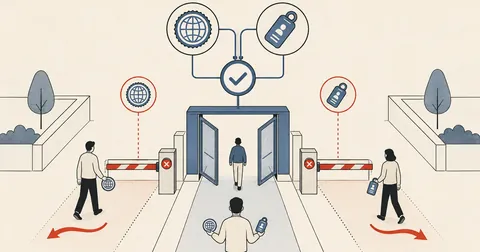
| IP origin | Pattern of failing users | Result |
|---|---|---|
| TH (TOT/AIS/True/3BB) | 100% @acme-co.example.com |
unblock + whitelist 24h |
| TH | Other users mixed into failures | keep block (real attacker from Thailand) |
| Non-TH (CN/IN/VN/KR/BR/US) | 100% @acme-co.example.com |
keep block (credential stuffing) |
| Non-TH | Other users mixed in | keep block (general attacker) |
| No exim failure log for this IP | Any case | keep block (possibly web/SSH brute force outside scope) |
The point I want to highlight is that even if 100 percent of the failing accounts belong to the customer's domain, an IP outside Thailand still does not get unblocked. That case is a botnet that has obtained the passwords and is stuffing them into login attempts, definitely not a ghost device in the office.
All Files in This System
NEW       /usr/local/sbin/csf-cond-unblock.sh           (BLOCK_REPORT hook — Layer 1)
NEW       /usr/local/sbin/csf-sweep.sh                  (sweep + TH filter + debounce — Layer 2)
NEW       /etc/systemd/system/csf-sweep.path            (Layer 3 trigger)
NEW       /etc/systemd/system/csf-sweep.service         (Layer 3 runtime)
NEW       /etc/cron.d/csf-sweep                         (Layer 4 safety net)
MODIFIED  /etc/csf/csf.conf                             (BLOCK_REPORT setting)
NEW       /var/log/csf-sweep.log                        (audit log per-event)
runtime   /var/run/csf-sweep.last                       (debounce lock file)
I keep a separate audit log at /var/log/csf-sweep.log because I want every decision to unblock or leave a block in place to leave a trace I can review. When something goes wrong, I can see what information drove the decision, rather than having a system that operates silently and leaves me guessing what it did.
Limitations to Know Before Using This
This is a workaround designed to address an immediate problem, not a permanent fix. Some areas are deliberately left out of scope.
-
Does not cover web/SSH/FTP brute force The sweep scope is mail-only, matching the original problem. If a customer is hit by brute force through Roundcube webmail, this system will not auto-unblock them.
-
The TH filter may affect VPN users or travelers If staff use a foreign VPN and happen to encounter matching ghost device failures, the system will not unblock them. I accept this condition; if it happens, they can ask an admin to unblock them manually.
-
The long-term fix is up to the customer The real fix is for the customer to change the compromised account's password and clear cached credentials on every device in the office. Once that is done, this workaround can be retired immediately. This is the most important part, but my customer is slow to respond, so I have to keep the workaround running until they take action.
Closing Thoughts
If you maintain a DA shared host and have a customer with a similar case—a ghost device in the office mixed with external brute force, both failing against the same accounts—you can try this pattern. The logic is the same throughout; just replace @acme-co.example.com with your customer's domain and adjust the geo filter to match the country where the actual office connects to the internet.
Use all 4 layers or start with just Layer 1 and Layer 2, whichever suits you. The principle is the same: do not trust an IP simply because it looks like the office. Read the actual logs and verify multiple conditions every time before unblocking it.
Want us to set this up?
Get help with server setup, configuration, migration, or troubleshooting. Save time for the work that matters.
Hit something like this? Stuck somewhere?
Come trade notes on the LinuxThai board

Comments 0
No comments yet — be the first