Let Clients Pick Photos on a Web Page Without a Login

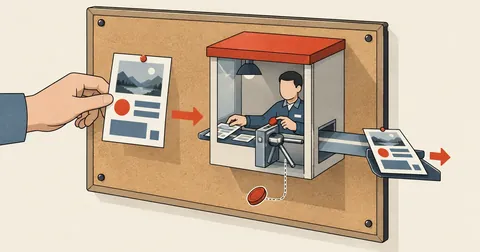
A public form without authentication does not mean letting anyone write whatever they want. It means moving all validation to the server endpoint instead.
I was building a new website for a property with more than two hundred existing photos, and I needed the owner to choose which photos went on which pages, because they knew better than I did which photos showed rooms still available to book and which showed areas that had since been renovated.
My old approach was to send a folder link and ask the client to reply with the photo numbers they wanted. The result was a long message that left me unsure which numbers belonged to which pages, followed by two or three rounds of questions. This time, I built a web page where they could make the selections themselves.
The first question was whether to add a login system, and my answer was no.
I have replaced the property name, actual filenames, website address, and all paths in this article with examples. The code structure, limits, and reasons behind each choice are from the actual job.
A Proper Login System That Keeps the Work from Getting Done
By the book, but stuck at the first page
- Needs user storage, passwords, and password recovery
- The client has to remember a password, or forget it and message me every time
- The work takes just three days, but leaves things to maintain indefinitely
- If I leak passwords, I am responsible for data I never needed to hold
Easy to access, but the endpoint needs controls
- Send one link, open it on a phone, and start tapping
- No account data to leak because there are no accounts
- Anyone with the link can overwrite the data; that has to be accepted
- All validation moves to the server endpoint
I weighed this against the value of the data. This page stores a list of selected photo IDs, with no personal data or money involved, and the worst possible damage is a wiped selection list, which can be restored from a backup. Compared with the burden of making a client in their sixties register an account, I chose to leave it out.
Ask three questions before deciding to leave out authentication. First, does the stored data contain anyone's personal information? Second, if a stranger overwrites everything, how much damage would it cause, and could it be restored? Third, does the readable data contain anything outsiders should not see? If the answers are no, recoverable, and no, this approach works. If any one fails, authentication is required. There is no shortcut.
A Hard-to-Guess Path Is Not Security, but It Is Not Worthless
I put this page under a hard-to-guess path: a folder with a long random name and no links pointing to it from anywhere.
I want to be clear that hiding a path is not security. Anyone who gets the link can access it indefinitely, and links can leak in many ways, through browser history, forwarding in chat, or browser extensions the client has installed. What it actually helps with is reducing the chance that an automated crawler will stumble across it. That is all.
The second layer is preventing indexing, which needs to be done both on the page and in the server response headers.
<!DOCTYPE html>
<html lang="th">
<head>
<meta charset="UTF-8">
<meta name="viewport" content="width=device-width, initial-scale=1.0, viewport-fit=cover">
<meta name="robots" content="noindex, nofollow">
<title>เลือกรูปสำหรับเว็บไซต์</title>
<?php
// save.php — ปลายทางเดียวของทั้งหน้า
header('Content-Type: application/json; charset=utf-8');
header('X-Content-Type-Options: nosniff');
header('X-Robots-Tag: noindex, nofollow');   // ตัวคำตอบเองก็ต้องบอกไม่ให้เก็บดัชนี
I included the header that tells the browser not to guess the file type because this endpoint returns text supplied by users. If the browser guesses that it is HTML and renders it, that immediately creates an opening for script injection.
One Endpoint, Validated with an Allowlist, Not a Blocklist
My rule is that every incoming value must pass a filter that defines what is allowed, rather than one that defines what is forbidden, because a list of forbidden things can never be complete, while a list of allowed things can always be complete.
<?php
$F = __DIR__ . '/selections.json';

if (($_SERVER['REQUEST_METHOD'] ?? '') === 'GET') {
    // ขาอ่าน: คืนรายการที่บันทึกไว้ ไม่มีก็คืนโครงว่าง
    if (isset($_GET['get'])) {
        if (is_file($F)) { readfile($F); } else { echo '{"sel":{}}'; }
    } else {
        echo '{"ok":true}';
    }
    exit;
}
if (($_SERVER['REQUEST_METHOD'] ?? '') !== 'POST') {
    http_response_code(405);
    echo '{"ok":false,"error":"method"}';
    exit;
}

$raw = file_get_contents('php://input');
// เพดานแรกสุด ก่อนแตะข้อมูลใดๆ — 200 KB พอสำหรับรายการเลือกทั้งเว็บหลายเท่า
if ($raw === false || strlen($raw) > 200000) { echo '{"ok":false,"error":"too-large"}'; exit; }

$d = json_decode($raw, true);
if (!is_array($d)) { echo '{"ok":false,"error":"bad-json"}'; exit; }
The core is the filtering loop below. I do not modify a single submitted value; I build a new dataset using only values that meet the criteria. Anything that fails silently disappears, with no need to report it back.
<?php
// สร้างของใหม่จากค่าที่ผ่านเกณฑ์ ไม่ใช่แก้ของที่ส่งเข้ามา
$clean = [];
foreach ($d as $k => $v) {
    if (!is_string($k) || !is_array($v)) continue;

    $k = preg_replace('/[^a-z0-9\-]/', '', $k);     // ชื่อหมวดเหลือแค่ตัวพิมพ์เล็ก เลข ขีด
    if ($k === '' || strlen($k) > 40) continue;     // ชื่อยาวเกินคือไม่ใช่ของเรา

    $ids = [];
    foreach ($v as $id) {
        // รหัสรูปต้องตรงแบบเป๊ะ: g ตามด้วยกลุ่ม 1-3 ขีดล่าง แล้วเลขสองหลัก
        if (is_string($id) && preg_match('/^g[123]_[0-9]{2}$/', $id)
            && !in_array($id, $ids, true)) {
            $ids[] = $id;
        }
        if (count($ids) > 60) break;                // หนึ่งหมวดเลือกได้ไม่เกิน 60 รูป
    }
    $clean[$k] = $ids;
    if (count($clean) > 40) break;                  // ทั้งเว็บมี 9 หมวด เผื่อไว้ 40 พอ
}
The format I enforce is a single letter, followed by a group number, an underscore, and two digits. No dots, no slashes, no other characters at all. This means a value that passes this check cannot form a directory traversal path, whatever it is joined to. This is why I use a regular expression anchored at both ends, instead of just stripping unwanted characters: stripping still leaves possibilities I have not thought of, while enforcing a format for the entire string leaves none.
I did not set these limits from theory; I took the actual requirements and multiplied them by four to five. This job has nine categories, and the largest category has fourteen photos. Limits of sixty and forty are therefore high enough that users will never hit them, but low enough that someone sending arbitrary requests can write only a few kilobytes of junk to the file.
Back Up Before Every Write, and Lock the File While Writing
This page saves automatically on every tap, which means the file gets overwritten very frequently. If someone accidentally presses the clear-all button and I have no previous copy, three days of work disappear in a single click.
<?php
$out = json_encode(['saved' => date('c'), 'sel' => $clean],
                   JSON_UNESCAPED_UNICODE | JSON_PRETTY_PRINT);

if (is_file($F)) @copy($F, $F . '.bak');        // สำรองของเดิมก่อนทุกครั้ง
$ok = @file_put_contents($F, $out, LOCK_EX);    // ล็อกกันสองคำขอเขียนทับกัน

echo $ok !== false ? '{"ok":true}' : '{"ok":false,"error":"write"}';
Locking the file during writes is not overkill, because this page saves automatically and the client can open it on two devices at once, both a phone and a computer. If two requests arrive at the same time without a lock, the result is a file with half of each dataset mixed together, which cannot be read back at all.
I considered keeping every version with a timestamp, but looking at actual usage, it was not worth it, because the only reason to restore anything is an accidental clear, which the user notices within seconds. A single backup of the previous version is enough, and there is no endlessly growing folder to clean up. For work involving several people editing over several days, I would add multiple versions then.
After finishing the code, I tested it by sending junk myself before giving the link to the client.
# ยิงข้อมูลมั่ว ต้องได้ ok แต่ไฟล์ผลลัพธ์ต้องไม่มีขยะนั้นอยู่เลย
curl -s -X POST -d '{"../../etc":["../../etc/passwd"],"x":[1,2,3]}' \
  https://example.com/p/abc123/save.php

# ยิงก้อนใหญ่เกินเพดาน ต้องได้ too-large
head -c 300000 /dev/urandom | base64 | curl -s -X POST --data-binary @- \
  https://example.com/p/abc123/save.php

# อ่านกลับมาดูว่าเหลืออะไรในไฟล์บ้าง
curl -s 'https://example.com/p/abc123/save.php?get=1'
The expected result from the first command is a success response, but when reading the file back, neither that key nor that value should be present. I stand by returning success rather than an error, because explaining what is wrong and where teaches the person probing it what to change next.
{
  "saved": "2026-11-14T10:22:41+07:00",
  "sel": {
    "home": ["g1_03", "g1_07", "g1_12"],
    "rooms-fan": ["g2_01", "g2_04"],
    "rooms-air": ["g3_02", "g3_05", "g3_09"]
  }
}
Designing the Frontend for Someone Who Is Not Comfortable with Computers
This took me several times longer than the server side, because the user was a property owner who only used a phone and had never used a website that involved selecting things this way.
- The page selection buttons are large boxes arranged in three columns on mobile, at least 64 pixels tall, making mis-taps unlikely, with a red number in the top-right corner showing how many photos have been selected for that page.
- There is no horizontal scrolling anywhere, because someone unfamiliar with it will not know there is more hidden to the right. Everything wraps to a new line instead.
- Unselected photos appear slightly faded. Selected photos get a gold border and a sequence number, making the difference clear without reading any text.
- Every tap saves automatically, followed by a message in the bottom bar showing when it was saved. There is no save button to forget to press.
- A button at the top of the screen opens a short tutorial video in which I recorded myself tapping slowly, one step at a time, with no narration.
The last point worked better than I expected. The client watched it once and could use the page immediately, without a single phone call to ask me anything. The video is less than a minute long, recorded with an ordinary screen recording tool, then compressed before being placed alongside the web page.
# บีบคลิปสอนให้เล็กพอสำหรับเน็ตมือถือ และตัดเสียงทิ้ง
ffmpeg -i raw_help.mp4 -an -vf "scale=720:-2" -c:v libx264 -crf 30 -preset slow help.mp4

# ย่อรูปเป็นภาพตัวอย่างสำหรับหน้าเลือก ด้านกว้าง 400 จุดภาพพอ
for f in photos/*.jpg; do
  convert "$f" -resize 400x400^ -gravity center -extent 400x300 -quality 78 "thumb/$(basename "$f")"
done
Debounced Autosave and Status Messages in Plain Language
Autosave needs a delay first; otherwise, someone tapping ten photos in quick succession sends ten overlapping requests, which is wasteful and also risks requests arriving out of order, leaving the result different from what the screen shows.
let saveTimer = null;
let dirty = false;

function toggle(id, section) {
  const set = selections[section] || (selections[section] = []);
  const i = set.indexOf(id);
  if (i >= 0) set.splice(i, 1); else set.push(id);
  render();
  dirty = true;
  clearTimeout(saveTimer);
  saveTimer = setTimeout(save, 800);   // รอให้หยุดกด 0.8 วิ ค่อยส่งครั้งเดียว
}

function save() {
  fetch('save.php', {
    method: 'POST',
    headers: { 'Content-Type': 'application/json' },
    body: JSON.stringify(selections)
  })
  .then(r => r.json())
  .then(d => { dirty = !d.ok; status(d.ok ? 'บันทึกแล้ว ' + nowText() : 'บันทึกไม่สำเร็จ'); })
  .catch(() => status('เน็ตหลุด ระบบจะลองใหม่เมื่อกดครั้งต่อไป'));
}

// กันปิดแท็บตอนที่ยังบันทึกไม่เสร็จ
window.addEventListener('beforeunload', e => { if (dirty) e.preventDefault(); });
I wrote all the status messages in the bottom bar in plain language, with no error codes and no mention of a server, because the reader does not want to know what broke. They just want to know whether the taps they just made have been saved.
Conclusion
The whole system is one HTML file, one forty-line PHP file, and one JSON file on ordinary shared hosting, with no database or membership system, and once the job is done, I can delete the entire folder without leaving anything to maintain.
I took away two things. First, leaving out authentication must be a decision, not an oversight. Answer the three questions about personal data, damage, and recovery first. If I cannot answer all of them, a login is required. Second, when there is no check at the door, every check must be at the endpoint, and it must use an allowlist that enforces the format of the entire string, rather than stripping unwanted characters.
Anyone who wants to put a single simple password in front of the first page is welcome to do so. It does not add much security beyond a hard-to-guess path, but if the client accepts it and it makes them feel more comfortable, there is no harm.
P.S. What I would like to add but have not implemented yet is a field for entering a caption under each selected photo. Captions are still being sent through chat, which brings back the original problem of not knowing which text goes with which photo. Adding this field would require another layer of filtering for free-form text, which is considerably harder than filtering photo IDs. I will come back and add it later.
Want us to set this up?
Get help with server setup, configuration, migration, or troubleshooting. Save time for the work that matters.
Hit something like this? Stuck somewhere?
Come trade notes on the LinuxThai board


Comments 0
No comments yet — be the first