Moving DA from CentOS 7 to Debian 12, Part 4 — Cutover and 17 Issues
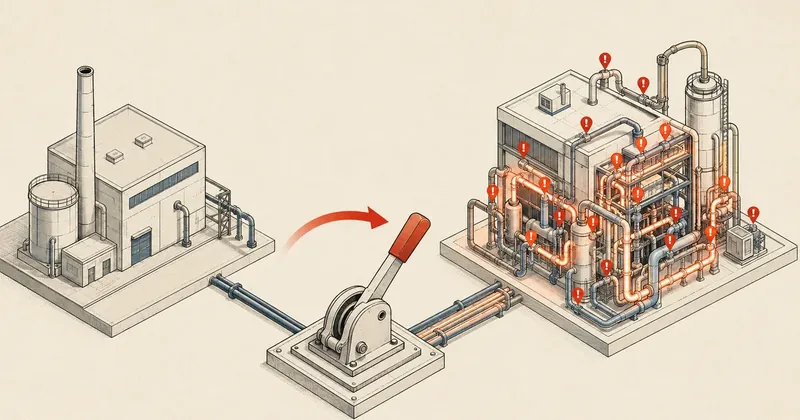
This is where the new machine actually has to take over from the old one. I intended customers to barely notice, but production had obstacles that never appeared in the lab, and once the switch was done, another 17 issues were waiting in line.
In parts 1 through 3 of this series, I covered preparing the VM and NAT pre-stage, taking apart RAID to build a ZFS mirror, and installing DA and CustomBuild. If you have not read those yet, I recommend going through them in order first, because this part builds on the current state of both machines.
At this point, the machines' status was briefly as follows.
- The old VM (CentOS 7) was still serving customers on the external bridge, using the actual public IP. Customers were using it normally.
- The new VM (Debian 12) was ready on the internal bridge, using private IP
192.168.1.20. - DA and CustomBuild were fully installed, and all smoke tests had passed.
Now it was time for the actual cutover: switching the new machine in to replace the old one. I originally intended to keep downtime close to 0 with the NAT pre-stage trick planned in part 1, but in production I hit 2 obstacles that broke that plan before it even started.
Obstacle 1 — The DA Legacy license is "last DA wins"
The DA Legacy license has a restriction that did not show up during lab testing: it does not allow 2 DirectAdmin instances to run simultaneously under the same license. Whichever instance activates last immediately invalidates the previous instance's license.
My NAT pre-stage plan assumed I could start the new DA alongside the old one and gradually move customers over seamlessly. That restriction broke the plan immediately, because I could not start the new DA while the old machine was still serving customers. I had to stop the old DA first, then start the new one, which meant there would definitely be downtime, not 0.
If you use a DA Legacy license, do not plan a cutover around "running 2 DA instances in parallel," because the license only lets the most recently activated instance survive. The old instance silently loses its license, and customers still connected to the old machine will find DA going down mid-session.
Obstacle 2 — qcow2 reads were very slow
The old machine's storage layer was qcow2 on top of mdadm RAID1, a stack of 3 layers. When DA Admin Backup had to read files for more than 80 users to create tarballs, it took hours. The cause was random IO amplification on qcow2: one IO operation at the guest level becomes several at the host level, making scattered reads of large numbers of small files very slow.
On the first run, I was still using the system's default /bin/gzip, which is single-threaded. On a machine with 16 vCPU, that wasted resources, leaving the other 15 cores idle. On the second run, I replaced /bin/gzip with a pigz wrapper (covered in detail in issue 12), which made it 4 to 6 times faster. Even then, because the main bottleneck was random IO on qcow2 rather than the CPU, it still took hours.
Actual customer downtime: 1 hour
With those 2 obstacles combined, the near-0 downtime plan was over, turning into about 1 hour of actual downtime. Here is a rough breakdown of where the time went.
- Stop the old DA and services (this is where customer downtime starts counting) — 5 minutes
- Run DA Admin Backup on the old machine (slow qcow2 IO, plus no pigz on the first run) — several hours
- Transfer the backup tarball to the FTP destination — 1 minute
- Swap the new VM's IP and MAC to match the old machine, then remove the NAT rules — 5 minutes
- Shut down the old VM, then start the new VM — 2 minutes (ARP refresh takes just 1 second)
- Fix up the DA config by rewriting NAT IP
192.168.1.20back to the actual IP — 5 minutes - Start the new DA and claim the license — 30 seconds
- Run the Admin Restore wizard from the stored backup — 1.5 hours
- Copy custom data and apply 29 DA settings — 15 minutes
- Start httpd, exim, dovecot, rspamd — 1 minute
- Smoke test 10 randomly selected sites — 10 minutes
Overall, customers could actually start using the services again after about 1 hour. I want to make the distinction clear here: the period when customers "could not access anything at all" was the actual downtime. Some of the Admin Restore wizard's 1.5 hours ran after the IP was up, and the main websites came back sooner than that. The slow part of the restore was individual users' data gradually coming back.
Cutover commands (rewrite the NAT IP back to the public IP)
During the switch, I had to change every place where DA had recorded the private IP to the actual public IP. The important point is that DA does not store the IP in just one place. It is spread across multiple files: the main config, the ip directory, list files, and various templates. I had to cover every location, or some parts would still bind to the private IP.
# rewrite IP ใน config หลักของ DA
sed -i 's|^ip=192.168.1.20|ip=203.0.113.42|; s|^serverip=192.168.1.20|serverip=203.0.113.42|' \
    /usr/local/directadmin/conf/directadmin.conf

# rename directory ของ ip (DA ตั้งชื่อ dir ตาม IP)
mv /usr/local/directadmin/data/admin/ips/192.168.1.20 \
   /usr/local/directadmin/data/admin/ips/203.0.113.42

# แก้ ip.list
sed -i 's|^192.168.1.20|203.0.113.42|' /usr/local/directadmin/data/admin/ip.list

# ไล่แก้ทุก template ที่มี private IP ฝังอยู่
grep -rln '192.168.1.20' /usr/local/directadmin/data/templates/ | \
    xargs -I{} sed -i 's|192.168.1.20|203.0.113.42|g' {}

# ถึงค่อย start DA — license จะ claim ตอนนี้
systemctl start directadmin
The order matters: finish all the rewrites first, then run systemctl start directadmin. If DA starts before the changes, it regenerates configs that still bind to the private IP, preventing Apache from starting.
The key trick that worked in production — IP and MAC reuse
The part of the plan that worked best was giving the new VM the old machine's public IP and MAC address. With the MAC matching, the upstream router only needed a second to refresh its ARP cache, and packets flowed again immediately.
A side benefit was that customers did not have to do anything: no DNS changes, no FileZilla config changes, no Outlook changes at all. Everything pointed to the same IP, mail server, and FTP server. Customers did not even know the machine had changed. This was the part that actually matched the planned "30-second swap," but the problem was that it happened after the backup had already taken hours, so it did not reduce downtime as I had hoped.
It moves the machine's entire "network identity" to the new VM. Every customer whose config points to the existing IP/host can leave everything as it is — greatly reducing support tickets after the migration.
Why not use DA's ipswap.sh
It would work, but it was unnecessary in this case. ipswap.sh rewrites every user's domain.conf, adding rollback complexity: if something goes wrong, there is a lot to undo. For me, reusing the IP and MAC at the network level was much simpler and touched fewer files. Rollback just meant moving the IP/MAC back, without touching user configs.
Why not pre-add the IP as metadata-only
I tried that: adding the public IP to DA as metadata only, without actually bringing the IP up on the NIC. Apache failed immediately.
AH00072: make_sock: could not bind to address 203.0.113.42:80
The reason is that DA generates config with <VirtualHost 203.0.113.42:80> and Listen 203.0.113.42:80, specifying the IP explicitly rather than using a wildcard. That IP therefore has to actually exist on the NIC when Apache starts; having it in DA's metadata is not enough. If the IP is not bound to a real interface, Apache cannot bind and will not start. This is why IP+MAC reuse had to happen after the backup, not before.
Lessons learned — What I would do differently
This cutover taught me 3 main things that I would do differently on the next migration.
- Move storage to ZFS before cutover. ZFS has native snapshots and
zfs send/zfs receive, which can send the old VM's state to the new machine in minutes. Compared with a DA backup that takes hours, it is a world apart. I have not actually tried this yet and intend to test it on the next migration. - Use a pigz wrapper from the start. Replacing the default single-threaded
/bin/gzipcuts backup time by 4 to 6 times. I learned this midway through the job, but should have set it up from the beginning. - Upgrade the DA license to Modern (subscription). It has no "last DA wins" restriction and allows 2 DA instances to run simultaneously, which would let the NAT pre-stage trick work to its full potential. If the budget allows, this is worthwhile, because it is what can actually bring downtime close to 0.
17 issues after cutover
After the main downtime ended and customers could start using the services again, I thought things should be smooth. Instead, 17 issues arrived in quick succession. Some even masked others: only after fixing one would the next appear, so I had to work through them in order. I will give a brief rundown here and save the detailed security fixes for part 5.
I split them into 3 levels — critical means the entire web stack is down, medium means a subset is unusable, and minor covers debugging notes and improvements worth knowing.
critical — The entire web stack is down
1. OpenSSL SECLEVEL=2 blocks nginx and Apache. Debian 12 uses OpenSSL 3 with a default SECLEVEL=2, which rejects SHA1 and MD5 in the CA chain. Some customers' legacy certs still had SHA1 intermediates. Even one bad cert prevented the entire web stack from starting, not just that one site. I temporarily fixed it in /etc/ssl/openssl.cnf by adding CipherString = DEFAULT@SECLEVEL=0.
[openssl_init]
ssl_conf = ssl_sect

[ssl_sect]
system_default = system_default_sect

[system_default_sect]
CipherString = DEFAULT@SECLEVEL=0
Options = UnsafeLegacyServerConnect
Then I ran systemctl restart nginx httpd to get the websites back first, before gradually reissuing customers' certs through Let's Encrypt one by one. Once all certs have rotated after 60 to 90 days, I will raise it back to SECLEVEL=2. I am saving the hardening details for part 5.
Lowering SECLEVEL to 0 allows weak ciphers system-wide. Use it only to bring the websites back first. Set a reminder to reissue certs and raise it again within the 60-90 day cycle. Do not leave it this way permanently.
2. nginx duplicate listen with TAB indentation. This is a DA 1.7+ bug: during ./build rewrite_confs, it adds TAB-prefixed listen lines that duplicate existing lines (indented with spaces). nginx -t immediately reports duplicates, and the websites stay down. The permanent fix is a CustomBuild post-hook at /usr/local/directadmin/custombuild/custom/post.rewrite_confs.sh that uses sed to strip TAB-prefixed listen lines after every rebuild, avoiding manual fixes each time.
3. Subdomains use an outdated PHP version and return HTTP 500. DA stores subdomain PHP versions in URL-encoded format: for example, %31 means slot 1 and %33 means slot 3. The problem was that the slot mapping after restore did not match the old machine. For example, slot 3 on the old machine was PHP 7.4, but slot 3 on the new machine turned out to be PHP 5.6. When composer autoload contained the ?? null-coalescing operator, it worked on 7.4 but could not be parsed by 5.6, immediately returning 500. The fix is through the DA panel: go to User Level, then Domain Setup, click the subdomain, choose PHP Version Selector, and save. Be careful here: clicking Modify Domain changes only the main domain and leaves the subdomain untouched.
4. Missing reseller packages. User backup tarballs do include user.conf, but do not include .pkg template files. If the admin backup is incomplete, packages simply disappear, disrupting the configs of users assigned to them. The fix is to recreate each .pkg file from the user.conf of a user assigned to that package, extracting the settings to rebuild the template.
medium — Some subsets are unusable
5. Reversed private_html / public_html symlink direction. DA versions before 1.6 kept HTTPS content separately in private_html, while versions after 1.6 consolidated it into public_html and connected them with a symlink. Restoring across versions reversed the symlink direction, causing HTTPS to display the wrong content. The fix is per user: use ls -la to check the symlink direction and correct it.
6. DA FTP backup reports "FTP information invalid". This error is misleading: the message is generic, but there were actually 3 layers of problems — (a) /home/tmp, where DA stages files before sending them, was missing after restore; (b) proftpd on the destination machine was not chrooted; (c) CSF on the source machine blocked outbound port 21. All 3 layers had to be fixed before the error disappeared. Fixing just one layer still produced the same message, making it difficult to trace.
7. DA scheduled backups silently fail to run. The DA installation on Debian does not add the per-minute dataskq cron line, and daemon mode does not scan backup_crons.list itself. As a result, scheduled backups were configured but never ran, with complete silence and no errors. The fix is to add a cron entry at /etc/cron.d/directadmin_cron to run dataskq every minute.
* * * * * root /usr/local/directadmin/dataskq d800
8. FTPS handshake fails because of a TLS cert directive. The proftpd-basic config shipped with Debian uses TLSECCertificateFile to point to DA's cert at /etc/exim.cert, which is actually an RSA cert, not ECC. When the directive does not match the cert type, the handshake fails silently, without a clear error. The fix is to use sed to change TLSECCertificateFile to TLSRSACertificateFile in tls.conf.
9. Wrong CSF MODSEC_LOG path. DA and nginx-modsec ship a CSF config with MODSEC_LOG = "/var/log/apache/modsec_audit.log", but nginx's ModSec3 actually logs to /var/log/nginx/error_log. As a result, scanners detected by ModSec were not banned as configured, because CSF was reading the wrong log file and never saw the events that should trigger a ban. The fix is to match the path to where ModSec3 actually writes.
10. CSF BLOCK_REPORT does not fire for direct csf -d calls. DA's BFM (Brute Force Monitor) calls csf -d directly, bypassing LFD entirely. As a result, the configured BLOCK_REPORT hook does not fire. This became particularly apparent when customers' office IPs rotated through PPPoE: the IP kept changing, making a static csf.allow unusable, and bans generated no reports. The fix has 2 layers — a BLOCK_REPORT hook and a periodic sweep cron job. I am saving the full details for part 5.
minor — Debugging notes and improvements
11. CSF TCP_OUT blocks the relay port. Some mail relay providers use nonstandard ports such as 2525 or 24. With CSF blocking these outbound ports by default, mail could not go through the relay. The fix is to add the relay's port to TCP_OUT and TCP6_OUT.
12. A pigz wrapper makes DA backups 4-6 times faster. This is what helped reduce my downtime on later runs. DA Admin Backup normally calls /bin/gzip, which is single-threaded and wastes resources on a machine with 16 vCPU. The fix is to run apt install pigz, then mv /bin/gzip /bin/gzip.bin, and replace /bin/gzip with a wrapper script that calls pigz to use all cores.
apt install -y pigz
mv /bin/gzip /bin/gzip.bin
cat > /bin/gzip <<'EOF'
#!/bin/sh
exec /usr/bin/pigz "$@"
EOF
chmod +x /bin/gzip
The result was that a 150 GB backup dropped from 45 minutes to 10 to 12 minutes. This approach is straightforward: DA does not even know the difference. It calls /bin/gzip as before, but pigz does the work.
13. Debian sudoers binary paths differ from CentOS. Be careful here: on Debian, exim is at /usr/sbin/exim, not /usr/bin/exim as on CentOS. This means sudoers entries copied from CentOS have the wrong path. When the path does not match, the sudoers rule silently falls through to a password prompt, leaving scripts that ran automatically on CentOS stuck waiting for a password on Debian. The paths in sudoers need to be corrected to match Debian.
14. DA PHP conf override pattern. I covered this in part 3: use the 99-custom-*.ini pattern. If you have not seen it, go back and read part 3.
15. Sudoers wildcard path traversal vulnerability. This is a CVE-level issue, which I will cover in full in part 5. If you use wildcard * in sudoers entries, this is something you need to look at.
16. csfpost.sh path precedence causes a silent regression. CSF checks 2 paths, /usr/local/csf/bin/csfpost.sh and /etc/csf/csfpost.sh, but runs only one: /usr/local wins. The file in /etc/csf is silently ignored, with no warning. If you put rules in /etc/csf and think they are working, they are actually not running. The fix uses a drop-in pattern, which I will cover in part 5.
17. DA domain alias pattern. This is a lesson learned, not a bug. domains.list contains the primary domains, while aliases are in .pointers. Apache log files are always named after the primary domain, but WordPress siteurl may point to an alias. When using grep to find traffic or tracing logs for a site customers access through an alias, it is easy to look in the wrong file. Keep this in mind when debugging.
Entire web stack down
- OpenSSL SECLEVEL=2 blocks SHA1
- nginx duplicate listen TAB
- Wrong subdomain PHP slot, 500
- Missing reseller package
Affected subsets + debugging
- Reversed symlink direction
- FTP/FTPS 3-layer + cert directive
- CSF log path / BLOCK_REPORT
- pigz, sudoers path, domain alias
Closing
This cutover made one lesson clear: a plan that looks good in the lab does not necessarily survive production. The license restriction and qcow2 IO were the two obstacles that did not appear during smoke tests but surfaced right at cutover. Most of the 17 post-migration issues came from differences between CentOS and Debian, combined with mismatched slot mappings during restore. Once the patterns are familiar, they are not difficult to work through.
The final installment, part 5, will cover security fixes and hardening in depth, making it a key part of the series. It includes a sudoers wildcard CVE that many people still do not know about. If you still use wildcard * in sudoers entries, read that part carefully.
Use whatever storage or license suits your migration; the principles are the same throughout. If I think of anything else, I will come back and update this later.
Want us to set this up?
Get help with server setup, configuration, migration, or troubleshooting. Save time for the work that matters.
Hit something like this? Stuck somewhere?
Come trade notes on the LinuxThai board


Comments 0
No comments yet — be the first