One Codebase, Two Roles: Hosted Web, Worker at Home

At first, I thought about splitting the code into two repos. Half a day in, I realized I was creating a lifetime of maintenance for myself. The right approach was to keep one codebase and let a single variable decide which role each machine takes.
One of the back-office systems I maintain had grown beyond what its setup could comfortably handle. It started as a single Laravel application on an office desktop. The web was there, the database was there, the job queue was there, and so was every task that needed heavy external programs, such as document reading, file conversion, and transcription. It worked very well until the office internet went down for an extended period, leaving the entire team unable to use anything.
So I sat down to write a plan for splitting the system. The rule I set before starting was do not split the code into two codebases, because I knew that three months after doing that, the two sides would no longer match. This article covers the structure I ended up with, along with pieces you can put to use right away.
The hostnames, paths, database names, and module names in this article are examples. The structure and code are real.
The problem was everything depending on one machine
That one machine carried roughly the following — the web pages the team used all day, the webhook endpoint for an external messaging system, the database, the job queue, and tasks that called seven or eight different local programs. Whenever the machine went down, customer messages sent during that time were lost too, because nothing was there to receive them.
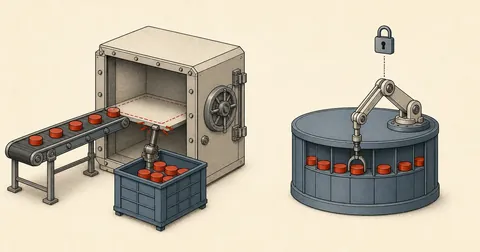
One machine handles every role
A reboot, an internet outage, or someone unplugging the wrong machine = the web goes down, incoming messages are lost, background work stops, and the team can only wait. Nothing can keep running.
Web on an always-on host, heavy work on the home machine
The home machine goes down = the web remains fully usable and messages keep arriving normally. Only jobs that need local programs stay queued, then resume when the machine comes back.
The important part of this goal is "stay queued," not "disappear." Jobs that cannot run now must remain intact so they can run later. If the design loses jobs when the machine goes down, it has merely moved the problem somewhere else.
Four principles I set before writing a line of code
I wrote these four principles on paper first. Whenever I was unsure which design direction to take, I went back and read them.
- One codebase, two roles — Decided only by `APP_ROLE=web` or `APP_ROLE=worker` in .env. No separate repos or branches.
- One direction: the worker pulls from the web — The web side does not need to know the worker machine. Nothing connects inbound to the worker.
- All outbound sending happens on the web side — The worker returns only "results." Delivery status stays in one place.
- Files live in shared storage — Both sides see the same files. Neither side holds the only copy.
The second principle paid off the most. Once the worker initiates the requests to pull jobs, the home machine needs no inbound access from the internet at all. No open ports, no domain, no tunnel. More importantly, nothing breaks when the worker machine goes down. Jobs simply pile up in the table.
One APP_ROLE controls the scheduler, routes, and commands
Only three places actually need to vary by role — scheduled tasks, worker routes, and commands that call local programs. Every other line of code stays the same.
# .env ฝั่งโฮสต์เว็บ
APP_ROLE=web
DB_HOST=127.0.0.1
QUEUE_CONNECTION=redis
FILESYSTEM_DISK=s3
WORKER_TOKEN=<TOKEN>

# .env ฝั่งเครื่องที่บ้าน
APP_ROLE=worker
WEB_API_BASE=https://app.example.com
WORKER_TOKEN=<TOKEN>
FILESYSTEM_DISK=s3
One short helper, available throughout the system.
// app/helpers.php
function app_role(): string
{
    return config('app.role', 'web');   // config/app.php: 'role' => env('APP_ROLE', 'web')
}

function is_web(): bool    { return app_role() === 'web'; }
function is_worker(): bool { return app_role() === 'worker'; }
Wrap the entire block of scheduled tasks, without going through them line by line.
// routes/console.php
if (is_web()) {
    Schedule::command('mail:fetch')->everyFiveMinutes();
    Schedule::command('docs:vault')->everyMinute();
    Schedule::command('jobs:release-stale')->everyFiveMinutes();
    Schedule::command('billing:close-stale')->dailyAt('01:30');
}

// เครื่อง worker ไม่มีงานตามเวลาเลยสักตัว — มันมีหน้าที่เดียวคือวนดึงงาน
During development, I use `APP_ROLE=web+worker` on one machine and let the worker pull jobs from its own API, so I can test the whole cycle without needing two machines. It is very convenient while coding, but never use this mode in production, because it removes every benefit of the split and also hides bugs such as "forgot to pass a value between machines." Turn it off as soon as the second machine is available.
The ai_jobs table and atomic job claims
Laravel's normal job queue does not work for this case because the worker is on a different machine and network, without access to the same Redis instance. So I built my own queue table that the two sides can access through HTTP.
// database/migrations/xxxx_create_ai_jobs_table.php
Schema::create('ai_jobs', function (Blueprint $t) {
    $t->id();
    $t->string('type', 40);                 // doc.index / pdf.render / media.convert ...
    $t->json('payload');
    $t->string('status', 12)->default('queued');   // queued -> running -> done | failed
    $t->unsignedTinyInteger('priority')->default(5);
    $t->unsignedTinyInteger('attempts')->default(0);
    $t->timestamp('run_after')->nullable();
    $t->timestamp('locked_at')->nullable();
    $t->string('locked_by', 64)->nullable();
    $t->json('result')->nullable();
    $t->text('error')->nullable();
    $t->timestamps();
    $t->index(['status', 'run_after', 'priority']);
});
The core is claiming a job. Never read first and update afterward. It must be a single statement that either claims the job or does not, followed by a check of the affected row count.
-- จองงานหนึ่งใบให้ worker ที่ระบุ
UPDATE ai_jobs
   SET status = 'running', locked_by = ?, locked_at = NOW(), attempts = attempts + 1
 WHERE id = (
        SELECT id FROM (
          SELECT id FROM ai_jobs
           WHERE status = 'queued'
             AND (run_after IS NULL OR run_after <= NOW())
           ORDER BY priority ASC, id ASC
           LIMIT 1
        ) AS pick
      )
   AND status = 'queued';
-- affected = 1 คือจองได้ · affected = 0 คือมีคนชิงไปแล้ว ให้วนไปหาใบถัดไป
// app/Services/AiJobs.php
public function claim(string $worker): ?object
{
    $affected = DB::update($this->claimSql(), [$worker]);
    if ($affected !== 1) {
        return null;                 // ไม่ได้แปลว่าพัง แปลว่าคนอื่นเอาไปก่อน
    }
    return DB::table('ai_jobs')->where('locked_by', $worker)
             ->where('status', 'running')->orderByDesc('locked_at')->first();
}
The AND status = 'queued' condition on the last line matters more than it looks. Without it, two workers making requests at the same time can select the same id and both update it successfully = one job gets executed twice. I covered this claim-before-sending approach in detail in a separate article, because jobs that affect the outside world involve many more details.
worker:pull keeps pulling jobs in one direction
The web side exposes a set of routes behind middleware that checks a token. These routes exist only when role=web.
// routes/worker.php — โหลดเฉพาะเมื่อ is_web()
Route::middleware('worker.token')->prefix('worker')->group(function () {
    Route::post('/claim',        [WorkerController::class, 'claim']);
    Route::post('/{id}/result',  [WorkerController::class, 'result']);
    Route::post('/{id}/fail',    [WorkerController::class, 'fail']);
    Route::post('/heartbeat',    [WorkerController::class, 'heartbeat']);
});
The worker side is a single command that keeps looping.
// app/Console/Commands/WorkerPull.php
public function handle(): int
{
    abort_unless(is_worker(), 1, 'คำสั่งนี้รันได้เฉพาะเครื่องที่ตั้ง APP_ROLE=worker');
    $me = gethostname().'-'.getmypid();

    while (! $this->shouldQuit()) {
        $job = $this->api()->post('/worker/claim', ['worker' => $me])->json('job');
        if (! $job) { sleep(5); $this->beat($me); continue; }

        try {
            $result = app(HandlerMap::class)->run($job['type'], $job['payload']);
            $this->api()->post("/worker/{$job['id']}/result", ['result' => $result]);
        } catch (\Throwable $e) {
            // ส่งแค่ประเภทกับรหัสข้อผิดพลาด ไม่ส่งข้อความที่มีข้อมูลลูกค้าติดไปด้วย
            $this->api()->post("/worker/{$job['id']}/fail", ['error' => class_basename($e).': '.$e->getCode()]);
        }
    }
    return 0;
}
# /etc/systemd/system/app-worker.service (เครื่องที่บ้าน)
[Unit]
Description=App worker (pull mode)
After=network-online.target
Wants=network-online.target

[Service]
Type=simple
User=appuser
WorkingDirectory=/home/appuser/app
ExecStart=/usr/bin/php /home/appuser/app/artisan worker:pull --max-time=3600
Restart=always
RestartSec=5
KillSignal=SIGTERM
TimeoutStopSec=120

[Install]
WantedBy=multi-user.target
When the worker goes down, the web side needs to know, rather than leaving the team wondering why clicking does nothing. I have the worker send a heartbeat every minute, and the web page displays a single message: "N jobs queued · Processing machine last contacted at HH:MM." After fifteen minutes, it alerts the maintainer. That is enough for the team to understand the situation without calling to ask.
Files must live in the same place for both sides
The most time-consuming part to fix was not the queue, but the files. The old code had eighteen places that called storage_path() directly. Every one assumed that "the file is on the same machine as the running code," an assumption that broke as soon as I split the system across two machines.
I moved all the files to object storage and wrote a single helper around it. The idea is "download to a temporary location, do the work, then delete the file on every execution path."
// app/Support/RemoteFile.php
public static function withLocal(string $disk, string $path, \Closure $fn)
{
    $tmp = tempnam(sys_get_temp_dir(), 'rf_');
    chmod($tmp, 0600);
    try {
        file_put_contents($tmp, Storage::disk($disk)->get($path));
        return $fn($tmp);
    } finally {
        @unlink($tmp);          // ต้องอยู่ใน finally เท่านั้น ไม่งั้น early return ทิ้งขยะไว้
    }
}
With that helper, the old code barely needs any changes beyond the line that opens the file.
$text = RemoteFile::withLocal('s3', $doc->path, function (string $local) {
    return app(PdfReader::class)->extract($local);      // โปรแกรมภายนอกต้องการพาธจริงในเครื่อง
});
Temporary files for this kind of work are real customer documents, not playthings. The rule I enforce on myself is directories 0770 · files 0600 · random names · always delete in finally, including paths that return early and paths that throw an exception. If deletion happens in try and someone later adds an early return, files will stay on the machine without anyone knowing.
Separate "making decisions" from "running binaries"
This was where the real effort went — roughly two-thirds of the total time. The old code mixed everything together: one function called a program to read a file, decided what the result meant, wrote to the database, and sent messages. Splitting it across machines meant cutting it into two parts.
My rule for deciding where to split was a single question — does this line of code need a program installed on the machine? If so, it goes on the worker side. If not, it stays on the web side. That simple. And crucially, all outbound sending always stays on the web side, even if the worker creates what will be sent. Once the worker is allowed to send things itself, the "has this been sent?" status becomes spread across two machines, leaving no single place to rely on when duplicate sending needs to be prevented.
The cutover plan and rollback path
I was not comfortable switching a system like this over by feel, so I wrote an eighteen-step sequence in three phases — prepare the code ahead of time without affecting the existing system, prepare the new machine without switching over, then make the switch on a day when the team is not using it.
# ช่วงเตรียม (ทำล่วงหน้าได้ ระบบเดิมไม่กระทบ)
php artisan migrate --force                  # ตาราง ai_jobs ขึ้นก่อน ยังไม่มีใครใช้
rclone copy storage/app/private remote:bucket/private --progress   # ย้ายไฟล์รอบแรก
php artisan config:cache && php artisan route:cache
# ลด TTL ของ DNS เหลือ 60 วินาที ล่วงหน้าอย่างน้อยหนึ่งวัน

# ช่วงสลับ
php artisan down --secret=<TOKEN>            # ปิดของเก่า เหลือทางให้เราเข้าไปตรวจ
rclone copy storage/app/private remote:bucket/private        # ไฟล์รอบสุดท้าย
mysqldump --single-transaction --quick appdb | gzip > /tmp/final.sql.gz
# กู้ลงฐานข้อมูลฝั่งโฮสต์ใหม่ แล้วเทียบจำนวนแถวตารางหลักให้ตรงกันทั้งสองฝั่ง
-- ขั้นที่ห้ามข้าม: เทียบจำนวนแถวก่อนสลับ DNS
SELECT 'leads' t, COUNT(*) n FROM leads
UNION ALL SELECT 'messages', COUNT(*) FROM messages
UNION ALL SELECT 'invoices', COUNT(*) FROM invoices
UNION ALL SELECT 'documents', COUNT(*) FROM documents;
The rollback path has to be written before starting, not worked out after things break. Mine was short — point DNS back to the original machine and bring the old system up. But there was one important condition.
If the new side has already received new data, simply pointing DNS back means discarding all data created after the switch. The correct rollback is to dump the data from the new side and restore it over the old side first, then bring the old system up. So I set a rule that rollback is only allowed on the same day. After that, I fix things going forward. There is no rollback.
When not to split
I am not encouraging everyone to split their systems this way. This took five to six full days and added several things to maintain — tokens, shared file storage, heartbeats, a custom queue table, and another set of deploy scripts. I used only two criteria to decide.
First, there must be enough heavy work requiring local programs that moving it to ordinary hosting is not possible. If everything can move, move it; that will be done much sooner. Second, the web and incoming messages really must stay up. If they can go down for an hour or two without causing anyone trouble, hold off. Spending that time improving backups is more worthwhile.
If your constraints differ from mine, adapt this as needed. The two things I really want you to take away are to use a single variable to control roles without splitting the codebase, and to always have the side with no inbound access initiate job pulls. Both principles apply to other architectures too; neither is tied to Laravel. If I have left gaps in the explanation or made any typos, I will come back and fix them later.
Want us to set this up?
Get help with server setup, configuration, migration, or troubleshooting. Save time for the work that matters.
Hit something like this? Stuck somewhere?
Come trade notes on the LinuxThai board

Comments 0
No comments yet — be the first