Secrets Set to 600, but 0644 Logs Go Offsite Every Night

The system where I found this hole handled secrets very well. Every credential was encrypted, every secret file was set to 600, and ownership was correct. Yet customer data still left the machine every night at two in the morning, through something nobody had ever classified as confidential.
I was auditing a system that had fairly tight controls over stored credentials. All configuration files were encrypted, every file had 0600 permissions, and ownership was correct. So I turned to other areas nobody had touched, and stumbled over a single line in the backup script saying it bundled the entire application directory and uploaded it to object storage every night. That meant the logs went up too, and that log file was 0644, readable by every account on the machine, with error messages carrying real customer data throughout the lines.
This differs from the configuration file encryption I wrote about before because it was never classified as confidential in the first place. Nobody made a checklist with a line saying "check log file permissions," because most people do not think of logs as secrets. But under personal data protection law, a file with a person's name and financial figures on the same line is an even bigger concern than a database password.
I made up every example log line in this article from scratch. The names, numbers, and reference codes are fictional; the pattern of the problem and the way to close the hole are real.
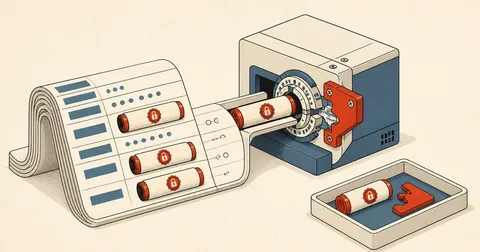
The path of one log line
Before fixing anything, I mapped out the data's path, because the place to stop it is not the place where I found the problem.
The first three points are on the machine and still manageable. But the fourth is the point of no return: whatever went up last night has already gone up. Even if I finish fixing the code today, the old copies will remain there for another 90 days under the retention policy.
What a line that should not exist looks like
This is the pattern I encounter most often, written entirely with good intentions: the developer wants to know immediately which case they are dealing with when debugging.
[2026-10-19 02:14:07] production.ERROR: ออกเอกสารไม่สำเร็จ
  ผู้รับ "นายทดสอบ ตัวอย่างดี" เลขอ้างอิง AB-0000-1234
  ยอดรวม 12,345.00 คงเหลือ 6,789.00 ช่องทาง "บัญชีสาขาตัวอย่าง"
  {"phone":"08X-XXX-XXXX","email":"[email protected]"}
A line like this serves the person debugging very well, and that is exactly why it was written. The problem is that it does not exist only while I am debugging. It stays in that file for months and travels everywhere the file goes.
Log files always travel farther than the developer expects. They go up with the backup every night, get copied during server migrations, get sent as attachments to people outside the team when opening support cases with providers, and sometimes end up in a directory the web server can serve without anyone realizing it. Assume that someone outside the team will eventually read everything written to a log. If that is unacceptable, do not write it there in the first place.
One rule that eliminates almost the whole problem
The rule I follow is logs record only "what broke," not "who it broke for". The full message containing customer context can be sent to the web page for authorized users to read as usual, because the page already has access controls. The log, which has no access controls at all, gets only a code.
Log human-readable messages
Full context makes debugging as easy as possible, but that context is real people's data, and it stays with every copy of the file throughout its retention period. Going back to delete it later is almost impossible.
Log result codes and internal ids
I get the error type, the failure point, and the row id to look up in a system with access controls. I can debug just as effectively without carrying PII along.
Here is what the code I switched to looks like.
try {
    $doc = $this->issue($order);
} catch (IssueFailed $e) {
    // log: รหัส + id เท่านั้น ห้ามมีชื่อ ห้ามมีตัวเลขเงิน ห้ามมีเบอร์
    Log::error('doc.issue.failed', [
        'code'     => $e->code(),       // เช่น CHANNEL_CLOSED
        'order_id' => $order->id,       // id ภายใน ไม่ใช่เลขที่เอกสารจริง
        'stage'    => $e->stage(),
    ]);

    // ข้อความเต็มไปโผล่บนหน้าจอของคนที่มีสิทธิ์ดู ไม่ลงไฟล์
    return back()->withErrors(['issue' => $e->userMessage()]);
}
The part to watch is $e->getMessage() on exceptions I create myself: it is often written as a human-readable sentence with full context. If I accidentally pass the whole thing into Log::error($e->getMessage()), I am back where I started. So I give exceptions separate code() and userMessage() methods, effectively forcing the developer to choose which one belongs where.
Filter with regex in code; do not rely on instructions
In systems that use language models to help read documents, people often address this by adding "do not include national ID numbers or bank account numbers in the output" to the instructions and considering it done. I do not count that as a control, because it is not enforcement; it is a request.
What can actually enforce this is a filtering layer in the code, placed before the file write, and it should be a layer that cannot be bypassed, not a function the developer has to remember to call.
namespace App\Logging;

use Monolog\LogRecord;

final class RedactPii
{
    /** @var list<array{0:string,1:string}> */
    private const RULES = [
        ['/\b\d{13}\b/u', '[id-redacted]'],                       // เลขประจำตัว 13 หลัก
        ['/\b\d{3}-\d-\d{5}-\d\b/u', '[acct-redacted]'],          // เลขบัญชีมีขีด
        ['/\b\d{10,12}\b/u', '[num-redacted]'],                   // เลขยาวที่ไม่รู้ว่าอะไร
        ['/\b0\d{1,2}-?\d{3}-?\d{4}\b/u', '[tel-redacted]'],      // เบอร์โทร
        ['/[\w.+-]+@[\w-]+\.[\w.-]+/u', '[mail-redacted]'],       // อีเมล
    ];

    public function __invoke(LogRecord $record): LogRecord
    {
        return $record->with(
            message: self::scrub($record->message),
            context: self::walk($record->context),
        );
    }

    public static function scrub(string $s): string
    {
        foreach (self::RULES as [$re, $to]) {
            $s = preg_replace($re, $to, $s) ?? $s;
        }
        return $s;
    }

    private static function walk(array $a): array
    {
        foreach ($a as $k => $v) {
            $a[$k] = is_array($v) ? self::walk($v) : (is_string($v) ? self::scrub($v) : $v);
        }
        return $a;
    }
}
Then I attach it to the channel so it runs on every line without the calling code needing to know about it.
// config/logging.php
'daily' => [
    'driver'     => 'daily',
    'path'       => storage_path('logs/app.log'),
    'days'       => 14,
    'permission' => 0640,
    'tap'        => [\App\Logging\TapRedact::class],
],
regex can filter only the patterns I can think of. Thai people's names have no fixed pattern to match, and neither do addresses. This filtering layer is therefore the last safety net, not the primary control. The primary control is still to avoid writing those things in the first place. Anyone using the filter as a reason to say "there is a filter now, so I can log anything" has misunderstood the point from the start.
Log file permissions and logrotate
After dealing with the contents, I also need to lock down permissions. Many frameworks default to 0644, which means every account on the machine can read the file, including other customers' accounts on a shared host.
# ดูว่ามีไฟล์ log ตัวไหนที่คนนอกอ่านได้บ้าง
find /srv/app/storage/logs /var/log/app -type f -perm -o+r -printf '%M %u:%g %p\n'

# ปิดให้หมด แล้วให้ของใหม่เกิดมาถูกตั้งแต่แรก
sudo chmod 0640 /srv/app/storage/logs/*.log
sudo chown appuser:webgroup /srv/app/storage/logs/*.log
Running chmod now fixes only existing files. Files created tomorrow will go back to 0644 unless I configure permissions at the source. In Laravel, I set permission in the configuration file as shown above. For files the system rotates itself, I need to configure logrotate.
/srv/app/storage/logs/*.log {
    daily
    rotate 14
    missingok
    notifempty
    compress
    delaycompress
    create 0640 appuser webgroup
    su appuser webgroup
}
The create 0640 line is the key, because logrotate creates the new file after rotation. Without it, logrotate copies the mode of the old file, which may be correct on day one but can drift once someone changes something.
Exclude logs from the archive uploaded offsite
This brings me to the point in the article's title. Most backup scripts follow the pattern "bundle the entire directory and exclude the large stuff," and the exclusion list usually contains only node_modules and video files. Nobody thinks of logs because they are small.
# แบบเดิม — ตัดแค่ของหนัก log ติดขึ้นไปด้วยทุกคืน
tar czf "$OUT/app-$TS.tar.gz" \
  --exclude='node_modules' --exclude='vendor' --exclude='*.mp4' \
  -C /srv app

# แบบที่ควรเป็น — ตัด log ออกจากก้อนหลักไปเลย
tar czf "$OUT/app-$TS.tar.gz" \
  --exclude='node_modules' --exclude='vendor' --exclude='*.mp4' \
  --exclude='storage/logs' --exclude='*.log' --exclude='*.log.gz' \
  -C /srv app
The next question is whether to keep logs at all. My answer is yes, but with separate archives, separate retention periods, and separate destinations, because logs and backups exist for different reasons. Backups are for restoring the system; logs are for tracing events over a short period.
# ก้อน log แยก เก็บสั้นกว่ามาก และไม่ปนกับก้อนที่เอาไว้กู้ระบบ
tar czf "$OUT/logs-$TS.tar.gz" -C /srv/app storage/logs
rclone copy "$OUT/logs-$TS.tar.gz" "remote:$(cat /etc/app/backup-bucket)/logs/"
rclone delete "remote:$(cat /etc/app/backup-bucket)/logs/" --min-age 30d
I read destination names and keys from a configuration file with restricted permissions instead of writing them directly into the script, because the script lives in the repo, and more people can read the repo than can access the machine.
Temporary files are another kind of log
While investigating logs, I found a related issue: temporary files the application creates during processing, such as files extracted from documents users upload or intermediate files passed to external tools. These files contain the customer's full content and often get left behind when the code takes an early exit.
$dir = storage_path('app/private/tmp/'.bin2hex(random_bytes(6)));
mkdir($dir, 0770, true);
$file = $dir.'/in.bin';

try {
    file_put_contents($file, $payload);
    chmod($file, 0600);

    if (! $this->precheck($payload)) {
        return self::SKIPPED;      // early return — จุดที่คนลืมลบบ่อยที่สุด
    }
    return $this->run($file);
} finally {
    // ลบทุกเส้นทาง รวมทั้ง early return และตอนโยน exception
    @unlink($file);
    @rmdir($dir);
}
Three things must be in place together: a 0770 directory, 0600 files, and unpredictable names. Deletion must go in finally, because placing it at the end of the function means it will not run on early-exit paths, which occur even more often than the normal path in systems with extensive validation.
Check how much has already leaked
After closing the hole, I think I also need to establish how much leaked before the fix; otherwise, I cannot know whether anyone needs to be notified.
- Download the backup archives from the last two or three nights and extract them into a temporary directory with restricted permissions. Do not extract them somewhere other people can access.
- Run the same regex patterns used by the code filter against the extracted log files. Count matching lines without reading the contents.
- If the count is greater than zero, trace that line format back to its source in the code and fix it there before doing anything else.
- Delete old archives containing logs from the offsite destination as far as policy allows, and record what was deleted and when.
- Delete the entire extracted directory as soon as the inspection is complete. Do not leave it behind, because it is now a pile of customer data sitting on the machine.
The counting command I use deliberately prints only counts and file names, not contents.
for f in /srv/tmp/audit/*/storage/logs/*.log; do
  n=$(grep -cE '\b[0-9]{13}\b|\b[0-9]{3}-[0-9]-[0-9]{5}-[0-9]\b|[[:alnum:]._+-]+@[[:alnum:].-]+' "$f")
  [ "$n" -gt 0 ] && printf '[HIT] %-48s %s บรรทัด\n' "$(basename "$f")" "$n"
done
rm -rf /srv/tmp/audit
When checking for leaked data, people often use cat or tail to inspect files visually. That puts the data into the terminal's scrollback, into the session log of the connection tool, and, if the screen is being shared, in front of whoever is watching too. Count and measure; do not read. Counts and file names are enough. Open the contents only when truly necessary, then close them immediately.
Conclusion
This hole did not come from anyone making a mistake. It came from a gap between categories. The person responsible for credentials took full care of them, the person writing backups made them as complete as possible, and the person writing logs made debugging as easy as possible. Everyone did their own job well, but nobody saw the entire path at once.
What I added to the system documentation was therefore not a new rule, but one question that must be answered whenever a new log line is written — if this line turns up offsite tomorrow, can I accept that? If the answer is no, the only option is to leave the unacceptable parts out when writing that line. Filters and file permissions are just safety nets, not the primary control.
Feel free to adjust the regex patterns or retention periods to suit the rules of your own work. The principles are the same. If I have left anything out or made a typo, I will come back and fix it later.
Want us to set this up?
Get help with server setup, configuration, migration, or troubleshooting. Save time for the work that matters.
Hit something like this? Stuck somewhere?
Come trade notes on the LinuxThai board

Comments 0
No comments yet — be the first