Charset Mismatch Silently Kills JOIN Indexes — an utf8mb4 Mirror

All the indexes are still there, and SHOW INDEX lists them, but none are used because the two databases are speaking different charsets, and MariaDB says nothing.
A customer system I maintain has an old database that still uses tis620 throughout, while the new application uses utf8mb4. When I needed to combine their data with a JOIN across databases, the web pages became unusually slow even though the join columns had indexes on both sides. There was not a single error or warning. It took me several days to trace it to the charset, so I wrote down both how to prove it and the fix I actually use now.
The database and table names in this article are fictional. The commands, scripts, and benchmark numbers are real.
Symptoms: slow JOINs despite having all the indexes
Start by checking which side still has columns that are not utf8mb4. This command checks the entire database in a second.
-- คอลัมน์ไหนในฐาน mirror ที่ยังไม่ใช่ utf8mb4
SELECT TABLE_SCHEMA, TABLE_NAME, COLUMN_NAME, CHARACTER_SET_NAME, COLLATION_NAME
FROM information_schema.COLUMNS
WHERE TABLE_SCHEMA IN ('mirror_db','mirror_db2','app_db')
  AND CHARACTER_SET_NAME IS NOT NULL
  AND CHARACTER_SET_NAME <> 'utf8mb4'
ORDER BY TABLE_SCHEMA, TABLE_NAME;
Check the database level too, because sometimes the tables have been converted but the database default is still the old charset. Newly created tables will end up back on tis620.
-- charset ระดับ database
SELECT SCHEMA_NAME, DEFAULT_CHARACTER_SET_NAME, DEFAULT_COLLATION_NAME
FROM information_schema.SCHEMATA;
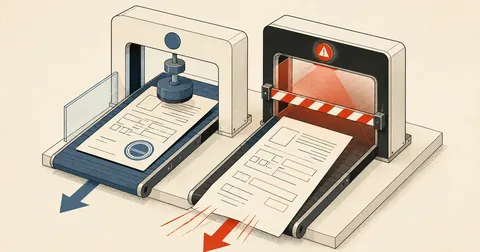
EXPLAIN is the decisive check. Before conversion, a query joining across charsets shows type=ALL and key=NULL: a full table scan, even though the ref_no column clearly has an index.
-- ก่อนแปลง: join ข้าม charset -> type=ALL, key=NULL, rows=ทั้งตาราง
EXPLAIN
SELECT c.ref_no, r.amount
FROM app_db.job_register c
JOIN mirror_db2.submit_log r ON r.ref_no = c.ref_no
WHERE c.doc_date BETWEEN '2025-10-01' AND '2025-10-31';
To isolate whether collation really is the issue, try forcing a matching collation on the constant side, then see whether the plan changes.
-- ทดสอบเปรียบเทียบแบบ isolate: บังคับ collation ให้ตรง แล้วดูว่า plan เปลี่ยนไหม
EXPLAIN
SELECT * FROM mirror_db2.submit_log
WHERE ref_no = CONVERT('680000002' USING utf8mb4) COLLATE utf8mb4_unicode_ci;
Some cases are luckier: they produce an explicit error saying Illegal mix of collations (tis620_thai_ci,IMPLICIT) and (utf8mb4_unicode_ci,IMPLICIT) for operation '='. I count that as lucky, because at least it tells me something. The more dangerous case says nothing and simply becomes a hundred times slower.
How it works: why a charset mismatch can kill an index
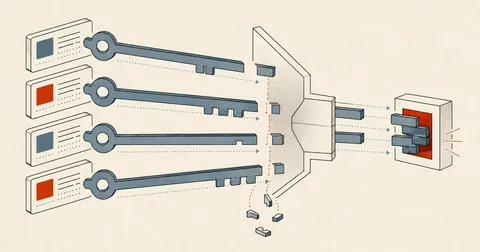
In plain terms, when MariaDB compares two values with different charsets or collations, it coerces the lower-priority side to match the other side according to collation coercibility rules. The problem is that if the side being converted is a column, rather than a constant, every row must be read and converted before comparison. That is equivalent to wrapping the column in a function, which immediately makes its index unusable.
All the indexes are still there, and SHOW INDEX lists them, but the optimizer chooses not to use them. There is no warning or error at all. The system still returns correct answers, just 100-1000 times slower, and the effect only becomes visible once the data grows large enough. In my case, it ended with long full scans on MyISAM tables that escalated into 504 errors on every page of the site, which I cover in a separate article.
The options, and which one I chose
Quick but fragile
Add COLLATE to each ON/WHERE clause. This can be done immediately without touching the database, but every existing and future query needs the fix. Worse, accidentally putting COLLATE on the indexed column side kills the index all over again. It must go on the literal side only.
Slower to set up, but resolves it
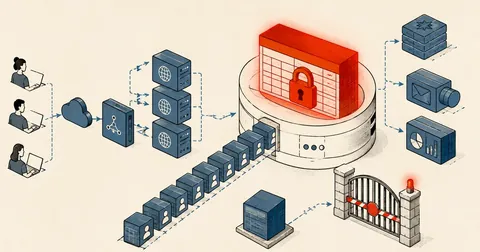
Pull data from the source, convert it to utf8mb4, and store it on the same machine as the application. The production database stays untouched, and the entire new system uses the same charset throughout. This is the option I chose.
The third option is to convert the source database itself. I ruled that out from the start because it is the production database for the existing system, with people actively using it. If anything goes wrong while changing it, real work is affected immediately. My own rule is to avoid converting the charset of a database that other systems still use if there is another option.
The key to conversion: do it during the dump, not with iconv afterward
mariadb-dump -h 10.0.0.21 -u<user> -p<password> \
  --single-transaction --no-tablespaces --skip-lock-tables \
  --default-character-set=utf8mb4 \
  --where="doc_date >= date_sub(curdate(), interval 4 year)" \
  mirror_db doc_head
The key option is --default-character-set=utf8mb4. It tells the server that this connection uses utf8mb4, and the server transcodes the tis620 data as it exports it. It uses the server's own mapping, which is more accurate and avoids having to guess the encoding afterward with iconv.
The other flags needed alongside it are --single-transaction, which provides a consistent snapshot for InnoDB; --skip-lock-tables, which is essential because the source has MyISAM tables that --single-transaction does not cover, and without it the dump locks the production database; and --no-tablespaces, which avoids needing PROCESS privileges on the source. I always pull from the slave rather than the master to avoid consuming production resources.
The exported data is indeed utf8mb4, but the CREATE TABLE line still says DEFAULT CHARSET=tis620, matching the actual source. Loading it directly produces a table declared as tis620 with utf8mb4 bytes inside, immediately corrupting the data. These two steps must always go together: transcode during the dump, then rewrite the schema with sed.
Fixing the SQL definitions with sed — all five lines are required
# sed แก้ "หัว SQL" (CREATE TABLE) จาก tis620 -> utf8mb4 ; data เป็น utf8mb4 อยู่แล้วจาก dump ข้างบน
FIXCS='s/CHARSET=tis620/CHARSET=utf8mb4/g; s/CHARACTER SET tis620/CHARACTER SET utf8mb4/g; s/tis620_thai_ci/utf8mb4_unicode_ci/g; s/tis620_bin/utf8mb4_bin/g; s/ENGINE=InnoDB /ENGINE=InnoDB ROW_FORMAT=DYNAMIC /g'
These five rules each have a different job. The first changes the table-level charset. The second changes it at the column level, which is the part people most often forget. Some columns override the table setting. Missing this rule leaves a table declared as utf8mb4 with tis620 hidden at the column level, so the index is still unusable and the cause is even harder to find. The third and fourth fix the collations, both case-insensitive and binary.
The fifth handles ROW_FORMAT=DYNAMIC, which is necessary because tis620 uses 1 byte per character while utf8mb4 uses up to 4 bytes. A varchar(255) column that used to take only 255 bytes becomes 1,020 bytes, while the InnoDB index prefix limit with COMPACT is only 767 bytes. DYNAMIC is required to get 3,072 bytes; otherwise, index creation fails.
I recommend adding one more rule now to get rid of MyISAM at the same time, because charset problems and lock problems always come together.
FIXCS="$FIXCS"'; s/ENGINE=MyISAM/ENGINE=InnoDB ROW_FORMAT=DYNAMIC/g'
The big trap: sed table renames need a preceding keyword
When creating a staging table, I need to change the table name in the dump file from doc_head to doc_head__new before loading it. The correct approach is to anchor the match with a keyword and use a backreference.
# ถูก: anchor ด้วย keyword แล้วอ้าง backreference \1
sed -E "s/(DROP TABLE IF EXISTS|CREATE TABLE|INSERT INTO|ALTER TABLE|LOCK TABLES) \`$t\`/\1 \`${t}__new\`/g"
# ผิด (เวอร์ชันแรกที่ทำพัง): แทนทุก `ชื่อตาราง` ที่เจอ
sed -E "s/\`$t\`/\`${t}__new\`/g"
The old database has several tables with a column sharing the table's name. For example, the type_ref table has a column named type_ref, and the amount table has a column named amount. Without an anchor, sed also renames the column in CREATE TABLE and in the INSERT INTO column list. The result is a staging table with incorrect column names, or an SQL error halfway through, followed by a rename that has already replaced the good table. This cost me more time than anything else in this job.
Turning it into an actual pipeline
The script I use looks roughly like this. It has two main modes: reload, which converts the entire structure, and upsert, which pulls only new rows.
mirror.sh <mode>
  |- flock /tmp/app-mirror.lock          กัน cron รอบซ้อน (exit 75 ถ้าซ้อน)
  |- SRC / DUMPOPT / FIXCS               config ด้านบนสุด
  |- table_exists()                      guard ก่อน rename
  |- reload(db, table, [where])          dump -> sed rename -> sed charset -> load -> RENAME swap
  |- upsert(db, table, where)            dump --no-create-info --replace (ไม่ drop ตาราง)
  |- กลุ่มตารางตามงาน
  `- case $MODE: full | daily | hourly
The upsert() function is for large tables where a full reload is impractical. It pulls only the last 14-30 days.
# upsert เฉพาะแถวล่าสุด (ไม่ drop) — REPLACE INTO ตารางเดิม
upsert(){ # db table where
  db=$1; t=$2; where=$3
  mariadb-dump $SRC --no-create-info --replace --skip-lock-tables --default-character-set=utf8mb4 --where="$where" "$db" "$t" 2>>"$LOG" \
    | mariadb "$db" 2>>"$LOG" \
    && echo "$(ts) upsert OK   $db.$t ($where)" >>"$LOG" || echo "$(ts) upsert FAIL $db.$t" >>"$LOG"
}
That is because --no-create-info means no CREATE TABLE is emitted for sed to modify. Any table synced only through upsert will remain tis620 forever. It is converted only when it goes through an hourly/daily/full reload. During verification, each table must be checked to see whether it has been through a reload.
Two guards must always be used together: checking that the staging table actually exists before renaming, and flock to prevent overlapping runs.
table_exists(){ # db table
  mariadb "$1" -N -e "SELECT COUNT(*) FROM information_schema.tables WHERE table_schema=DATABASE() AND table_name='$2'" 2>>"$LOG"
}
The application side must use utf8mb4 from the start
// config/database.php ของ Laravel
'charset'   => 'utf8mb4',
'collation' => 'utf8mb4_unicode_ci',
If the database or tables were accidentally created as latin1, inserting Thai text will fail with error 1366 Incorrect string value. These two commands fix it afterward.
-- ถ้าเผลอสร้างเป็น latin1 มาแล้ว
ALTER DATABASE `app_db` CHARACTER SET utf8mb4 COLLATE utf8mb4_unicode_ci;
ALTER TABLE `app_db`.`job_register` CONVERT TO CHARACTER SET utf8mb4 COLLATE utf8mb4_unicode_ci;
Another issue that surfaced after moving to utf8mb4 was PHP's substr(). It cuts through Thai characters, causing them to display as question marks. Every occurrence needs to be changed to mb_substr(). I ran into this in several places in the admin interface before fixing them all.
Measuring the results after conversion
The 55 ms versus 772 ms figures came from moving a formula previously calculated on the fly in WHERE into a stored column and indexing it. The result was exactly the same 23,076 rows, but roughly 14 times faster.
-- ตัวอย่างการเพิ่ม index บนคอลัมน์ที่คำนวณไว้ล่วงหน้า แทนการคิดสูตรใน WHERE ตอน query
ALTER TABLE expected_lines
  ADD COLUMN expected_diff_amount DECIMAL(14,2) NULL,
  ADD INDEX el_paidst_amount_case_idx (paid_status, amount_group, case_key),
  ADD INDEX el_paidst_expdiff_case_idx (paid_status, expected_diff_amount, case_key);
Finish verification with these two commands. The first must return 0, and the second checks whether every table has been reloaded.
# นับตารางที่ยังไม่ utf8mb4 — ต้องได้ 0
mariadb -N -e "
SELECT COUNT(*) FROM information_schema.TABLES
WHERE TABLE_SCHEMA IN ('mirror_db','mirror_db2')
  AND TABLE_COLLATION NOT LIKE 'utf8mb4%';"

grep -c 'reload OK'   /var/www/app/storage/logs/mirror.log
grep    'reload FAIL' /var/www/app/storage/logs/mirror.log
Then visually spot-check the Thai text once more. Checking HEX alongside it is more reliable than looking at the characters alone, because mojibake can sometimes be very subtle.
-- สุ่มเช็คภาษาไทยว่าไม่เพี้ยน (mojibake) หลัง transcode
SELECT name, HEX(LEFT(name,3)) FROM mirror_db.type_ref LIMIT 5;
A short sequence for getting started
- Use information_schema.COLUMNS to identify columns that are not yet utf8mb4, and save the list for comparison at the end.
- Confirm the symptoms with EXPLAIN and establish type=ALL first, so there is evidence that the fix actually improves things.
- Set up a mirror that pulls from the slave using mariadb-dump with --default-character-set=utf8mb4 and --skip-lock-tables.
- Include all five sed FIXCS rules plus the rule to remove MyISAM, and remember to anchor the match with a keyword when renaming tables.
- Load into a staging table, then swap with RENAME, using a table_exists guard and flock to prevent overlapping runs.
- Add indexes on the actual join keys, then run EXPLAIN again to get ref or eq_ref instead of ALL.
- Set up a freshness check comparing max(date) with today, because if the slave stops replicating, the mirror will keep running normally but its data will be stale.
I learned that last point the hard way. The mirror quietly stopped advancing: cron still wrote reload OK every hour, and the logs looked perfect, but the data was stuck on yesterday because the source had stopped replicating. I have now added a separate cron job to check Slave_IO_Running and Seconds_Behind_Master, with a threshold of 1,800 seconds. Exceeding it triggers a red warning banner at the top of the site where people can see it.
For anyone dealing with an old tis620 database that needs to coexist with a new system, I think this structure can be adapted directly by changing just the database name and table list. If anyone has a better approach that does not require a mirror, please share it. I would also like to know whether there is a more complete solution. If I have missed anything in the explanation or made a typo, I will come back and correct it later.
Want us to set this up?
Get help with server setup, configuration, migration, or troubleshooting. Save time for the work that matters.
Hit something like this? Stuck somewhere?
Come trade notes on the LinuxThai board
Comments 0
No comments yet — be the first