Import Land Parcel Boundaries from Government Maps into SketchUp

SketchUp's Add Location provides satellite imagery and ground elevations, but leaves out what designers most want to know—the land parcel boundaries. That data already exists in the government's mapping system and is exposed through standard WFS for direct retrieval, if you know which parameters to send.
I needed to model a building on a plot of land and had already used SketchUp's Add Location to bring in satellite imagery and ground elevations. What was missing was the parcel boundary—the imagery only showed fences and tree lines, which do not always match the actual boundary. I could not reliably position the building to meet the setback distances.
Parcel boundary data already exists in the government's land parcel mapping system, and behind the website it is exposed through WFS, the same open OGC standard used by GIS systems around the world. I tried fetching it and placing it in the model. It worked, lining up with the imagery. This article records the whole process.
Parcel boundaries from this kind of mapping system are map reference data, not legally surveyed boundaries. They can help with site planning, estimating setbacks, assessing usable space, or preliminary discussions, but must never be used to establish actual boundaries, place boundary markers, or settle disputes. Work that requires legal boundaries must be handled by a surveying official. Errors on the order of meters are normal for this dataset. I use it only to help with site planning and have never used it as a reference for anything else.
Log in normally first, then call WFS
The government mapping system requires an authenticated login before you can view the data. I logged in with my own account through the website as usual, just as I do for everyday use. I did nothing beyond that. Once logged in, the resulting session can call WFS, a standard service the system already provides, within the account's permissions.
Government services are shared resources. I make requests as a one-time task for each project, fetch only the map sheets covering the actual work area, then save the results to a file and continue working from that file. I do not send repeated requests while experimenting. If you follow this process, check the system's terms of service first, and do not turn it into an automated job that fires requests in rapid succession.
The biggest trap: this layer does not accept bbox alone
I started the way everyone does: send a WFS request for features within the bounding box of interest, straight from the textbook. The result was zero features. No error, nothing. It returned a perfectly empty FeatureCollection, leading me to think I had requested the wrong layer or used the wrong coordinates. I spent quite a while tracking that down.
The reason is that the land parcel layer is not a plain table but a parameterized view—a view that requires parameter values to be supplied. GeoServer uses viewparams for this. Without it, the conditions in the underlying query match nothing, so the result is empty every time, even with the correct bounding box.
The required value is the map sheet code covering that area:
https://<host>/geoserver/<workspace>/wfs
  ?service=WFS&version=1.0.0&request=GetFeature
  &typeName=<workspace>:V_PARCEL47
  &viewparams=utmmap:503624412
  &outputFormat=application/json
  &srsName=EPSG:4326
The sheet code is assembled from the label shown on the map, converting the Roman numeral in the middle to a number:
ROMAN = {"I": "1", "II": "2", "III": "3", "IV": "4"}

def sheet_code(label: str) -> str:
    """'5036 II 4412'  ->  '503624412'"""
    a, roman, b = label.split()
    return f"{a}{ROMAN[roman]}{b}"

print(sheet_code("5036 II 4412"))   # 503624412  (ค่าตัวอย่าง)
How do I find out which sheet covers the area of interest? I query the sheet index layer. This index layer accepts bbox normally, without viewparams. Send it the model's bounding box, and it returns the sheets overlapping that box, with their labels in each feature's properties.
Watch the coordinate order in bbox—WFS version 1.0.0 uses lon,lat (x first), while version 1.1.0 onward reverses that to lat,lon as defined by EPSG. Swap them and the result is empty again, which can lead you to blame viewparams instead. I stick to 1.0.0 and use lon,lat throughout so I do not have to think about it each time.
Convert coordinates without installing another library
The source geometry is stored in UTM zone 47, in meters, which cannot be used directly with SketchUp because the model side works with latitude/longitude. The usual approach is to install pyproj and convert it locally, but I did not have pyproj on my machine at the time and did not want to install it in the middle of the job.
The shortcut is to let the server do the conversion. Add srsName=EPSG:4326 to the request, and GeoServer reprojects the data before returning it. The result is GeoJSON in lon/lat, without writing a single line to handle coordinate systems myself.
Zone 47 covers most of Thailand. If the project is in the far east, use the zone 48 layer instead. You can determine this from the project's longitude; the dividing line is at 102 degrees east.
The SketchUp side: latlong_to_point does it all
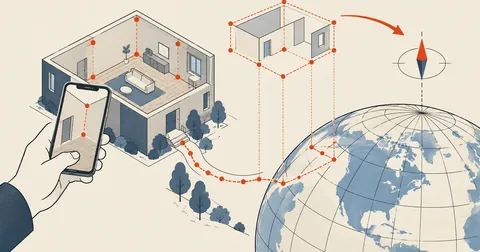
A model that has been through Add Location knows its position on Earth and has built-in methods for converting coordinates in both directions. I use latlong_to_point: feed it a lon/lat pair and get a point in the model's coordinate system. It lines up with the imagery without any further adjustment.
The forward conversion is latlong_to_point([lon, lat])—it takes an array with longitude first. The reverse, point_to_latlong(pt), does not return a LatLong as the name might suggest. It returns a Geom::Point3d where .x is longitude and .y is latitude. I read them the wrong way around on my first attempt, and the parcel lines ended up in the middle of the ocean. If your lines disappear somewhere far away, check this first.
This is the entire SketchUp script:
require 'json'

model = Sketchup.active_model
ents  = model.active_entities

# ไฟล์นี้เตรียมไว้ก่อนแล้วจากฝั่ง Python: [[[lon,lat],[lon,lat],...], ...]
parcels = JSON.parse(File.read('D:/work/parcels.json'))

model.start_operation('Import parcels', true)

parcels.each do |ring|
  pts = ring.map do |lon, lat|
    p = model.latlong_to_point([lon, lat])
    Geom::Point3d.new(p.x, p.y, p.z + 5.cm)   # ยกขึ้นกันเส้นจมภาพถ่าย
  end
  pts << pts.first unless pts.first == pts.last

  created = ents.add_edges(pts)

  # วงปิดที่อยู่ระนาบเดียวกันจะเกิดหน้าขาวขึ้นมาเองและบังภาพดาวเทียม -> ลบทิ้ง
  created.each do |edge|
    next unless edge.valid?
    edge.faces.each { |f| f.erase! if f.valid? }
  end
end

model.commit_operation
Two lines took several failed attempts to get right.
The line that raises z by 5 centimeters—if the lines sit exactly at zero elevation, they share a plane with the satellite imagery, causing z-fighting: the lines flicker in and out as you rotate the view. Raising them slightly eliminates it completely.
The face-removal block—SketchUp automatically creates a face when lines form a closed loop in the same plane, which every parcel does. The result is an opaque white surface covering the imagery so nothing is visible. I have to remove those faces, leaving only the lines.
One more thing to know—Add Location has an option to bring in 3D buildings, which appear as white boxes in the model. Those are buildings from the mapping service's dataset, not the parcel lines I just imported. Be careful not to delete the wrong objects.
Trim to the bounding box before drawing
One map sheet contains hundreds of parcels, but the model covers only a small patch. I filter them on the Python side before sending them to SketchUp; otherwise, the model gets unnecessarily heavy:
def clip(rings, bbox):
    """เก็บเฉพาะแปลงที่มีจุดใดจุดหนึ่งตกในกรอบโมเดล"""
    lon0, lat0, lon1, lat1 = bbox
    out = []
    for ring in rings:
        if any(lon0 <= lon <= lon1 and lat0 <= lat <= lat1 for lon, lat in ring):
            out.append(ring)
    return out

# กรอบเอามาจาก point_to_latlong ของมุมโมเดลใน SketchUp (ค่าตัวอย่าง)
bbox = (99.7980, 16.1960, 99.8060, 16.2030)
I chose the condition "at least one point falls inside the box" rather than "every point must be inside the box" because I still want to see parcels that straddle the model's edge, so I know where the neighbors are.
Why not use the endpoint that returns data with one click?
The system has an endpoint that returns parcel data when you click on the map. At first, I thought that would be an easy solution, but after looking into it, I found it served a different purpose:
Properties, no geometry
It returns the parcel number, area in rai-ngan-square wa, center point, and zone—a useful set of properties, but the field that should hold the boundary is empty. It can verify information, but cannot draw the shape.
Actual geometry as coordinates
It returns the complete geometry, with every point of every parcel on the sheet, ready to draw. The tradeoff is having to know the sheet code and send the correct viewparams.
So I use them together: fetch the geometry from WFS, then, if I want to add parcel numbers and areas as text in the model, query the other endpoint for each parcel.
Conclusion
The whole process is shorter than I expected—take the model's bounding box and ask the index layer which sheets cover it, use the sheet codes to request the parcel layer with viewparams and srsName=EPSG:4326, trim it to what is needed, then draw it with latlong_to_point. Finish by raising z slightly and removing the automatically created faces.
For me, the most useful part is seeing the actual boundaries overlaid on the imagery at the start of the project, before putting time into modeling the building. Fences and property boundaries often do not line up. It is better to know that on day one than after the design is finished. But I will repeat that this dataset is only a reference aid; work that requires legal boundaries still needs a survey.
If you want to adapt this to another mapping system, the same structure applies because WFS is a common standard. Just change the layer names and parameters as needed. If I have left anything out or made any typos, I will come back and correct them later.
Hit something like this? Stuck somewhere?
Come trade notes on the LinuxThai board
Comments 0
No comments yet — be the first