AI Reads Mail Attachments: ClamAV fail-closed, bwrap and a Hook
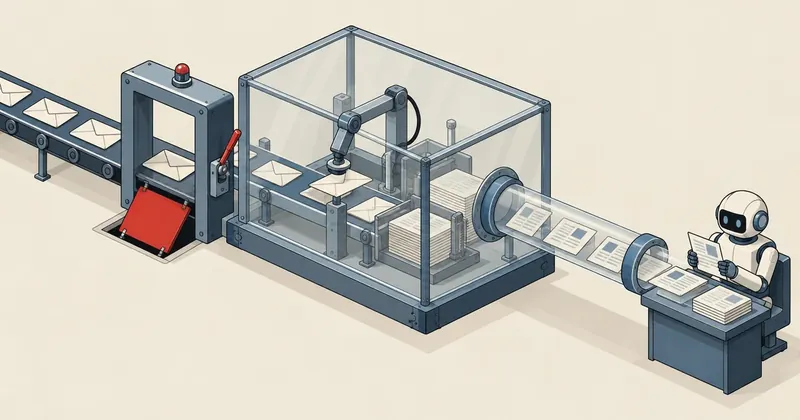
Attachments from outsiders pose two kinds of danger. The file itself can be malware, and the text inside can tell the model to read secrets on the machine. I therefore let nothing touch the raw files except a single pipeline I can control
1-minute summary
- Symptom / problem
- An AI must extract data from attachments sent by outsiders, which may be malware or hold text that instructs the model.
- Who should read
- People letting an LLM read attachments from external senders.
- Fix in short
- Route every file through one path with a fail-closed ClamAV scan, run the parser in a network-less bubblewrap, and use a PreToolUse hook to stop the model opening raw files.
A client regularly receives email from outsiders with PDFs, office files, and images attached, and wanted AI to help extract data into a database. At first, I thought I would just hand the files directly to Claude, but the person responsible for the work said something that stopped me. He said, "You're the one opening and reading them. You need to find a way to protect how you read them." I sat still for a while because he was right. Incoming files are not dangerous only when a human double-clicks them. When AI opens them with the machine's permissions, they are dangerous too, sometimes even more so. So I wanted to explain how I put the protective layers in place.
The limits, program names, and lists of terms checked by the hook in this article are examples to make the explanation clear. I am not publishing the client's actual setup, and no protective layer guarantees one hundred percent protection. I will state the limitations plainly in a section near the end.
Two risks that need different defenses
The first is the file itself. A malicious document may exploit a vulnerability in a parser or file converter. If the parser runs with the same permissions as the system holding the client's data, it is already over when the file is opened. The second is the text inside. An email or document can contain instructions for the model, such as telling it to read a secret file on the machine and send it out, which is prompt injection through an attachment. These two problems need separate layers of protection.
Use scanning and a sandbox
Scan it with antivirus before touching it, and run the parser in a sandbox with no network, no access to other files, and memory and CPU limits. If it gets compromised, only the filter is lost.
Use least privilege
The model never reads raw files. It reads only extracted text from the database, and even if it is tricked, there should be no secrets for it to read in its working environment.
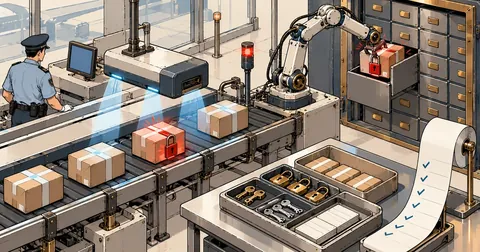
I arranged for files to pass through a single entry point. The sequence is to fetch mail read-only, scan it, extract text in a sandbox if it is clean, store the text in the database, and then let the model read from the database. It never sees the raw files.
Fetching mail read-only
The first stage is fetching. I open the mailbox in readonly mode and fetch with BODY.PEEK, without deleting messages, marking them as read, or moving them between folders. The client's mail system therefore looks as though no one has touched it, and each batch can be rerun because files already stored are skipped. I have already written separately about fetching without disturbing the mailbox in Fetching Mail Without Touching the Mailbox, so I will show only the core here.
import imaplib, os

M = imaplib.IMAP4_SSL(os.environ["MAIL_HOST"])
M.login(os.environ["MAIL_USER"], os.environ["MAIL_PASS"])
M.select("INBOX", readonly=True)            # readonly: ไม่มีอะไรในกล่องเปลี่ยน

typ, ids = M.search(None, "ALL")
for num in ids[0].split():
    typ, data = M.fetch(num, "(BODY.PEEK[])")   # PEEK: ไม่ติดธง \Seen
    raw = data[0][1]
    # ส่ง raw ไปแยกไฟล์แนบ แล้วเข้า scan() เป็นด่านถัดไป ห้ามเปิดก่อน
Scanning through a ClamAV socket, with fail-closed behavior
I talk to clamd through a unix socket using the zINSTREAM command, sending data in 1 MiB chunks, each prefixed with a 4-byte big-endian length, and ending with a length of 0. There are three possible results: clean (None), a signature name, or "TooBig" if the file exceeds clamd's limit, which I set to 100 MB and also treat as not clean.
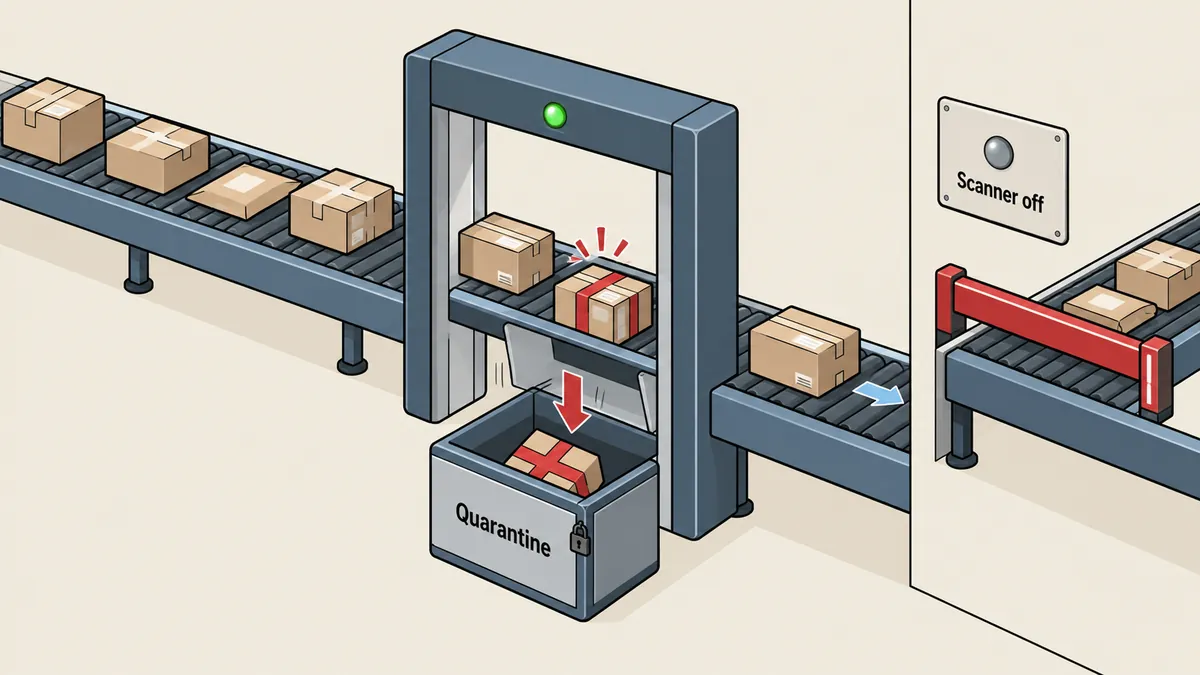
The key is that if clamd does not respond or returns something unexpected, an exception must stop the entire process, rather than letting it continue as though the file were clean. That is what fail-closed means. A script that says "if scanning fails, skip it for now" means that the day the scanner goes down is the day every file gets a free pass.
import socket, struct

CHUNK = 1 << 20          # 1 MiB
class ScanUnavailable(Exception):
    pass

def scan(data: bytes, sock_path="/run/clamav/clamd.ctl"):
    """คืน None = สะอาด / ชื่อ signature / 'TooBig' ; ติดต่อ clamd ไม่ได้ = raise"""
    if len(data) > 100 * 2**20:
        return "TooBig"
    try:
        s = socket.socket(socket.AF_UNIX)
        s.settimeout(60)
        s.connect(sock_path)
        s.sendall(b"zINSTREAM\0")
        for i in range(0, len(data), CHUNK):
            c = data[i:i + CHUNK]
            s.sendall(struct.pack(">I", len(c)) + c)
        s.sendall(struct.pack(">I", 0))
        reply = s.recv(4096).decode(errors="replace").strip("\0\n ")
    except OSError as e:
        raise ScanUnavailable(str(e))           # fail closed
    if reply.endswith(" OK"):
        return None
    if reply.endswith(" FOUND"):
        return reply.split(": ", 1)[-1].rsplit(" FOUND", 1)[0]
    raise ScanUnavailable(reply)                # ตอบแปลก = ถือว่าใช้ไม่ได้
I never save infected files to disk. I record only the message ID, filename, and signature name in a quarantine file, in case the person responsible wants to know what came in.
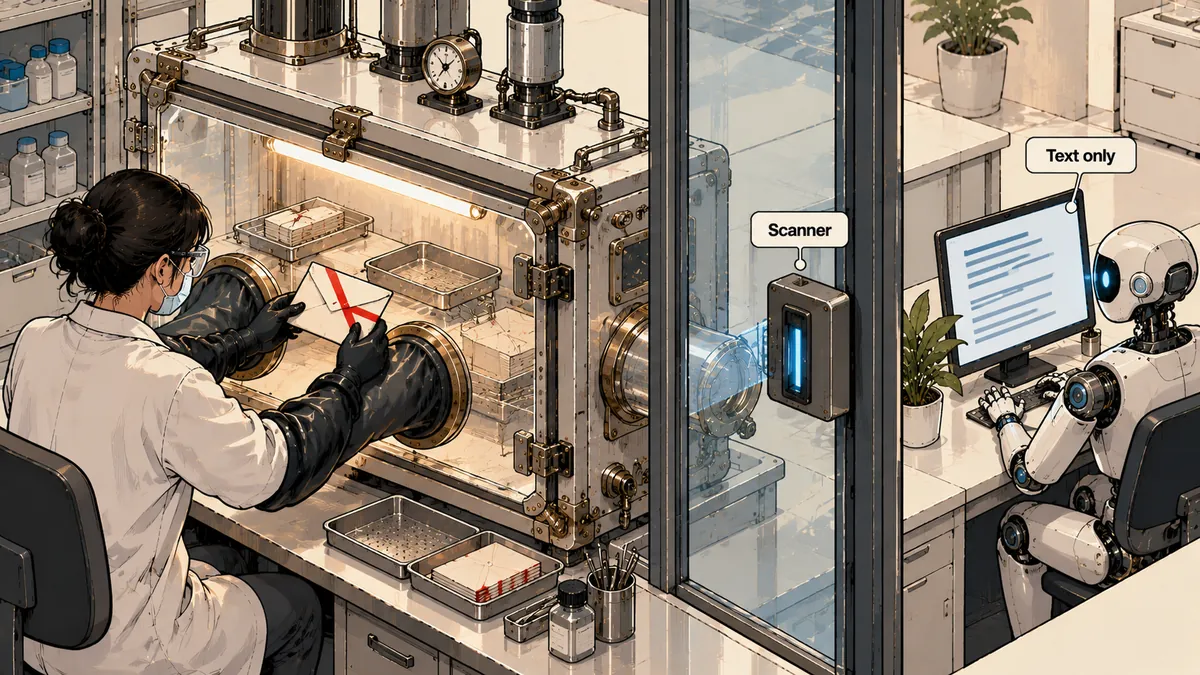
Running parsers in a bubblewrap sandbox with resource limits
A file that is clean according to signatures is not necessarily safe. Signatures catch only known threats. I therefore always run every file converter, such as pdftotext and pdfimages, inside bubblewrap. This sandbox has no network, cannot see the system's home directories, has read-only /usr and its own tmpfs at /tmp, bind-mounts only the files it needs to read, and is wrapped with prlimit to cap memory, CPU time, and output file size, and disable core dumps.
# ตัวอย่างค่า: IN คือไฟล์ที่ผ่านสแกนแล้ว
prlimit --as=1073741824 --cpu=30 --fsize=524288000 --core=0 -- \
bwrap --unshare-all --die-with-parent --new-session --clearenv \
      --ro-bind /usr /usr \
      --symlink usr/bin /bin --symlink usr/lib /lib --symlink usr/lib64 /lib64 \
      --proc /proc --dev /dev --tmpfs /tmp \
      --ro-bind "$IN" /work/in.pdf \
      --setenv PATH /usr/bin \
      pdftotext -layout /work/in.pdf -
--unshare-all isolates the network, PID namespace, and visible mounts. --die-with-parent prevents child processes from lingering after the parent dies. --clearenv clears environment variables that might leak tokens into the sandbox. The result is that any file not bind-mounted into it effectively does not exist from the program's point of view.
Office files: opening only the XML needed
docx xlsx pptx files are zip archives containing XML. I never let an office application open them. My own code reads only the XML members needed, with limits against zip bombs: 20 MB per member, 60 MB for the entire file, and an uncompressed-to-compressed size ratio no higher than 200. The point to watch is not to trust only the sizes declared in the file headers. I also limit the actual number of bytes read.
import zipfile

MAX_MEMBER, MAX_TOTAL, MAX_RATIO = 20 * 2**20, 60 * 2**20, 200

def office_xml(path: str, wanted: set[str]) -> dict[str, bytes]:
    out, total = {}, 0
    with zipfile.ZipFile(path) as z:
        for info in z.infolist():
            if info.filename not in wanted:
                continue
            if info.file_size > MAX_MEMBER:
                raise ValueError("member too big")
            if info.compress_size and info.file_size / info.compress_size > MAX_RATIO:
                raise ValueError("compression ratio too high")
            with z.open(info) as f:
                data = f.read(MAX_MEMBER + 1)     # อ่านจริงแบบมีเพดาน ไม่เชื่อ header
            if len(data) > MAX_MEMBER:
                raise ValueError("member too big (actual)")
            total += len(data)
            if total > MAX_TOTAL:
                raise ValueError("total too big")
            out[info.filename] = data
    return out
- Office files are opened as zip archives using the code above, without an office application.
- Read only XML containing content, such as the document itself and sharedStrings.
- Strip the tags to leave plain text, then store it in the database.
- If any limit is exceeded, reject the entire file and record the reason.
A hook to keep the model from opening raw files itself
Everything above concerns the pipeline, but my model has tools that can read files and run shell commands. If it decides to open a raw file in the mail folder itself and inspect it directly with unzip or python, the entire pipeline becomes meaningless. I therefore installed a PreToolUse hook, a small program that Claude Code calls before every tool use. If the hook exits with exit code 2, the tool is blocked and the message printed by the hook is sent back for the model to read.
{
  "hooks": {
    "PreToolUse": [
      {
        "matcher": "Read|Bash",
        "hooks": [
          { "type": "command",
            "command": "python3 -I \"$CLAUDE_PROJECT_DIR/tools/mail-guard/read_guard_hook.py\"" }
        ]
      }
    ]
  }
}
I put three rules in the hook. First, the Read tool and pdf-reading tools are blocked from accessing raw files in every mailbox. Second, Bash commands are split into segments at ; & | and newlines, and a segment is blocked if it contains both a raw-mail path and terms for unpacking, opening documents, viewers, or interpreters, unless it runs a script in our tools folder. Third, png jpg gif webp images can still be read because they have already been scanned before being saved.
import json, re, sys

RAW     = re.compile(r"mail-store/(mailbox-a|mailbox-b)/raw/")
OPENERS = re.compile(r"\b(unzip|7z|tar|libreoffice|pdftotext|python3?|bash|sh)\b")
OURS    = "tools/mail-guard/"

def check(tool: str, inp: dict):
    if tool == "Read" and RAW.search(inp.get("file_path", "")):
        return "ไฟล์ดิบอ่านตรงไม่ได้ ใช้เครื่องมือหรือข้อความที่สกัดไว้ในฐานข้อมูล"
    if tool == "Bash":
        for seg in re.split(r"[;&|\n]", inp.get("command", "")):
            if RAW.search(seg) and OPENERS.search(seg) and OURS not in seg:
                return "คำสั่งนี้เปิดไฟล์ดิบเอง ให้ใช้สคริปต์ในโฟลเดอร์เครื่องมือแทน"
    return None

ev = json.load(sys.stdin)
why = check(ev.get("tool_name", ""), ev.get("tool_input", {}))
if why:
    print(why, file=sys.stderr)
    sys.exit(2)             # 2 = block และส่งข้อความกลับให้โมเดล
The order of the checks matters more than it seems
I put the checks in this order because each protects the next. Scanning always comes before parsing, because the parser contains the most complex code and offers the most opportunities for vulnerabilities. If the parser sees the file before scanning, the scanning layer serves no purpose. The sandbox always comes before the database, because if the parser is compromised, it must see only the supplied file and read-only /usr, not the client's data. And the model always comes last, because it is the least predictable layer. I therefore feed it only plain text that has passed every check.
Another point I considered in the design was that every check must fail closed. If scanning goes down, stop. If the sandbox cannot be created, stop. The inconvenience of a stopped pipeline that I have to investigate myself is much cheaper than the damage from letting something through.
Limitations that need to be stated plainly
I have never presented this hook as protection against every case. It is a regex heuristic. It is an additional layer for defence in depth. Someone intent on bypassing it can do so, and a model tricked into finding a way around it may find a gap the regex did not anticipate. The real controls are the three things underneath it: fail-closed antivirus, a sandbox with no network, and an environment with only the permissions needed to do the job. If the model gets past the hook, the damage is still limited by the minimal permissions it has. I therefore put more effort into the lower layers than into the hook.
If you can invest in only one layer, put it into least privilege and sandbox isolation, not regex, because you can keep adding regex rules forever and they can keep being bypassed forever too. The hook is there to tell a model that is not acting maliciously, "This is not the right way," and catch its mistakes. It is not there to stop a deliberate attacker.
Another extractor of mine, which calls another AI through a CLI, is wrapped in a similar sandbox. Its home is an empty tmpfs, it can see only its login folder and workspace, and the database socket is hidden, because text in an email may tell the model to read secrets.
Testing it directly instead of assuming it works
I set up the following tests to check each layer separately.
- Use the EICAR test file, a standard string detected by all antivirus programs, not actual malware. It must be detected, and no copy of the file may remain on disk.
- Stop clamd and run the pipeline. The process must stop with an error and parse nothing.
- Prepare a zip archive with an unusually high compression ratio. It must be rejected by the ratio limit.
- Tell the model to try to unzip a file in the raw-mail folder. The hook must return exit 2 with a guidance message.
- Try to have the sandboxed parser read a file outside the bind mounts. It must not find it.
# ทดสอบข้อ 2: ปิด clamd แล้วดูว่าท่อต้องไม่เดินต่อ
sudo systemctl stop clamav-daemon
python3 run_pipeline.py --once ; echo "exit=$?"     # ต้องไม่ใช่ 0 และไม่มีข้อความที่สกัดถูกเขียน
sudo systemctl start clamav-daemon
Summary
The sequence I use for attachments from outsiders is to fetch read-only, scan with fail-closed behavior, run converters in a sandbox with no network and with resource limits, open office files with code that enforces zip-bomb limits, let the model read only from the database, and install a hook as an additional layer that I acknowledge can be bypassed. Anyone is welcome to adapt it, but I want to stress one point: when the scanner goes down, the system must stop, not let files through. If I have left anything out of the explanation or find a better way to contain this, I will come back and update it later.
Want us to set this up?
Get help with server setup, configuration, migration, or troubleshooting. Save time for the work that matters.
Hit something like this? Stuck somewhere?
Come trade notes on the LinuxThai board

Comments 0
No comments yet — be the first