Retiming Edits for Different Audio Lengths with Waveform Correlation

Two audio files that should contain the same material but differ in length by 1.48 seconds do not necessarily need scaling across the whole timeline. Measurement shows that most of the difference is a constant shift of about 2 seconds, with a very small scale factor that is barely visible.
1-minute summary
- Symptom / problem
- An edit plan of 33 segments was laid on 194.28 seconds of audio, but the new audio is 192.80 seconds
- Who should read
- People who must carry an edit plan over to an audio file of a different length
- Fix in short
- Do not stretch by ratio. Run cross-correlation over 8 windows at 8 kHz, fit a line new = a*old + b, and convert every cut point through that same line.
I had laid out an edit plan with 33 segments across 9 sections of a sample song against audio recorded from a player (which I call the "original recording"), with a duration of 194.28 seconds. Later, I received a new set of lossless stems from another source, lasting 192.80 seconds, and needed to move the entire plan onto the new timeline. I did not want to rebuild the whole plan, so I needed a way to transfer it that I could verify would preserve alignment.
I will leave out the song's content and the details of individual segments, and focus on the measurement method and numbers. I also need to state up front that the results file specifies humanListeningVerified = false, meaning I have not yet listened to confirm the result. Everything in this article is verified by numbers alone.
The quick method I almost used was multiplying by the ratio
The first method that comes to mind is multiplying every cut point by 192.80 / 194.28 = 0.99238. It sounds reasonable because the two files have different durations, but when I compared it with the measured results (the fitted line comes in the next section), I found errors ranging from 0.5 to 1.85 seconds.
| Time in old file | Multiplied by 0.99238 | From measured line | Error |
|---|---|---|---|
| 20 s | 19.848 | 17.995 | 1.85 s |
| 100 s | 99.238 | 98.002 | 1.24 s |
| 177 s | 175.652 | 175.008 | 0.64 s |
| 194.28 s | 192.800 | 192.289 | 0.51 s |
What I actually had was a "constant shift of about 2 seconds" plus a "very small scale factor," rather than scaling across the whole timeline. Multiplying by the duration ratio incorrectly spreads both the shift and the extra length at the end of the file across the timeline. As a result, cut points near the start of the song that should move by just two seconds end up almost another two full seconds out of place.
The new file extends about 0.5 seconds beyond what the fitted line predicts at the end (194.28 x a + b = 192.29, but the file is 192.80 long). I will not draw a conclusion about the cause of this extra tail because I do not have enough evidence. I handled it by forcing the last segment to end at exactly 192.80.
Measuring with cross-correlation across 8 windows
I compared the vocals separated from the original recording (a preview file produced by a source separation tool) with the lossless vocal stem from the new set. I used normalized signed-waveform cross-correlation, first converting to mono at 8 kHz, because one sample at 8 kHz lasts 0.125 milliseconds, almost three hundred times finer than one frame at 30 fps (33.3 milliseconds), and much less computationally expensive than comparing at 48 kHz.
The 8 windows start at 20, 45, 70, 90, 115, 140, 165 and 177 seconds in the old file. The recorded results are:
I no longer have the script that generated that results file (only the recorded results remain), so I do not know the window length or the exact fitting details used. The code below is an "example method" I rewrote using the same principles, rather than the original script.
import subprocess
import numpy as np
from scipy.signal import correlate

SR = 8000

def load_mono(path):
    raw = subprocess.run(
        ['ffmpeg', '-v', 'error', '-i', path,
         '-ac', '1', '-ar', str(SR), '-f', 'f32le', '-'],
        capture_output=True, check=True).stdout
    return np.frombuffer(raw, dtype=np.float32).astype(np.float64)

def ncc_best(ref, probe):
    """ref ยาวกว่า probe; คืน (offset เป็นซัมเปิลใน ref, คะแนน -1..1)"""
    n = len(probe)
    cc = correlate(ref, probe, mode='valid', method='fft')
    c2 = np.concatenate(([0.0], np.cumsum(ref * ref)))
    energy = c2[n:] - c2[:-n]                       # พลังงานหน้าต่างเลื่อน
    denom = np.sqrt(np.maximum(energy, 1e-12) * float(np.dot(probe, probe)))
    score = cc / denom
    k = int(np.argmax(score))
    return k, float(score[k])

def locate(old, new, t_old, win=6.0, search=6.0):
    p0 = int(t_old * SR)
    probe = old[p0:p0 + int(win * SR)]
    lo = max(0, p0 - int(search * SR))
    hi = min(len(new), p0 + int((search + win) * SR))
    k, s = ncc_best(new[lo:hi], probe)
    return (lo + k) / SR, s
Dividing by the square root of the energy is what keeps the score between -1 and 1, independent of the loudness of each passage. I calculate the sliding window energy with a single cumsum instead of recalculating it at every position, using the same formula I used to match files by audio in Matching Unlabeled Files with Correlation and Hungarian.
I tested this function with a synthetic signal shifted by 2.006 seconds and stretched by a factor of 1.0000778. Fitting from 8 windows at the same positions gave a = 1.0000781 and b = -2.0058, close to the configured values. The correlation scores for the test signal were around 0.90 (these are values from the test signal, not the actual job).
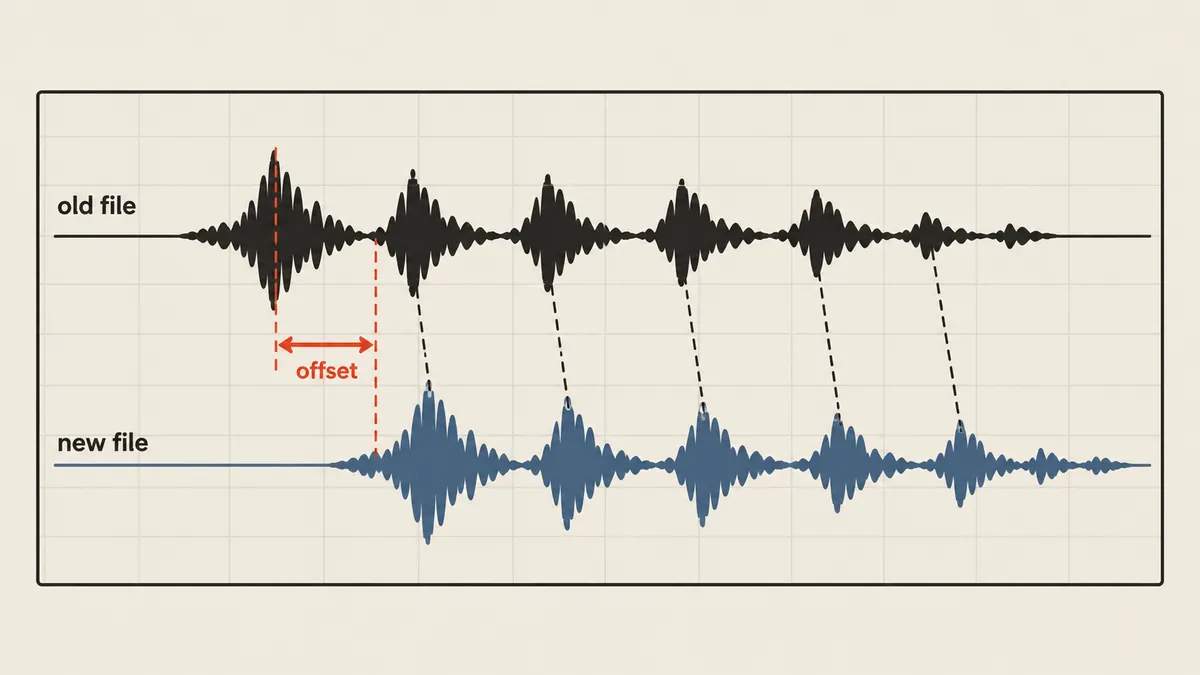
Fitting the line new = a*old + b
The eight offsets gave me eight pairs of (old time, new time), and a degree-1 np.polyfit gave me the straight line that minimizes the overall error.
import numpy as np

old_t = np.array([20, 45, 70, 90, 115, 140, 165, 177], dtype=float)
off   = np.array([-2.001875] * 5 + [-1.991875] * 3)
new_t = old_t + off

a, b = np.polyfit(old_t, new_t, 1)
resid = a * old_t + b - new_t
print(f'a = {a:.9f}  ({(a - 1) * 1e6:.1f} ppm)')
print(f'b = {b:.5f} s')
print(f'residual max = {np.abs(resid).max() * 1000:.1f} ms')
Recalculating from the recorded offsets gave me a = 1.000077763 (77.8 parts per million away from 1), b = -2.00612 seconds, and a maximum residual of 4.7 milliseconds, much less than one frame at 30 fps (33.3 milliseconds).
The 77.8 ppm scale difference accumulates to 15 milliseconds over 194 seconds, less than one frame, but I kept it in the equation because doing so costs nothing. My guess is that this scale difference could come from a difference between the playback or recording device's clock and the file's timing. That is a hypothesis; I have not proved it.
Transforming the entire plan through one line
The key is that every boundary in the plan must pass through the same equation, including both cut segment boundaries and song section boundaries, rather than fitting each segment separately.
def mapped(t, a, b, new_dur):
    return round(min(max(a * t + b, 0.0), new_dur), 6)

def retime(plan, a, b, new_dur, src_len):
    adjustments = []
    for cut in plan['cuts']:
        cut['start'] = mapped(cut['start'], a, b, new_dur)
        cut['end'] = mapped(cut['end'], a, b, new_dur)
    plan['cuts'][-1]['end'] = new_dur                    # ท่อนสุดท้ายจบพอดีที่ท้ายไฟล์ใหม่
    plan['cuts'][0]['in'] += max(0.0, -b / a)           # ตัดช่วงเงียบหัวไฟล์อัดเดิม
    for i, cut in enumerate(plan['cuts']):
        length = cut['end'] - cut['start']
        limit = src_len[i] - length - 0.025              # กัน in เลยปลายคลิปต้นทาง
        if cut['in'] > limit:
            adjustments.append({'cut': i, 'was': cut['in'], 'now': max(0.0, limit)})
            cut['in'] = max(0.0, limit)
    return adjustments
The first segment's leading boundary was at zero in the old plan. After transformation, it became negative (-2.006), but was clamped to zero, leaving the first 2.006 seconds of the old file with nowhere to go in the new audio. I therefore advanced the first segment's read start point in its source clip by 2.006 seconds, which was exactly the silence at the start of the original recording. For the other segments, I checked the limit that the in-point plus the new duration must not exceed the source clip's duration minus 0.025 seconds. As a result, 2 segments needed their source-in reduced, and I recorded the reasons in sourceInAdjustments.
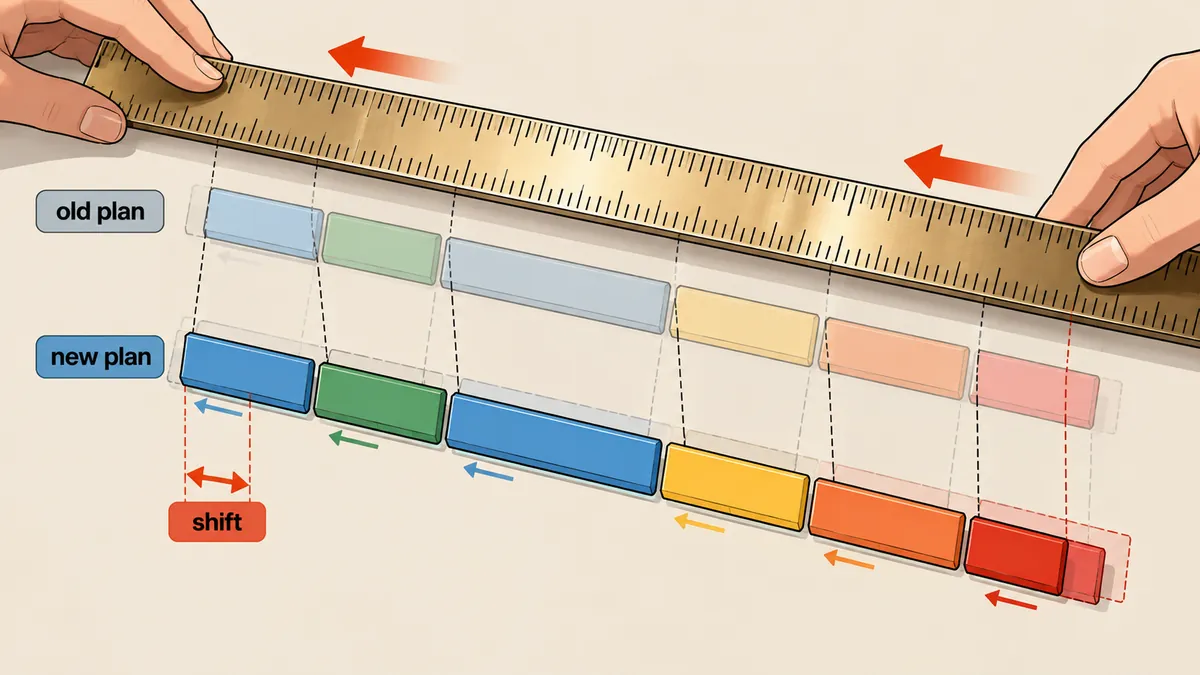
I have summarized the entire workflow, from measurement to writing the new plan, in this diagram.
I left the old plan untouched, keeping it as a historical record and recording its SHA-256 in alignment.json, while writing the new plan to a separate file. If anything is wrong, I can always go back and compare them.
What I still do not know, and the limitations
- I do not know the window length or fitting method used in the actual measurement. The code in this article is an example method. I can confirm only the recorded numbers and the results recalculated from them.
- The results state that listening verification has not yet been performed (`humanListeningVerified = false`). I have kept that statement rather than making it look better than it is.
- This method requires the same vocals or signal content in both files. If processing changes the waveform, the correlation score will drop and the fitted line will no longer be usable.
- Eight windows are enough for a straight line. If I suspect nonlinear shifts (for example, where edits have been made), I need to add more windows and inspect the residual at each point rather than trusting a single line.
My conclusion is that before moving an edit plan onto a new set of audio, I should measure at several windows first, without guessing or scaling by the total duration. I need to check both how the offset changes over time (which indicates scaling) and whether the residual is less than one frame, then save the measurements as evidence. I will come back and add more later.
Hit something like this? Stuck somewhere?
Come trade notes on the LinuxThai board



Comments 0
No comments yet — be the first