Food Factory Drawings: Sheets, Scales, and Paper Sizes

Most people get stuck on incomplete drawing sets and choosing scales, not on drawing quality. This article is entirely about drawings and paper calculations, not an application guide.
Someone asked me to help draw a food factory layout for a license application. I had never worked in this field before, so I started by reading through the good manufacturing practice requirements for food under Ministry of Public Health Notification No. 420, B.E. 2563, then breaking them down into a list of drawing sheets to prepare. Once I started, I realized that drawing was not what took the time; it was deciding upfront what scale and paper size to use for each sheet. If I got that wrong on the first sheet, I would have to lay out the entire set again.
I am writing purely from a drafter's perspective: what belongs in the drawing set and how to calculate the numbers on the paper. This is not a guarantee that following these drawings will get your application approved. The assessment criteria and required supporting documents depend on the food category, the nature of the premises, and the officials' judgment. Before starting the actual drawings, always confirm the list and format with the local Provincial Public Health Office, because requirements vary by area, and what I have written here may already be outdated by the time you read it.
The drawing set has 7 items, each answering a different question
What helped me understand this work faster was to stop seeing it as a drawing set and start seeing each sheet as an answer to a different question. Once I looked at it that way, it became clear what belonged on which sheet and what had been put on the wrong sheet where readers could not find it.
| Sheet | Question it answers | Common scale range |
|---|---|---|
| Location map | Where is it, how do you get there, and how far is it from contamination sources? | No fixed scale; include north and landmarks |
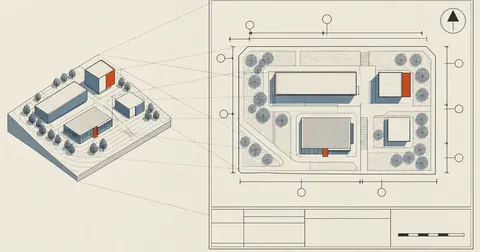
| Site plan | What is inside the boundary, and where are the entrances, exits, waste holding area, and treatment pond? | 1:200 to 1:500 |
| Production building floor plan | What rooms are there, how wide, long, and high is each, and what is its area in square meters? | 1:50 to 1:100 |
| Sections | How high are the ceilings, how much do the floors slope, and where do they drain into channels? | 1:50 |
| Elevations | Where are the openings, and are there insect screens and ventilation openings? | 1:100 |
| Production flow diagram | How do materials move, where do they enter and leave, and where are the control points? | Not to scale; an arrow diagram |
| Machinery list | What machines are there, how many, what is their production capacity, and what is the total horsepower? | A table with numbers keyed to the floor plan |
I always start with the flow diagram before the floor plan, because the flow determines which rooms need to be next to each other. If I draw the floor plan first and add the arrows afterward, I find that the arrows double back repeatedly, and I have to move the rooms anyway. That takes much more time.
Rooms to include in the floor plan, and the area summary table to attach
The production building floor plan must show every room with its dimensions—width multiplied by length multiplied by height—and its area in square meters. For one dry food factory drawing set, I worked through the following minimum room list.
The room list is: raw material receiving, raw material storage, mixing, boiling, soaking and washing, an intermediate holding room, a drying room or enclosed drying shed, unfolding/cutting/weighing, packing and sealing, separate packaging storage, finished product storage and dispatch, separate lockable cleaning chemical storage, a changing room with lockers, handwashing sinks and footbaths, toilets, cleaning equipment storage, and an office. Two commonly forgotten requirements are packaging storage that is separate from the production area, and toilet doors that must not open directly into the production area.
I do not type the area summary table by hand, because a single floor plan change means updating every affected cell in the table. My method is to model the plan as three-dimensional floors and have a script read the area of each room's floor face directly in square meters.
# encoding: UTF-8
# อ่านพื้นที่ห้องจากหน้าพื้นที่ระดับ z = 0 แล้วสรุปเป็นตารางเมตร
m  = Sketchup.active_model
m2 = ->(a) { (a * 0.00064516).round(2) }        # ตารางนิ้ว -> ตารางเมตร
mm = ->(v) { (v.to_f * 25.4).round }

rows = []
m.entities.grep(Sketchup::Group).select { |g| g.name.to_s.start_with?("ห้อง-") }.each do |g|
  floor = g.entities.grep(Sketchup::Face)
            .select { |f| f.normal.z.abs > 0.99 && f.bounds.min.z.to_f.abs < 0.01 }
  next if floor.empty?
  b = g.bounds
  rows << [g.name.to_s.sub("ห้อง-", ""),
           mm.(b.width), mm.(b.height), mm.(b.depth),
           m2.(floor.sum(&:area))]
end

rows.sort_by! { |r| -r[4] }
rows.each { |n, w, d, h, a| puts "#{n}|#{w} x #{d} x #{h}|#{a} ตร.ม." }
puts "รวมพื้นที่ใช้สอย #{rows.sum { |r| r[4] }.round(2)} ตร.ม."
One thing to watch for is that if a room has columns or machinery bases in the middle, the floor face will have holes in it, so the resulting area will be smaller than width multiplied by length. That reflects the actual area, but it will not match what readers calculate in their heads. I therefore print both values side by side and choose the one that fits the table field.
One-way flow without backtracking, and separating wet and dry zones
The core of the plan is that materials must move in one direction, entering at one end and leaving at the other, without looping back or crossing paths. The drawings must also clearly separate three routes: materials, people, and waste.
The wet and dry zones must be physically separated in the drawings, not merely shaded in different colors. There must be a wall or barrier clearly labeled as an air curtain or plastic strip curtain, and air must flow from clean to dirty areas. The boiling room, which produces steam, and the drying room must each have their own ventilation to keep steam from flowing back into the dry zone.
Separate the three routes
- Materials: thick, solid arrows
- People: dashed arrows
- Waste: arrows in another color, with waste holding points
- A legend explaining every line on the same sheet
One jumble of arrows
- Every arrow looks the same
- The waste route crosses the dry zone without explanation
- No handwashing point on the way into the production line
- Toilet doors open directly into the production area
Details to include in sections and elevations, beyond heights
Sections are sheets that drafters often rush through, but they are the only place to show floor and wall details. I therefore specified at least five annotations for this project's sections.
- Wet zone floor slope Approximately 1:100 toward grated drainage channels, with arrows showing flow from clean to dirty areas.
- Sediment or grease trap Before the drain leaves the building, showing its position and level.
- Smooth, cleanable wall finish at least 2.0 meters high With rounded floor-to-wall junctions, known as coving, shown in an enlarged detail in a corner of the sheet.
- Ceiling heights and floor levels in every room Referenced to the same datum throughout the building.
- Positions of light fixtures with shatter guards With the designed illuminance: at least 200 lux in production areas and at least 500 lux at inspection points.
The elevations must show every opening, along with insect screens, air curtains, or plastic strip curtains to keep out insects, animals, and birds. The issue I encounter more often than others is open outdoor drying yards. If the production process includes sun drying and the drawings show an open yard, that will definitely raise an issue. The usual approach is to switch to an enclosed drying shed or a raised drying house with mesh to keep out insects, birds, and dust, or to use a hot-air dryer instead. That change affects the floor plan, site plan, and machinery list, so I recommend settling it before drawing the first sheet.
During the site inspection, officials carry the drawings and compare them with the actual premises one room at a time. A room that is drawn but not yet built is as much of a problem as something already built but missing from the drawings. If construction will be phased, clearly identify on the drawings which phase already exists, instead of drawing everything together and explaining it verbally on site afterward.
Flow diagrams are easier to build as a web page and print than to draw in CAD
A flow diagram has no scale; it is boxes and arrows. I therefore do not draw it in CAD at all. I build a single HTML page and print it to PDF, because changing the sequence is much easier. When a client asks to add a step in the middle, I just insert a box and the rest flows downward automatically, without having to move each arrow.
The structure I use is a three-column table: process steps in the middle, inputs on the left, and waste or outputs on the right. Each box has a sequence number in a corner and a label at the top right for control points.
<div class="row">
<div class="side in">น้ำที่ผ่านระบบปรับปรุงคุณภาพ</div>
<div class="card">
<span class="num">3</span>
<span class="chip cp">CP</span>
<div class="t">ล้างและแช่วัตถุดิบ</div>
<div class="d">ควบคุมเวลาและคุณภาพน้ำที่ใช้ บันทึกทุกรุ่นผลิต</div>
</div>
<div class="side out">น้ำล้าง -> รางระบาย -> บ่อบำบัด</div>
</div>
<div class="row"><div class="down"></div></div>
.row  { display: grid; grid-template-columns: 1fr minmax(320px,470px) 1fr;
        gap: 16px; align-items: center; }
.card { grid-column: 2; border: 1.6px solid #0f172a; border-radius: 12px; padding: 12px 14px; }
.down { grid-column: 2; height: 30px; position: relative; }
.down::before { content: ""; position: absolute; left: 50%; top: 0;
                height: 21px; border-left: 2px solid #334155; }
.down::after  { content: ""; position: absolute; left: 50%; top: 21px; margin-left: -6px;
                border-left: 6px solid transparent; border-right: 6px solid transparent;
                border-top: 9px solid #334155; }

@media print {
  @page { size: A4 portrait; margin: 10mm; }
  body  { background: #fff; padding: 0; font-size: 9pt; }
  .row  { grid-template-columns: 1fr minmax(190px,300px) 1fr; gap: 8px; }
  .card { padding: 5px 8px; border-width: 1pt; box-shadow: none; break-inside: avoid; }
  .down { height: 16px; }
  .down::before { height: 11px; }
  .down::after  { top: 11px; }
}
Besides the process steps, the flow diagram must include control points. I use three categories: CCP for critical control points, QC for quality inspection points, and CP for process control points, with a legend on the same sheet. Steps involving food additives need particular attention. Such steps should be marked as CCPs and supported by documents explaining how quantities are controlled, records for every production batch, and residue analysis results within legal limits. That is a matter for production staff and the laboratory, not something a drafter can decide for them. The drawings have just one job: to show where that step sits in the production line and where the separate, lockable chemical storage room is located.
Key the machinery list to the floor plan, and add up all the horsepower
The machinery list looks like a simple table, but it has the greatest legal impact of any sheet in the set, because it determines whether the establishment qualifies as a factory requiring a license from another authority.
If the machinery totals 50 horsepower or more or there are 50 or more workers, the establishment falls under category 3 factories and also requires a factory operating license from the Department of Industrial Works. That application package must include electrical drawings—a single-line diagram, load schedule, and grounding system—signed and certified by a licensed electrical engineer. These two conditions are connected by or, not and, so add up the horsepower of every item, including fans, pumps, and compressors, before deciding which side of the threshold it falls on.
Layout plans and flow diagrams generally do not require an engineer's signature. Structural and building services work that falls within regulated engineering practice still requires a licensed engineer's signature, however. I separate these two groups of sheets from the start, because the group requiring an engineer's signature has a longer turnaround and must be sent for review first.
Calculate the paper size first: how many meters fit on A4 at 1 to 100?
This is the part I most want you to read, because it can eliminate all the work of laying out the drawings again. The principle is simple: the actual dimensions divided by the scale denominator must not exceed the paper space left after subtracting the margins and title block strip.
# ผังกว้าง W ยาว L เมตร วาดที่สเกล 1:S ลงกระดาษได้ไหม
PAPER = {"A4": (297, 210), "A3": (420, 297), "A2": (594, 420), "A1": (841, 594)}
MARGIN = 10      # ขอบกระดาษทุกด้าน มม.
TITLE  = 40      # แถบหัวกระดาษด้านขวา มม. (ตารางชื่อแบบ มาตราส่วน ทิศเหนือ)

def fits(w_m, l_m, scale, paper="A4", landscape=True):
    pw, ph = PAPER[paper] if landscape else PAPER[paper][::-1]
    usable_w = pw - 2 * MARGIN - TITLE
    usable_h = ph - 2 * MARGIN
    draw_w = w_m * 1000.0 / scale        # ขนาดที่จะปรากฏบนกระดาษ มม.
    draw_l = l_m * 1000.0 / scale
    ok = (draw_w <= usable_w and draw_l <= usable_h) or \
         (draw_l <= usable_w and draw_w <= usable_h)   # ลองหมุน 90 องศาด้วย
    return ok, round(draw_w, 1), round(draw_l, 1), usable_w, usable_h

for paper in ("A4", "A3", "A2"):
    for s in (50, 100, 200):
        ok, dw, dl, uw, uh = fits(46.0, 24.0, s, paper)
        print(f"{paper} 1:{s:<4} ต้องการ {dw} x {dl} มม. · มีที่ {uw} x {uh} มม. "
              f"-> {'ลงได้' if ok else 'ไม่พอ'}")
The example above is a production building 46 meters wide and 24 meters deep. The result is that A4 landscape leaves just 237 by 190 millimeters of usable drawing space. At 1:100, the plan needs 460 by 240, which is nowhere near fitting. A3 landscape provides 360 by 277, which is still too narrow for the required 460. It only fits comfortably on A2. If it has to stay on A3, the scale must be reduced to 1:200, at which point the numbers in small rooms become unreadable.
If you need multiple sheets, use match lines instead of shrinking the plan
Suppose the client insists on A3 because that is all their printer supports, and the building is too wide at 1:100. My approach is to split it into two sheets along a clearly defined line, rather than reduce the scale. Reducing the scale makes the numbers in small rooms unreadable throughout the set, whereas splitting the plan only breaks its continuity, which annotations can address.
First, the match line must follow a column grid line or wall line, not run through the middle of a room, and that line's name must be printed at the edge of both sheets. Second, extend the drawing at least one column bay beyond the split on both sheets, so readers have overlapping content to confirm the join. Third, both sheets must use exactly the same scale. One cannot be 1:100 and the other 1:150, because putting them together would produce two different buildings.
Another way the scale changes unintentionally is during printing. If someone opens the print dialog and leaves it set to fit to page, the entire sheet immediately shrinks by about three to five percent. The dimensions on the drawing remain correct, but anyone measuring with a scale ruler will get the wrong distances. I therefore do two things on every sheet. First, I export a PDF with the page size already set and specify that it must be printed at 100 percent. Second, I draw a graphic scale bar beside the title block, divided into one-meter segments. This bar always scales with the drawing, so even if the print scale is wrong, readers can still measure against it.
I put the same set of information in the title block of every sheet: scale, north, legend, area summary table, the establishment's name and location, the sheet number out of the total number of sheets, and a space for the operator's signature. Sheet numbering matters more than you might think, because if someone makes photocopies and loses a sheet, nobody will know unless the total number of sheets is stated.
Personally, I think this drawing set takes many times more effort in deciding scales and sheet splits than in the actual drawing. If I finish the paper calculations before drawing the first line, the remaining work is simply a matter of working through the list. And as I said at the beginning, everything I have written here is about drawings alone. Before starting the actual work, always confirm the list with the local Provincial Public Health Office. If I have left anything out or made a typo, I will come back and correct it later.
Hit something like this? Stuck somewhere?
Come trade notes on the LinuxThai board
Comments 0
No comments yet — be the first